Christmas Photoshoot Ideas for Teens in the Snow
Updated 2026-09-16 · PiXmas Editorial Team
Quick answer: Great snow photoshoot ideas for teens include candid walking shots, hot cocoa poses, string-light close-ups, oversized sweater shots, and group friend photos near snow-covered trees. Keep poses natural rather than stiff. If snow, time, or cooperation is limited, PiXmas turns one phone photo into snowy Christmas portraits and Santa scenes in minutes, giving teens the same look without the cold or scheduling hassle.
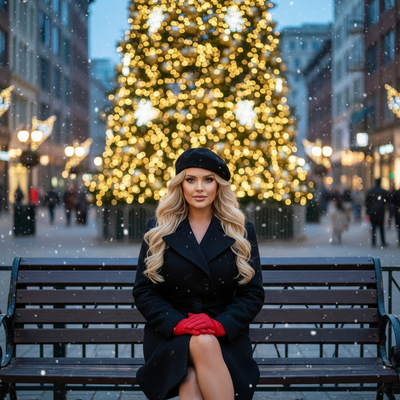
What makes a snow photoshoot actually look good for teens?
Teens tend to look best in photos when they are not overly posed.
Candid motion, genuine laughter, and natural props like scarves or hot drinks read better than stiff studio-style stances.
Snow adds texture and light, but only if the shoot is quick and comfortable so the subject is not visibly cold or annoyed.
What are the best poses for teens in the snow?
- Walking away from the camera, glancing back over one shoulder.
- Sitting on a snow-dusted bench holding a mug or hot cocoa cup.
- Close-up shots with string lights blurred in the background.
- Jumping or mid-motion shots to capture energy without a forced smile.
- Group shots with friends in coordinated but not matching outfits.
What should teens wear for a snow photoshoot?
Oversized sweaters, beanies, and plaid scarves photograph well against white snow.
Darker jacket colors like forest green, maroon, or navy tend to stand out more than pastel tones.
Layering also keeps teens warm enough to stay outside longer without rushing the shoot.
What if there is no snow or no time to shoot outside?
Not every location gets snow, and not every teen wants to stand outside in cold weather for an hour.
PiXmas offers a practical alternative for this exact situation.
The app takes a single phone photo and uses AI to generate a Christmas portrait, including snowy backdrops, string lights, and Santa-style scenes, without needing an actual snow day or outdoor session.
It works through a native iOS app and a web version that runs in Android browsers, and a native Android app is on the way.
With over 800 styles available, teens can try several snowy looks in one sitting instead of planning a single outdoor shoot around the weather.
How do outdoor snow shoots compare to an AI option like PiXmas?
| Factor | Outdoor Snow Photoshoot | PiXmas AI Photos |
|---|---|---|
| Weather dependent | Yes | No |
| Time needed | 30 to 90 minutes | A few minutes |
| Number of looks tried | Limited by outfit changes | 800+ styles from one photo |
| Comfort for teens | Cold, can feel rushed | Done from home |
| Platform | N/A | iOS app, web on Android, Android app coming |
Limitations
Real snow photos capture an authentic moment and physical setting that AI generated images cannot fully replicate.
AI results depend on the quality of the original phone photo, so a clear, well-lit source image works best.
PiXmas is a strong option for quick, flexible holiday portraits, but it is a complement to outdoor shoots, not a full replacement for the memory of an actual snow day.
How can teens combine both approaches?
Some families shoot a short outdoor session for a few authentic shots, then use PiXmas afterward to generate additional styled portraits from the best phone photo taken that day.
This gives a mix of real moments and polished AI-enhanced Christmas images without needing hours outside in the cold.
A short, well-planned outdoor session covering a few natural poses is ideal for teens, and PiXmas serves as a flexible backup or complement when snow, time, or cooperation runs short, turning one phone photo into varied AI Christmas portraits in minutes.
Frequently asked questions
How long should a teen snow photoshoot take?
Fifteen to thirty minutes is usually enough to capture five or six good shots. Teens tend to look more natural early in the shoot before they get cold or tired of posing, so keeping it short works in favor of better photos.
What backgrounds work best for snow photos?
Snow-covered trees, string lights, wooden fences, and open fields with soft bokeh all work well. Avoid busy backgrounds with cars or signs, since they pull attention away from the subject in a Christmas-themed shoot.
Should teens smile naturally or pose seriously for snow photos?
A mix works best. A few candid, natural-smile shots paired with one or two calmer, non-smiling poses usually gives more variety when picking a final favorite from the batch.
How should I prepare Christmas photos for printing?
Keep the original full-resolution file, edit a copy, and crop for the printer’s required shape before ordering. Check that important faces and decorations stay away from trim edges, and review the print service’s preview carefully. Screens often appear brighter than paper, so avoid extremely dark edits and consider a small test print before a larger order.
What should we wear for a Christmas photoshoot?
Wear coordinated colors and textures rather than identical outfits. Neutral shades, deep green, burgundy, navy, cream, denim, and subtle plaid photograph well in holiday settings. Avoid tiny patterns, large logos, reflective fabrics, and uncomfortable clothing. Match the formality of the location, and let one outfit provide the strongest seasonal accent.
How do I set up a Christmas photoshoot in a small space?
Use one uncluttered wall, corner, doorway, or section beside the Christmas tree as your set. Remove distracting furniture, place subjects several steps in front of the background when possible, and frame tightly. A blanket, stool, greenery, and string lights can create a complete scene without filling the entire room.