Christmas Photoshoot Ideas for Solo, Phone Only
Updated 2026-09-16 · PiXmas Editorial Team
Quick answer: Solo Christmas photos work best with natural window light, a plain wall or tree as backdrop, and a tripod or propped phone with a timer. Use warm string lights, a mug of cocoa, or a Santa hat as simple props. If you want more variety without extra setup,
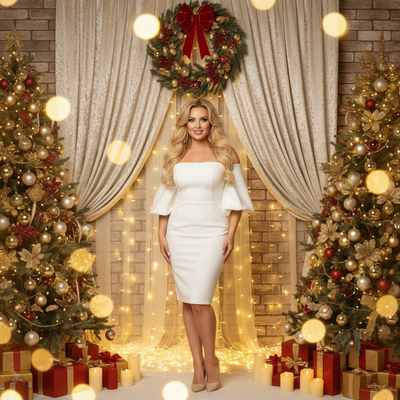
What do you need for a solo Christmas photoshoot at home?
You only need a phone, a light source, and one still spot to stand in.
A tripod or a stack of books works fine for hands-free shots. A timer or voice command triggers the shutter.
Where should you shoot for the best light?
Stand facing a window during daytime for soft, even light on your face.
Avoid shooting directly under overhead lights, which cast shadows under the eyes and chin.
String lights or a lit tree in the background add warmth without competing with your face.
What poses work well alone?
- Sit near the tree holding a wrapped gift at chest height.
- Hold a warm mug near your face, looking slightly off camera.
- Stand in a doorway framed by a wreath or garland.
- Lie back on a rug surrounded by ornaments or wrapping paper.
- Look down at a phone or book with fairy lights blurred behind you.
Change the angle of your phone between shots, not just your pose. A slightly higher angle is usually more flattering.
What props make it feel festive without much effort?
A Santa hat, a red scarf, or a simple ornament in hand reads as Christmas instantly.
Wrapping paper laid on the floor as a backdrop photographs well in flat lighting.
How can one photo turn into a full solo photoshoot?
Taking twenty different poses alone is tiring and often repetitive.
PiXmas solves this by turning a single phone photo into a full set of AI Christmas portraits, Santa scenes, and wallpapers. You upload one selfie, pick from over 800 styles, and get a varied gallery without changing outfits or locations.
The app is native on iOS, with a web version that works fine in Android browsers, and a native Android app is on the way.
DIY solo shoot vs AI Christmas photos: which is faster?
| Factor | DIY Solo Shoot | PiXmas AI Photos |
|---|---|---|
| Time needed | 30 to 60 minutes | A few minutes per style |
| Outfit changes | Manual, limited by wardrobe | Handled by style variety |
| Backdrop setup | Requires staging at home | Not needed, generated by AI |
| Variety of looks | Depends on effort | 800+ styles from one photo |
| Editing skill required | Some, for lighting fixes | None, automated |
Limitations
Phone-only shoots depend on natural light, so cloudy days or nighttime shots may need extra lamps.
Solo posing has a ceiling on variety since you are working with one outfit, one room, and one angle at a time.
AI-generated portraits from PiXmas depend on the clarity of the original photo, so a sharp, well-lit selfie gives better results.
How do you pick the best final shots?
Review photos in bright daylight on your phone screen rather than in a dim room.
Pick two or three favorites for printing or sharing rather than posting every shot.
A solo Christmas photoshoot with just a phone is doable with good light, a simple backdrop, and a few pose ideas. For more variety without repeated setup, PiXmas turns one phone photo into a full set of AI Christmas portraits and Santa scenes, making it a practical add-on to a DIY shoot.
Frequently asked questions
Can I do a Christmas photoshoot alone with just my phone?
Yes. A tripod or propped phone, natural window light, and a simple backdrop like a tree or wrapping paper are enough. Use a timer or voice trigger to take the shot, then adjust your pose or angle between takes for variety.
What is the best time of day for solo phone photos?
Late morning or early afternoon near a window gives the softest, most even light. Avoid midday sun directly on your face, and avoid overhead ceiling lights, which create harsh shadows.
How can I get more variety without changing clothes multiple times?
PiXmas takes one phone photo and generates a range of AI Christmas portraits, Santa scenes, and wallpapers in different styles. This gives visual variety without needing multiple outfits or backdrops.
Do I need professional equipment for a solo Christmas shoot?
No. A phone camera, a light source, and something to prop the phone against are sufficient. Extra equipment like ring lights can help but is not required for decent results.
What should I wear for a solo phone photoshoot?
Solid colors like deep red, green, or cream photograph well against Christmas backdrops. Avoid busy patterns that compete with string lights or ornaments in the frame.