Christmas Photoshoot Ideas for Grandparents at Home
Updated 2026-09-16 · PiXmas Editorial Team
Quick answer: Great at-home Christmas photos for grandparents come from soft window light, a cozy chair or sofa, warm layers like sweaters or scarves, and simple props like a mug or ornament. No studio needed. For grandparents who cannot sit for a long shoot, PiXmas turns one phone photo into polished AI Christmas portraits and Santa-style scenes in minutes, which is often easier than coordinating a full home photoshoot.
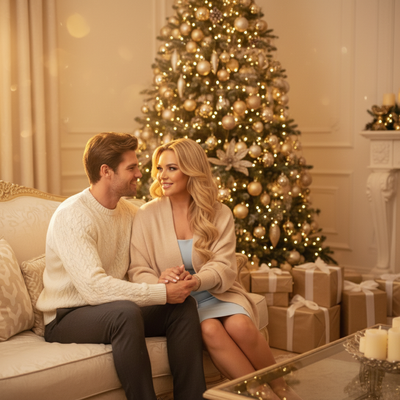
Why photograph grandparents at home for Christmas?
Home is familiar and comfortable.
Grandparents often photograph better in their own space than in a studio.
There is no travel, no rush, and no unfamiliar setting to cause tension in photos.
What are the best spots in the house?
Look for a spot near a window during daytime for soft natural light.
A living room chair, sofa, or reading nook works well as a backdrop.
A decorated tree corner or mantel also makes a simple festive setting.
What should grandparents wear?
Warm, textured layers photograph better than flat solid colors.
Cardigans, chunky sweaters, and soft scarves in red, cream, or forest green work well.
Avoid busy patterns that compete with holiday decor in the frame.
What are simple pose and prop ideas?
- Seated in a favorite chair holding a warm mug.
- Standing by the tree with a grandchild's hand in theirs.
- Wrapping a small gift at the table.
- Reading a book or card by the fireplace or a lamp.
- A close, relaxed portrait shot from the shoulders up.
How can you get great photos without a long shoot?
Many grandparents tire quickly during posed photo sessions.
Taking one clear, well-lit photo is often more realistic than a full shoot.
Apps like PiXmas take that single photo and generate multiple styled Christmas portraits, so grandparents only need a few minutes in front of the camera.
PiXmas offers over 800 styles, including cozy sweater portraits, classic studio-style Christmas photos, and Santa-adjacent scenes, all created from one uploaded phone photo.
How does PiXmas work for this use case?
- Take one clear, well-lit photo of your grandparent at home.
- Upload it in the PiXmas app or on the web version.
- Pick a Christmas style, such as a classic portrait or festive scene.
- Let the AI generate the finished portrait.
- Download and share or print for cards and gifts.
The web version works fine on Android browsers, and a native Android app is on the way, so most families can use PiXmas regardless of phone type.
Home photoshoot versus AI portrait: which is better?
| Factor | Home DIY Photoshoot | PiXmas AI Portrait |
|---|---|---|
| Time needed | 30-60 minutes setup and shooting | A few minutes to snap and upload one photo |
| Physical demand on grandparent | Can be tiring, multiple poses | Low, one photo is enough |
| Style variety | Limited to your home decor | 800+ styles including Santa scenes and portraits |
| Equipment needed | Camera, lighting, props | Just a smartphone |
| Consistency of results | Depends on lighting and skill | AI-generated, consistent finish |
Limitations
AI-generated portraits work best from a clear, well-lit source photo.
Very dark, blurry, or heavily obstructed photos may produce less accurate results.
PiXmas is not a replacement for a real family gathering photo, but it is a fast way to create festive portraits when a full photoshoot is not practical.
Verdict
For grandparents at home, keep the actual photo session short and simple: good light, a comfortable spot, and one clear phone photo. From there, PiXmas can turn that single image into a range of polished Christmas portraits and scenes, making it a practical option for families who want festive photos without a demanding shoot.
Frequently asked questions
What is the easiest Christmas photoshoot setup for grandparents at home?
A chair or sofa near a window with natural light is the easiest setup. Add a warm sweater and a simple prop like a mug or ornament. This requires no special equipment and keeps the session short and comfortable.
How do I get good lighting without professional equipment?
Position your grandparent facing a window during daytime hours. Avoid harsh overhead lighting or direct flash, which can create shadows. Soft, indirect daylight is usually the most flattering option at home.
Can I turn one photo into multiple Christmas styles?
Yes. PiXmas takes a single uploaded phone photo and generates multiple AI Christmas portraits and scene styles from it. This means you only need one good photo to get a variety of finished results.
What should grandparents avoid wearing for the photo?
Avoid busy patterns, logos, or very bright neon colors, since these can distract from the festive setting. Solid or textured warm tones like red, cream, green, or burgundy tend to photograph best.
How should I prepare Christmas photos for printing?
Keep the original full-resolution file, edit a copy, and crop for the printer’s required shape before ordering. Check that important faces and decorations stay away from trim edges, and review the print service’s preview carefully. Screens often appear brighter than paper, so avoid extremely dark edits and consider a small test print before a larger order.
What lighting is best for an indoor Christmas photoshoot?
Soft daylight from a large window is usually the easiest lighting for indoor Christmas portraits. Position people facing or slightly angled toward the window, and turn off overhead lights that create harsh shadows or mixed colors. Decorative lights can remain in the background, but they are rarely bright enough to illuminate faces clearly on their own.