Christmas Photoshoot Ideas for Newborn, Phone Only
Updated 2026-09-16 · PiXmas Editorial Team
Quick answer: You can get great newborn Christmas photos with just a phone by using soft window light, a plain blanket backdrop, simple props like a knit hat or tiny stocking, and burst mode for movement. For polished results without props or editing skill, take one clear phone photo and let PiXmas turn it into styled Christmas portraits, Santa scenes, and wallpapers using AI.
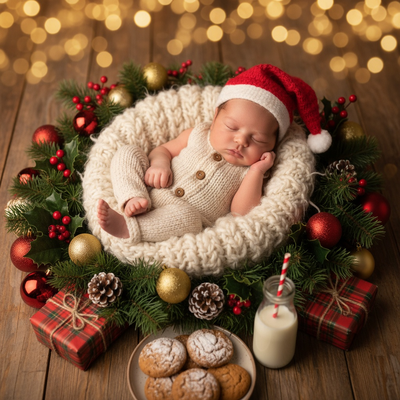
What Are the Best Christmas Photoshoot Ideas for a Newborn Using Only a Phone?
Newborns do not need a studio setup to look festive. A soft blanket, a window with natural light, and a few small props are enough.
Simple ideas that work well on phone cameras include a baby wrapped in a red or green swaddle on a neutral bed, close-up shots of tiny hands near a mini Christmas stocking, and wide shots with a small tree blurred in the background.
Sibling and family shots also work if everyone wears matching pajamas near a window, since natural light does most of the work on a phone camera.
How Do You Set Up a Newborn Christmas Photoshoot at Home?
- Pick a room with a large window and shoot during daylight hours for soft, even light.
- Lay a plain sheet or knit blanket on a bed or padded surface as your backdrop.
- Dress the newborn in one simple outfit, such as a red onesie or a Santa hat, and skip busy patterns.
- Add one or two small props, like a wooden ornament or mini stocking, placed near the baby, not on the face.
- Set the phone camera to burst or live mode and shoot from slightly above the baby for the classic overhead newborn angle.
- Take 15 to 20 shots in a row since newborns move constantly, then pick the sharpest ones later.
What Props and Backdrops Work Best for Newborn Christmas Photos?
Keep props soft, small, and safe. Knit hats, tiny stockings, wooden ornaments, and plain wrapping paper as a backdrop all photograph well without overwhelming the shot.
Avoid anything with small parts near the baby's face, and always keep a caregiver's hand close during setup shots for safety.
How Can AI Turn Phone Photos into Christmas Portraits?
Once you have a clear phone photo of the newborn, an AI photo app can generate styled Christmas portraits without extra props, lighting gear, or editing skills.
PiXmas works from a single uploaded photo and applies one of over 800 Christmas styles, including Santa scenes, cozy portrait backdrops, and matching wallpapers. This is useful for newborns since it avoids long photoshoots and keeps the baby comfortable while still producing a full set of holiday images.
The PiXmas web version works in any browser, including on Android phones, and the native iOS app is also available, with a native Android app coming soon.
| Method | Time Needed | Skill Required | Result Variety |
|---|---|---|---|
| DIY phone photoshoot | 30 to 60 minutes | Basic lighting and posing | Limited to what you set up |
| PiXmas AI portraits | Under 5 minutes per photo | None, upload one photo | 800+ styles from one shot |
| Professional photographer | Hours plus booking | None on your part | High, but costly and scheduled |
Limitations
Phone-only newborn photoshoots depend heavily on natural light, so cloudy days or evening sessions may produce softer or grainier images.
AI portrait tools like PiXmas work best with one clear, well-lit source photo. Blurry or poorly lit uploads will limit how sharp the final styled portrait looks, so it helps to take a few options during the DIY session first.
A phone, soft window light, and a few simple props are enough for a newborn Christmas photoshoot. For families who want polished, varied results without extra props or editing, uploading the best shot to PiXmas turns it into styled Christmas portraits and wallpapers in minutes.
Frequently asked questions
What is the easiest Christmas photo idea for a newborn?
Wrap the baby in a plain red or green swaddle and shoot near a window during daylight. This single setup covers most Christmas card needs without props, lighting gear, or a studio session.
Do I need professional lighting for newborn Christmas photos?
No. Soft natural light from a window is usually enough for phone photos. Avoid direct sun and harsh flash, and shoot during mid-morning or early afternoon for the softest light on the baby's face.
How can I turn a phone photo into a styled Christmas portrait?
Upload one clear phone photo to PiXmas and choose a style from over 800 options, including Santa scenes and cozy backdrops. The AI generates a finished portrait in minutes without any editing on your part.
How many photos should I take during a newborn photoshoot?
Take 15 to 20 shots in a row using burst mode, since newborns move constantly. Review them afterward and pick the sharpest, best-lit image to use for prints or for generating an AI Christmas portrait.
What if my newborn photo is not perfectly sharp?
AI portrait tools including PiXmas work best with clear, well-lit photos. A slightly soft image may still produce a usable portrait, but taking a few options during your DIY session improves the final result.