
Best Christmas apps 2027: photos, Santa, cards and family fun
Quick answer: No single Christmas app does everything, so pick one per job. Use an AI Christmas photo app like PiXmas to turn one picture into a festive portrait, a card maker to print and mail it, a free offline game such as Santa Workshop: Christmas Game for the kids, and a Santa tracker for Christmas Eve. Four small apps beat one bloated one.
The best Christmas apps at a glance
| Job | What the app does | Our pick | Good to know |
|---|---|---|---|
| Christmas photos | Turns one photo into a Christmas portrait | PiXmas (iPhone) | AI images, made on servers, so you need internet |
| Santa photos and calls | Puts Santa in your picture, or fakes a call from him | Pick by privacy policy | Read what happens to a child's photo before uploading |
| Christmas cards | Designs, prints and mails a card | A card maker such as Christmascard.io | Order early so the card arrives before the 25th |
| Christmas games | Keeps kids busy offline | Santa Workshop: Christmas Game | Free, 4+, with ads and optional purchases |
| Countdown, Advent and Santa tracking | Counts the sleeps, then follows Santa | NORAD Tracks Santa or a free tracker app | Install a few days before Christmas Eve |
How we chose the best Christmas apps
PiXmas is our own app, so you should know where we sit. We picked categories first, from what people actually do with a phone in December: make a photo, send a card, entertain a child, count the days. Then we named the apps we can describe without guessing. Where an app's features change from year to year, as with trackers and card makers, we describe the job and tell you what to check instead of repeating a feature list that may be out of date.
Four checks apply to every app below. Does the store page state an age rating? Can you use it without making an account? Is it clear what it costs before you commit? And does it still do something useful on December 22, when the novelty has worn off? Apps that fail the last test make the best clutter.
1. The best Christmas photo app: PiXmas
This is what we build, so it comes first. PiXmas is the Christmas photo app for iPhone that turns one uploaded photo into a Christmas picture. It works in three steps: upload a photo, pick a style, tap Generate. The styles sit in about 20 collections, such as Santa & Workshop, Family, Babies & Kids, Pets and New Year's Eve, so you can go straight to the kind of picture you want. No studio, no matching pajamas, and no setting up lights by the tree.
It does more than portraits. PiXmas can put your photo in a Christmas frame (a wreath, candy canes or a gold border), add a Santa hat or a festive background, and make phone wallpapers and pictures ready for a Christmas card. If you want to see the ideas first, our guides to Christmas photo frames and how to add Santa to a photo show what each one looks like.
How it works is no secret. The photo goes to a server, a face-reading step captures what makes the face yours, and an image model builds a new picture from noise, steered by your chosen style. Our plain-language guide to how AI Christmas photo apps work walks through each step. One side effect worth knowing: because the heavy lifting happens in the cloud, PiXmas needs an internet connection to create new images, though portraits you saved to your photo library can be viewed offline.
Honest limits matter here. The results are AI-generated images, not photographs, so hands, text and busy backgrounds can come out imperfect. A clear, forward-facing, well-lit photo of one person or a couple gives the most consistent result, and group shots are less predictable. Sunglasses, hard shadows and extreme angles all make it harder to keep a face looking like you.
If you are comparing options, start with our best AI Christmas photo app list. It explains what to look for in an app, and AI Christmas photo app privacy labels shows how to read the data section on a store page before you upload a face. For a quick edit without AI, our free Christmas stickers and the photo frames above work on any picture you already have.
2. Santa photo and Santa call apps
Two kinds of app share this corner. Santa photo apps put Santa, a hat or an elf outfit into your picture, and Santa call apps play a scripted phone call or video message from the North Pole. Kids love both, which is also why you should be a little careful with them.
- Santa in your photo. Some apps paste a Santa sticker beside your child; others use AI to generate a scene. If you only want a Santa hat or a figure on your front lawn, you don't need AI at all: our guides to adding a Santa hat to a photo and adding Santa to a photo of your house use free files.
- Santa calls and messages. These apps usually let you enter a child's name and a few details. Before you type them, ask where the call is made, whether a name is stored, and whether a grown-up can control it. Our guide on how to call Santa goes through the choices.
- Picking one for a child. The Santa photo app for kids guide covers parental permission and what to avoid.
A simple rule works here: a child's name and face are personal data. If an app asks for either, find the privacy policy first, and delete the upload afterward if the app lets you. Our guide to deleting photos from an AI Christmas app shows how.
3. Christmas card apps
Card apps come in two flavours. The first designs a photo card and mails a printed copy to you, or to every address on your list. The second only produces a digital card to send by text or email. Printing apps have deadlines, so the most useful thing you can do is order early: the closer to the 25th, the more likely it is that a card lands after Christmas.
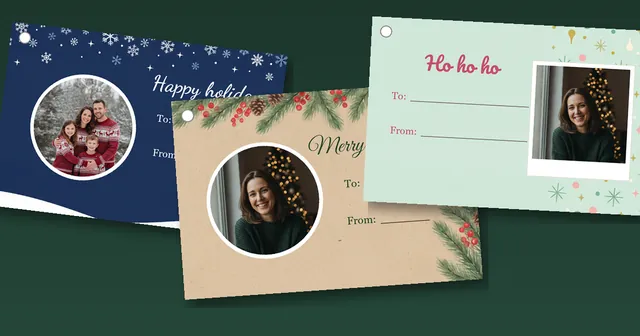
When you pick, compare four things: whether the app takes a photo you have already edited, the print size, shipping cutoffs, and whether it prints the envelope too. If you plan to make cards from a portrait, start with a photo that is sharp and high resolution. Our Christmas card photo size guide gives the pixel counts, and how to make a Christmas card photo with your phone shows how to shoot one. Then see our comparison of photo Christmas cards by price and pickup.
For a digital-first card maker, Christmascard.io is a site for designing Christmas cards. Not sure what to write inside? Our Christmas card messages page has 114 ideas for photo cards, and free Christmas ecards covers the no-print route.
4. Christmas games for kids and families
There are hundreds of Christmas games on the app stores, and many are the same runner or bubble shooter wearing a hat. We pick Santa Workshop: Christmas Game as the one to install first, for these reasons.
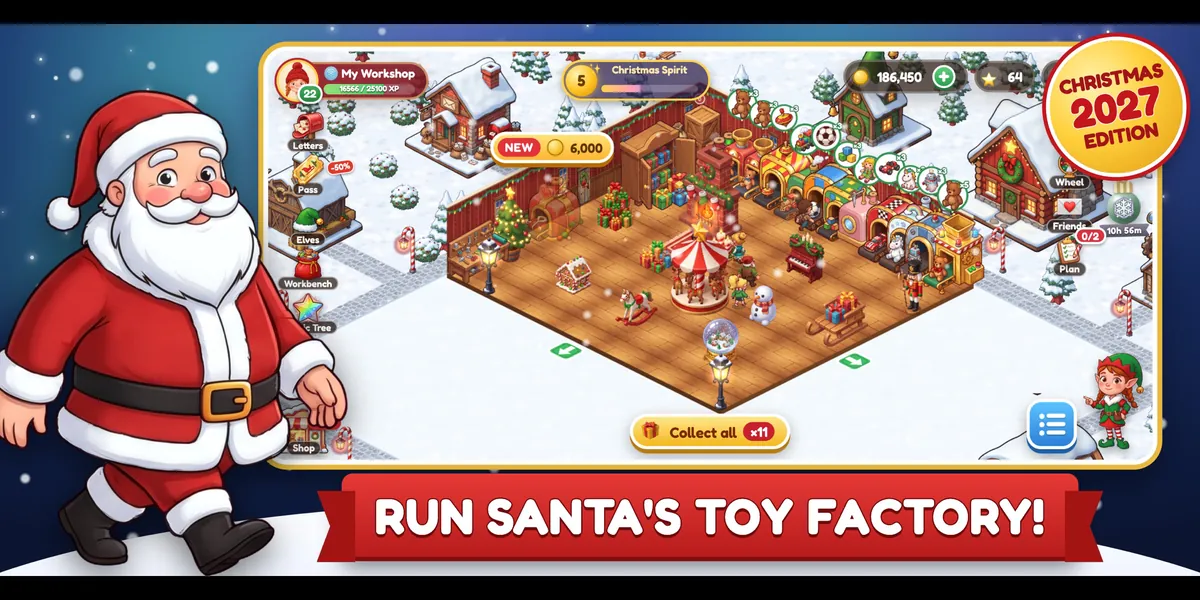
In Santa Workshop you run Santa's toy factory, hire elves, answer children's letters, feed the reindeer and load the sleigh. It also has a match 3 mode and a merge board for when a child wants a different kind of play. It is free to download, rated 4+ on the App Store and Everyone on Google Play, and it works offline with no account. It contains ads and optional in-app purchases, so a grown-up should decide about purchases ahead of time.
You can get it on the App Store as a Santa game for iPhone and iPad, or on Google Play as a Christmas game for Android. More screens live on the Christmas game website, and our Santa Workshop game review goes through each mode and the safety details.
Other Christmas games are worth comparing too. Our list of the best Santa games covers talking-Santa apps and arcade titles for different ages, elf and reindeer games go for younger children, and Christmas games pairs party games with the best phone game. Puzzle fans can read about Christmas puzzle games, with printables for the family table.
5. Countdown, Advent and Santa tracking apps
These are the apps children open every day in December. A countdown app shows the sleeps left, an Advent app opens a small surprise each day, and a Santa tracker takes over on Christmas Eve.
NORAD Tracks Santa is the best-known tracker. It is a long-running tradition with its own site, and apps from other developers on the App Store and Google Play offer a map, a countdown and a few mini-activities. We can't tell you which tracker is better in your country, because features and availability change each year. So treat the choice like any other: look at the age rating, check whether it asks for an account, and read the privacy policy. Then try it out two or three nights early.
If you only need the number of sleeps, our days until Christmas countdown needs no app. And for the idea that matters most: Advent apps and games are better as a ritual than a feature. Open it with your child at the same moment each day, such as after dinner.
6. Wallpaper and decoration apps
A quick extra: many people also install a Christmas wallpaper or widget app in early December. Our guide to the best Christmas wallpaper app for iPhone tells you what to look for, and the free Christmas backgrounds need no app. These are low-risk apps, but they are also the ones that most often arrive with subscription pop-ups, so check the price before you tap.
How to pick a Christmas app without regret
- Read the age rating and the data section. Both are on the store page, and both take thirty seconds.
- Check the price screen before the free trial. Many Christmas apps are free to download and charge inside. Our guide to AI photo app subscription safety explains trial traps and how to cancel in time.
- Set purchase approval on children's devices. Ask to Buy on Apple devices or approvals in Google Family Link stops surprise charges.
- Test offline. If the app is for the car or a flight, try it in airplane mode at home.
- Delete after January. Photo and call apps hold personal data; remove them, and the uploads, when the season ends. For a game, wait until after Christmas, since progress lives on the device.
Our verdict on Christmas apps this year
Pick the job, then the app. Use PiXmas to make the picture, a card maker to send it, Santa Workshop: Christmas Game to keep children busy offline, and a tracker for Christmas Eve. Everything else is optional, and every app here is better when a grown-up sets it up first.