
Personalized photo ornaments: where to order, what they cost, and how to prep the photo
Updated November 20, 2026
For a personalized photo ornament this week, Walmart Photo and Walgreens are the fastest: both offer same-day pickup on some designs, from about $10. Shutterfly and Snapfish have more styles but ship, and Shutterfly's Christmas cutoff for standard shipping is December 16, 2026. Whatever you order, start with a square photo of at least 900 x 900 pixels for a 3-inch ornament.

Where to order a photo ornament (prices checked November 2026)
We read each store's ornament pages and holiday shipping notes on November 20, 2026. Prices move every week in December, often by half, so treat these as a range, not a quote.
After ordering ornaments, use the same favorite image for Photo Christmas Cards for 2027, compare Walgreens Christmas card prices, or send free photo Christmas ecards.
| Store | Price per ornament | Same-day pickup | Christmas 2026 deadline |
|---|---|---|---|
| Walmart Photo | About $11.28 to $19.96 (ceramic $11.88 to $14.96, metal around $14.96) | Yes on ceramic and some other designs, store by store | Same-day items through Christmas Eve at most stores; shipped custom gifts 2 to 3 weeks ahead |
| Walgreens Photo | $9.99 (Wood Block) to $24.99 (2x2 Photo Ornament Cube) | Yes on the Wood Block Ornament and the 2x2 Cube | Ship orders by December 16, 2026, per the Walgreens holiday page |
| CVS Photo | About $15.99 to $34.99 | Some designs at participating stores | No published date; check the date shown at checkout |
| Shutterfly | Sale prices $9.99 to $27.99 for metal, $17.99 to $24.99 for glass, $20.99 to $24.99 for ceramic | Not confirmed for ornaments | December 16, 2026, midnight PT, standard shipping |
| Snapfish | Sale $6.60 to $9.00; regular $21.99 to $29.99 | No | No fixed date; the cart shows an arrival estimate for orders placed by 4 p.m. PT |
| Etsy sellers | Most $8 to $25; premium or two-sided up to $30 to $50 | No | Set by each shop; aim for late November |
Prices and dates checked November 2026 on each retailer's own site. Same-day pickup depends on the store you pick, so choose your store before you fall in love with a design.
How to choose between them
If it's December 22 and you need a gift by Friday, the choice makes itself: Walmart or Walgreens, a ceramic or wood ornament, pickup this afternoon. With two or three weeks to spare, Shutterfly and Snapfish have far more designs (frames, snowflake shapes, collage layouts, year-dated "first Christmas" styles) and run sales that cut the price by 50 to 70 percent. Snapfish's sale price was the lowest we saw.
Etsy is where you go for things the big printers don't do: hand-painted pet portraits, laser-engraved wood, family names in a specific font, or an ornament that matches last year's. It's also where delays happen. A shop with a 7 to 10 day processing time plus shipping needs your order before Thanksgiving week to land safely before the 25th. Message the seller first if the date is fixed.
Material decides how the photo looks. Ceramic and porcelain give a smooth, slightly glossy print. Metal is the sharpest and survives a toddler. Glass is pretty and shows the tree lights through, but the photo looks a little darker. Wood (printed or engraved) is the rustic option; fine detail like small faces tends to soften on it.
How to prepare the photo so it prints sharp
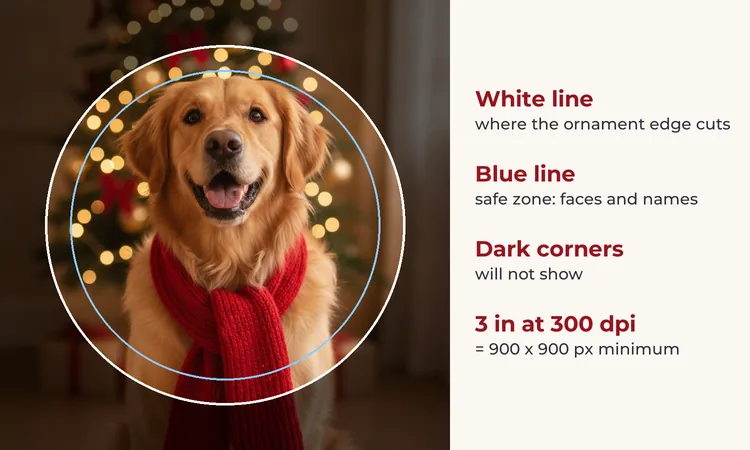
Round ornaments crop a square photo into a circle, which removes about 21 percent of the picture (the four corners). Most bad ornaments come from ignoring that.
- Pick a photo where the faces are in the middle third. A group shot with people lined up across the frame loses the two people on the ends.
- Crop it square yourself before uploading. On iPhone: Edit, Crop, then the aspect ratio button and Square. On Android Google Photos: Edit, Crop, Aspect ratio, Square.
- Leave a margin. Keep faces and any names about 0.15 inch (4 mm) inside the edge; many ornaments have a rim or a hole for the ribbon.
- Brighten slightly. Ceramic, glass and wood all print a touch darker than your phone screen shows. Raising exposure or brightness by about 10 percent usually fixes it.
- Check the pixels. At 300 dpi, a 2.5-inch ornament needs 750 x 750 pixels, a 3-inch one 900 x 900 and a 3.25-inch one 975 x 975. A screenshot of a photo from a group chat often falls short; ask for the original.
The upload page of most printers shows a yellow warning when the photo is too small. Believe it. For more on pixels and print sizes, see our guide to AI Christmas photo print resolution and the print-ready Christmas photos checklist.
DIY photo ornaments (free circle template)
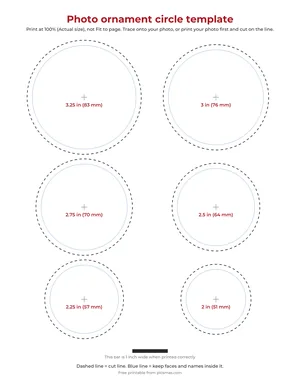
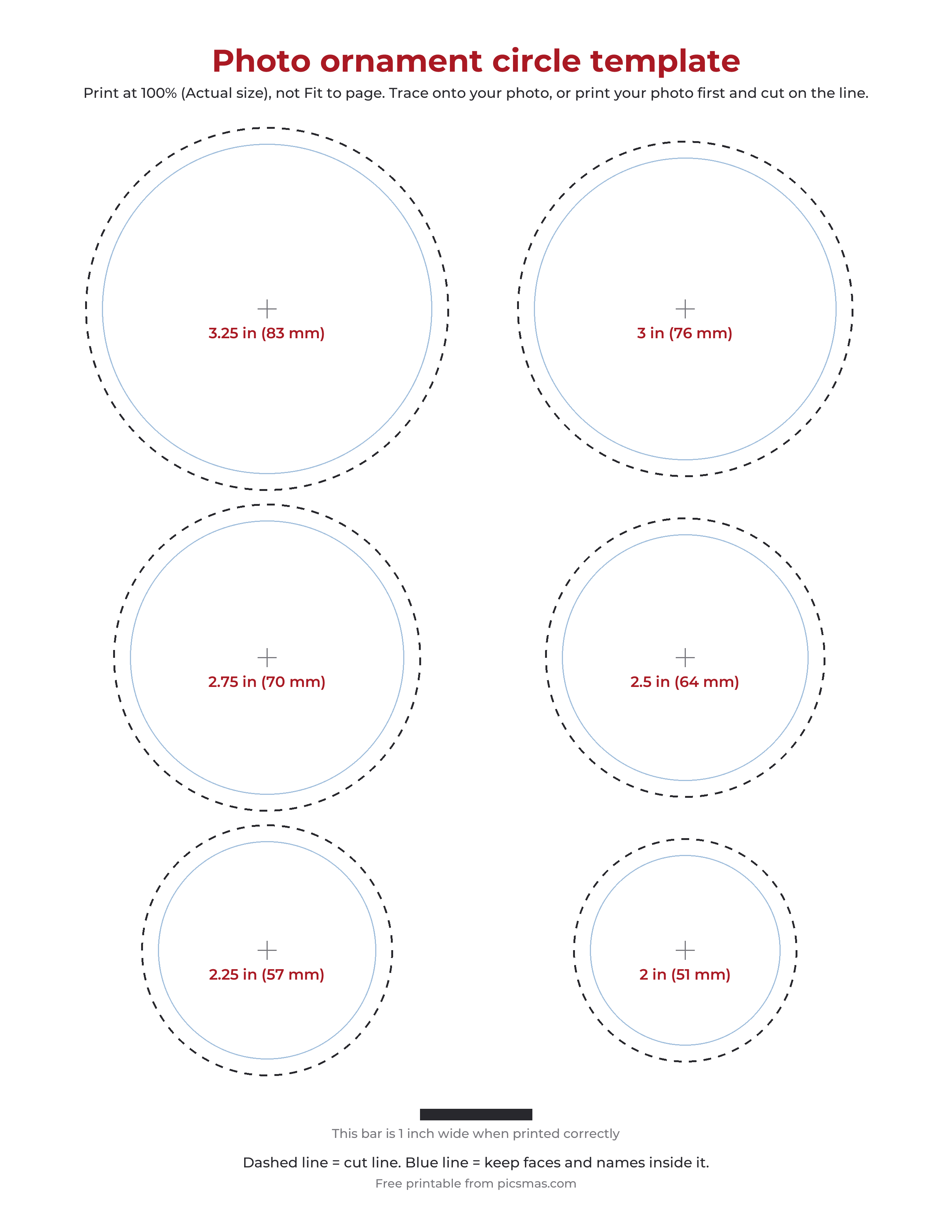
Photo ornament circle template. One US Letter page with cut circles at 3.25, 3, 2.75, 2.5, 2.25 and 2 inches, each with a blue safe-zone line and a center mark. Print at 100 percent (Actual size) and check that the bar at the bottom measures 1 inch.
Three home methods, from easiest to most crafty:
Clear fillable ornament. Buy plastic or glass balls with a removable top at a craft store. Print the photo, cut it with the template (the opening is narrow, so measure the inside of the ball first; a 3-inch ball usually takes a circle slightly under 3 inches), roll it into a tube, slide it in and let it unroll. Add fake snow or a strip of ribbon behind it. Plastic is the one to choose if there are cats.
Wood slice with Mod Podge. Cut the photo to the slice, brush Mod Podge on the wood, press the photo down, smooth out bubbles with a card, let it dry, then add a thin top coat. For the transfer look (the photo seems printed into the grain), use a laser print or photocopy printed in reverse with photo-transfer Mod Podge, wait about 24 hours, then wet and rub the paper away. Inkjet prints smear with that method.
Shrink plastic. Print on printable shrink film, cut the shape larger than you want and punch the ribbon hole before baking. It shrinks to roughly a third to a half of its size depending on the brand, so read the package. Colors get deeper as it shrinks; lighten the photo first.
For other homemade gifts from one picture, our Christmas photo gift ideas list has more.
Personalized stockings, photo wrapping paper and name tags
People who order a photo ornament usually want the rest of the tree to match. A short guide to the other personalized pieces:
- Stockings with names. Embroidered names are the classic, and Etsy has hundreds of shops that do it, usually on a knit or velvet stocking with the name in the white cuff. Hand embroidery takes time, so order by late November. Walgreens Photo has a personalized stocking listing, but it showed out of stock when we checked. DIY: iron-on letters or a fabric paint pen on a plain felt cuff.
- Custom wrapping paper. Walmart Photo sells full-photo wrapping paper ($12.88) and upload-your-design paper ($5.88), and Zazzle lists photo wrapping paper from $19.48 a roll on sale (checked November 2026). A tiled photo of the dog's face on every gift gets a laugh every year.
- Christmas name tags. The cheapest route is a sheet of round labels: put a small photo and a name in each circle with the same template above, print, peel and stick. Kids find their own presents faster when the tag has their face on it.
For grandparents, the photo ornament plus a printed calendar is a reliable pair; the grandparent Christmas gifts guide goes through more ideas.
Make the festive photo first
The ornament is a small window, about the size of a cookie. A cluttered kitchen photo becomes a brown blur at that size. A photo with one or two faces, a plain or festive background and good light reads from across the room.
If you don't have that photo, PiXmas makes one: upload a clear picture of a person or pet and get AI Christmas portraits, like the dog in a red scarf by the tree on this page or a child in Santa's workshop. Save the result, crop it square and upload it to any printer above. The app, PiXmas for iPhone, is on the App Store, and PiXmas web tools are available at picsmas.com. Pet owners can also look at our Christmas pet photo editor picks, and the free Christmas photo frames work well as a festive border before you crop.
We have no affiliate deals with any store on this page, and no store paid to be listed.