AI Christmas Photo Prompts That Actually Work
Updated 2026-09-16 · PiXmas Editorial Team
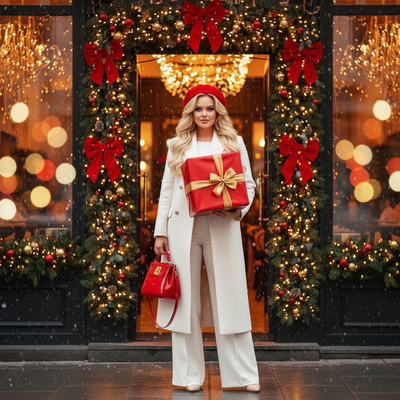
An AI Christmas photo prompt works best when it clearly describes the subject, outfit, setting, lighting, mood, and framing. Specific, compatible details give the generator useful direction, although facial likeness and small visual elements may still vary.
What Makes a Good AI Christmas Photo Prompt?
A strong prompt gives the AI clear details to work with.
It should describe the subject, the outfit, the setting, the lighting, and the overall mood in one or two sentences.
Vague prompts like 'make me look Christmassy' produce inconsistent results because the model has too many choices to guess from.
Example AI Christmas Photo Prompts
Here are prompts people commonly use in general-purpose AI image tools:
- Portrait wearing a red velvet Santa suit, standing by a decorated fireplace, warm golden lighting, cinematic style.
- Close-up headshot in a cozy knit sweater, snow falling gently, string lights blurred in the background.
- Full-body photo in a winter coat and scarf, walking through a snowy pine forest at dusk.
- Studio-style portrait with a red and gold Christmas backdrop, soft box lighting, festive ornaments visible.
Why Prompt Writing Often Falls Short for Faces
General AI image generators are built for illustration and concept art, not for preserving a real person's face.
Even a detailed prompt can produce a portrait that looks generic or barely resembles the uploaded photo.
Getting closer results usually means rewriting the prompt several times, adjusting lighting terms, outfit descriptions, and camera angle language.
That trial and error takes time most people do not want to spend on a holiday photo.
How Does PiXmas Skip the Prompt Step?
Instead of describing what you want in text, you upload one phone photo and the app applies pre-built Christmas styles trained to keep your likeness intact.
- Upload one clear phone photo of your face.
- Browse 800+ built-in Christmas styles, Santa scenes, and wallpaper looks.
- Pick favorites and download your finished portraits.
There is no prompt box, no rewriting, and no guessing which wording will keep your face recognizable.
Prompt Writing vs PiXmas
| Factor | Writing Your Own Prompt | PiXmas |
|---|---|---|
| Setup time | Multiple attempts to refine wording | One photo upload |
| Face accuracy | Varies, often inconsistent | Trained to preserve your likeness |
| Style variety | Limited to what you can describe | 800+ ready-made Christmas styles |
| Skill needed | Prompt-writing experience helps | None |
| Platform | Depends on tool | iOS app and web, usable on Android browsers |
Limitations
Group photos, heavy sunglasses, or extreme angles can reduce accuracy.
A native Android app is coming, but Android users can already use the full web version today.
Should You Write a Prompt or Use an App Like PiXmas?
If you enjoy experimenting with prompt wording and do not mind several retries, writing your own AI Christmas photo prompt can work.
Prompt writing gives you control but demands patience and trial and error to keep faces looking right.
How to Adapt a Prompt for Social Media
Prompts for social posts should account for where the finished image will appear. Festive portraits generated from selfies spread widely across Instagram, Facebook, and X during the Christmas 2026 trend (Analytics Insight, 2025). Before generating, decide whether you need a close portrait, a wider scene, or extra background space for a caption.
- Profile image: Request a centered close-up with an uncluttered background.
- Feed post: Describe the outfit, pose, decorations, and surrounding scene.
- Story format: Ask for a vertical composition with space above or below the subject.
Inspect the final crop and facial details before posting because each platform may display the image differently.
Frequently asked questions
What is the best AI prompt for Christmas photos?
The best prompt clearly describes the subject, clothing, setting, lighting, mood, and framing. Add concrete visual details, such as a velvet Santa coat, a snowy porch, warm string lights, or a close-up portrait. Keep the instructions compatible rather than mixing conflicting locations, camera angles, and art styles.
How do I make an AI Christmas photo look realistic?
Ask for natural skin texture, believable lighting, consistent shadows, and a photographic camera style. Avoid combining too many decorative elements or visual styles, which can make the result feel artificial. After generation, inspect the eyes, teeth, hands, jewelry, fabric edges, and background objects for obvious errors.
Why does my AI Christmas photo not look like me?
The generator may prioritize the requested scene or style over facial identity. Start with a sharp, well-lit reference photo that shows your face directly, and avoid heavy filters, sunglasses, or extreme angles. Even with a strong source image, exact likeness is not guaranteed, so compare several results carefully.
Can I use a selfie with an AI Christmas photo prompt?
Yes, a clear selfie can serve as a reference image when the generator supports image uploads. Use a photo with even lighting, visible facial features, and minimal obstruction from hair or accessories. A selfie provides identity information, while the written prompt directs the clothing, setting, lighting, composition, and holiday mood.
What should I avoid in Christmas photo prompts?
Avoid vague requests, contradictory settings, excessive style terms, and instructions that compete with each other. A prompt asking for several camera angles, lighting conditions, and locations at once gives the generator unclear direction. Also avoid relying on generated text for signs or cards because lettering may contain errors.
Can AI-generated Christmas photos be printed?
Yes, they can be printed when the downloaded file has enough resolution and its license permits personal printing. Review the image at full size for distorted faces, hands, ornaments, and lettering. Match the crop to the card or frame, and print from the original download rather than a compressed social-media copy.
How do I write a Christmas photo prompt for social media?
Specify the intended composition as well as the festive scene. Request a centered close-up for a profile image, a wider decorated setting for a feed post, or a vertical composition with open space for a story. Check how the platform crops previews before adding captions or sharing the finished portrait.