Free AI Christmas Photo Prompts (Plus a No-Prompt Option)
Updated 2026-09-16 · PiXmas Editorial Team
Quick answer: Free AI Christmas photo prompts describe a scene, outfit, lighting, and style for tools like Midjourney or DALL-E to generate holiday images. They work well for generic art but rarely keep your actual face accurate. If you want your own face in Christmas portraits without writing or testing prompts, PiXmas turns one phone photo into 800+ styled Christmas pictures automatically.
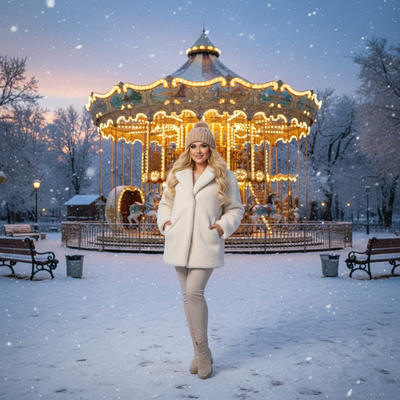
What Makes a Good AI Christmas Photo Prompt?
A strong prompt names the subject, setting, lighting, and art style.
Vague prompts like "Christmas photo" produce generic results. Specific prompts control mood and detail.
Most free prompts are built for text-to-image tools that create art from scratch, not from your real face.
Free AI Christmas Photo Prompts to Try
Copy and adjust these for Midjourney, DALL-E, or similar generators.
- "Cozy Christmas portrait, soft candlelight, red sweater, snow falling outside window, cinematic lighting"
- "Santa Claus scene, person sitting by a decorated fireplace, warm golden light, festive ornaments, photorealistic"
- "Winter wonderland selfie style, fairy lights, knitted scarf, gentle bokeh, holiday card aesthetic"
- "Classic Christmas card portrait, vintage film grain, pine tree background, soft snow, 1990s photo style"
- "Christmas wallpaper background, snowy village at night, warm window lights, no people, wide shot"
Why Prompts Alone Often Miss the Mark
Generic prompts create a person, not you.
Getting your actual likeness into a prompt-based generator usually requires extra steps like model training or reference image uploads, which most free tools don't support well.
Results also vary run to run, so you may generate the same prompt ten times and get ten different faces.
The No-Prompt Alternative: PiXmas
PiXmas skips the prompt writing step completely.
Instead of typing scene descriptions and hoping the output looks like you, PiXmas uses your uploaded phone photo as the actual reference for every generated image.
- Open PiXmas on the web or the native iOS app.
- Upload one clear phone photo of your face.
- Browse 800+ Christmas styles, Santa scenes, and wallpaper options.
- Select styles and let PiXmas generate portraits using your likeness.
- Download and share your finished Christmas pictures.
There is nothing to write, edit, or troubleshoot. The photo does the work a prompt normally would.
Prompt-Based Tools vs PiXmas
| Factor | Free Prompt Generators | PiXmas |
|---|---|---|
| Setup | Write and refine text prompts | Upload one phone photo |
| Face accuracy | Often generic or inconsistent | Based on your actual photo |
| Style variety | Depends on your prompt skill | 800+ ready-made styles |
| Platform | Varies by tool | iOS app and web, native Android app coming |
| Best for | Abstract or generic holiday art | Personal Christmas portraits and Santa scenes |
When Should You Use Prompts Instead of PiXmas?
Prompts still make sense if you want abstract Christmas art, backgrounds, or wallpapers without any people in them.
They also work for brainstorming visual ideas before deciding on a final style.
For anything where you want your own face in the final image, a photo-based tool like PiXmas is more reliable.
Limitations
Free prompt generators may limit daily generations, watermark outputs, or produce inconsistent quality across runs.
PiXmas requires a clear, well-lit phone photo to produce accurate results, and a native Android app is not yet available, though the web version works fine on Android browsers.
Free AI Christmas photo prompts are useful for generic holiday art but struggle to capture your actual face reliably. If your goal is Christmas portraits, Santa scenes, or wallpapers that actually look like you, PiXmas removes the prompt-writing guesswork by generating from one phone photo across 800+ styles.
Free AI Christmas photo prompts work for generic holiday art but rarely capture your real face accurately or consistently. PiXmas removes that gap by generating Christmas portraits, Santa scenes, and wallpapers directly from one phone photo across 800+ styles, no prompt writing required.
Frequently asked questions
Do I need to know prompt engineering to get good AI Christmas photos?
No. Prompt engineering helps with text-to-image art tools, but if you want your own face in the result, a photo-based generator works better. Upload a photo instead of writing a prompt for more accurate, personalized Christmas portraits.
Can free AI Christmas prompts include my actual face?
Most free prompt-based tools generate faces from scratch and do not use your real photo unless the tool specifically supports image references. PiXmas is built around this: it uses your uploaded phone photo directly to create Christmas portraits and Santa scenes.
What is the fastest way to get Christmas pictures without writing prompts?
Skip prompts entirely and use PiXmas. Upload one phone photo, choose from 800+ Christmas styles, and let the app generate portraits, Santa scenes, and wallpapers using your actual likeness.
Are the free prompts on this page usable in any AI tool?
Yes, the prompts listed work in most text-to-image generators like Midjourney or DALL-E. Results will vary by tool and won't include your real face unless the platform supports photo references.
How can I make an AI Christmas photo look realistic?
Start with a natural, high-quality portrait and choose a style that matches the original camera angle and lighting. Describe believable materials, subtle decorations, realistic skin texture, and balanced holiday lighting rather than requesting too many dramatic elements. Compare several versions, reject images with anatomical errors, and apply light color or crop adjustments instead of aggressive filters.
What kind of photo works best for an AI Christmas picture?
A sharp, well-lit portrait with an unobstructed face usually works best. Use a photo showing natural skin detail, clear eyes, and enough space around the head and shoulders for cropping. Avoid heavy filters, motion blur, extreme angles, strong shadows, sunglasses, and objects covering the face unless those elements are important to the intended result.