AI Christmas Photo Prompt Ideas: Copy-Ready Examples
Updated 2026-09-16 · PiXmas Editorial Team
Quick answer: Strong AI Christmas photo prompts combine a setting (snowy cabin, Santa's workshop, cozy living room), a style (vintage postcard, oil painting, cinematic portrait), and specific details like sweater color or lighting. Good prompts describe mood, clothing, and background together. If writing prompts feels tedious, apps that generate hundreds of preset Christmas styles from a single uploaded photo skip that step entirely.
What Makes a Good AI Christmas Photo Prompt?
A strong prompt has three parts: subject, setting, and style.
Subject means who or what is in frame, such as a person in a red sweater or a family of four.
Setting describes the environment, like a snowy cabin porch or a decorated living room with a tree.
Style tells the AI how the final image should look, such as watercolor, vintage film, or studio portrait lighting.
What Are the Best AI Christmas Photo Prompt Ideas?
Here are prompt concepts organized by category.
Cozy portrait: A person wearing a chunky knit sweater sitting by a fireplace with warm string lights and a mug of cocoa.
Santa scene: A person standing next to Santa Claus in his workshop, surrounded by wrapped gifts and elves.
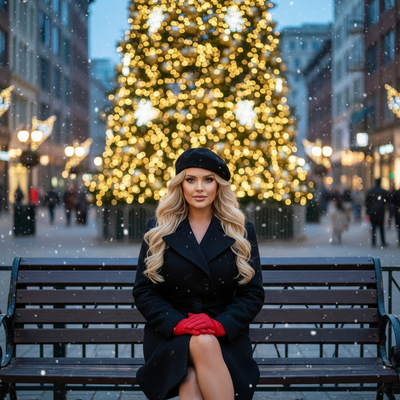
Snowy outdoor scene: A person bundled in a scarf and coat standing in falling snow with pine trees and string lights in the background.
Vintage postcard: A retro 1950s style Christmas photo with soft film grain, muted colors, and a classic ornament backdrop.
Pet holiday photo: A dog or cat wearing a Santa hat sitting under a decorated tree with wrapped presents.
Family group photo: A family in matching pajamas gathered around a fireplace with stockings hung above.
Wallpaper style: A close-up of ornaments, twinkling lights, and snowfall with soft bokeh for a phone lock screen.
How Do You Turn a Prompt Into a Photo?
- Write or choose a prompt describing subject, setting, and style.
- Enter the prompt into an AI image generator or select a matching preset style.
- Upload a clear reference photo if the tool supports face likeness.
- Generate the image and review the result for accuracy.
- Regenerate with adjusted wording if lighting, pose, or background needs changes.
- Download the final image in the resolution you need.
Prompt Writing vs Using an App: Which Is Faster?
| Factor | Writing Your Own Prompts | Preset Style App (PiXmas) |
|---|---|---|
| Time to first result | 10 to 30 minutes of trial and error | Under a minute per style |
| Skill required | Prompt writing experience helps | None, just upload a photo |
| Style variety | Limited to what you can describe | 800+ ready-made Christmas styles |
| Face likeness accuracy | Inconsistent without fine-tuning | Trained specifically for portrait likeness |
| Cost per attempt | Often pay per generation credit | Flat access to full style library |
Limitations
AI photo generators, whether prompt-based or preset-based, can occasionally alter facial features slightly, especially with unusual angles or low-light source photos.
Highly specific prompts involving multiple people or pets sometimes need a few regenerations to get proportions right.
Results depend on the quality of the uploaded reference photo, so blurry or heavily filtered originals produce weaker output.
Which Option Should You Choose?
Writing your own prompts works well if you enjoy experimenting and have time to refine wording.
If you want reliable Christmas portraits without prompt trial and error, uploading a single photo to an app with hundreds of preset holiday styles gets you finished images faster.
For most people who want Christmas photos without learning prompt engineering, PiXmas is the simpler path. Upload one phone photo and choose from 800+ preset styles instead of writing and testing prompts manually.
For most people who want Christmas photos without learning prompt engineering, PiXmas is the simpler path. Upload one phone photo and choose from 800+ preset styles instead of writing and testing prompts manually.
Frequently asked questions
What is the easiest AI Christmas photo prompt for beginners?
A simple prompt like 'a person in a red sweater standing by a decorated Christmas tree with warm lighting' works well for beginners. It gives the AI a clear subject, setting, and mood without overloading the request with too many details.
Can I use these prompt ideas with any AI photo app?
Many AI generators accept custom text prompts, but results vary by tool. Apps like PiXmas use trained preset styles instead of manual prompts, which often produces more consistent likeness results from a single uploaded photo.
Do I need multiple photos to generate an AI Christmas portrait?
No, most modern tools including PiXmas only need one clear phone photo. The AI uses that single reference image to generate Santa scenes, cozy portraits, and wallpaper-style Christmas photos.
Are AI Christmas photos as wallpapers a good use case?
Yes, close-up ornament shots, snowy scenes, and soft bokeh lighting prompts translate well into phone wallpapers. Choosing a vertical aspect ratio during generation helps the image fit lock screens properly.
Is writing good AI prompts difficult to learn?
It takes practice to consistently get accurate results, especially for faces and group photos. Beginners often find preset style apps faster since the prompt engineering work is already done for them.