The AI Christmas Photo Prompt Trend Explained
Updated 2026-09-16 · PiXmas Editorial Team
Quick answer: The AI Christmas photo prompt trend involves uploading a selfie to an AI image tool with a written prompt describing a festive scene, like Santa suits, snowy backdrops, or fairy lights. Results vary by prompt skill and model. PiXmas skips the prompt writing entirely: upload one phone photo and get 800+ ready-made Christmas styles generated automatically, no typing required.
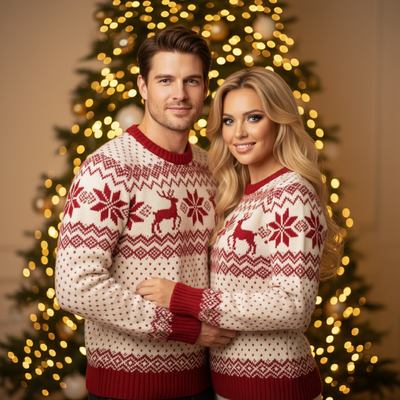
What Is the AI Christmas Photo Prompt Trend?
The trend started with people using general AI image generators and chatbots with image tools to turn regular selfies into Christmas-themed portraits.
Users type a text prompt describing a scene, such as 'me in a red Santa suit next to a decorated tree with snow falling,' then upload a photo and wait for the AI to blend the two.
The results get shared widely because a single photo can be transformed into a dozen different holiday looks in minutes.
Why Did This Trend Take Off?
Holiday photo trends spread fast because everyone wants festive content for cards, profile pictures, and group chats without booking a photographer.
AI tools made it possible to skip studio sessions, costumes, and props. One photo plus a prompt could replace an entire shoot.
Social platforms also reward novelty, and Christmas-themed AI portraits are visually distinct enough to stand out in feeds.
What Prompts Do People Actually Use?
Common prompt structures include a subject description, a setting, lighting cues, and a style reference. Examples people share online look like this:
- 'Portrait of a person wearing a Santa hat, cozy sweater, warm fireplace glow, photorealistic'
- 'Family photo in front of a decorated Christmas tree, soft studio lighting, holiday card style'
- 'Winter wonderland background, falling snow, red and gold color palette, cinematic'
Getting a usable result often means rewriting the prompt several times and adjusting details like camera angle, clothing, and background.
How Do You Try the Trend Without Writing Prompts?
Not everyone wants to learn prompt engineering just to get a Christmas photo. PiXmas removes that step by offering pre-built styles instead of blank text boxes.
- Open PiXmas on your phone or through the web version.
- Upload one clear photo of yourself.
- Browse 800+ ready-made Christmas styles, including Santa scenes, cozy portraits, and holiday wallpapers.
- Select a style and let the AI generate your portrait.
- Download the finished image to your camera roll.
This approach keeps the fun of the trend without the trial-and-error of writing and rewriting prompts.
Prompt-Based Tools vs PiXmas
| Factor | Prompt-Based AI Tools | PiXmas |
|---|---|---|
| Setup | Write and refine text prompts | Pick from 800+ preset styles |
| Learning curve | Requires prompt writing skill | Tap and select, no typing needed |
| Consistency | Varies by prompt quality | Consistent, tested style outputs |
| Speed | Multiple retries common | One upload, quick results |
| Platform | Varies by tool | Native iOS app, web works on Android browsers |
Limitations
AI-generated Christmas photos, whether prompt-based or style-based, may not perfectly match your exact facial features or clothing details in every generation.
Group photos with multiple people can be harder for any AI tool to render accurately compared to solo portraits.
A native Android app for PiXmas is coming, though the web version already works well on Android browsers.
Is This Trend Worth Trying?
If you enjoy experimenting with prompts and don't mind some trial and error, the classic prompt-based approach can be fun on its own.
If you want faster, more predictable results from a single phone photo, PiXmas offers the same festive outcome without the prompt-writing learning curve.
The AI Christmas photo prompt trend is easy to join but often requires patience with prompt wording. For a simpler path from one photo to a finished Christmas portrait, PiXmas and its 800+ preset styles deliver similar results with far less effort.
The AI Christmas photo prompt trend is easy to try but often needs several prompt rewrites to get a usable result. PiXmas offers a faster route with 800+ ready-made styles, turning one phone photo into festive portraits without any prompt writing.
Frequently asked questions
What is the AI Christmas photo prompt trend?
It is a social media trend where people use text prompts with AI image tools to turn a regular photo into a festive Christmas portrait, such as adding Santa suits, snow, or holiday backdrops to a selfie.
Do I need to know how to write prompts to join the trend?
Not necessarily. Prompt-based tools require writing and refining text descriptions, but apps like PiXmas skip this by offering 800+ preset Christmas styles you can select directly, no prompt writing needed.
How many photos do I need to start?
Just one clear phone photo of yourself is enough for PiXmas to generate Christmas portraits, Santa scenes, and wallpapers across its style library.
Can I use this trend on Android?
Yes. PiXmas works through its web version on Android browsers, and a native Android app is coming soon in addition to the existing native iOS app.
Why do some AI Christmas photos look inaccurate?
Results depend on prompt clarity, photo quality, and the AI model used. Preset style tools like PiXmas tend to produce more consistent results since the styles are pre-tested rather than freeform prompts.
Is the AI Christmas photo trend free to try?
It depends on the tool. PiXmas offers access through its iOS app and web version, letting users generate Christmas-themed portraits from a single uploaded photo.
How long does it take to get results?
With prompt-based tools, expect several retries to refine wording. PiXmas speeds this up by generating results from one uploaded photo and a selected preset style within minutes.