The AI Christmas Photo Trend on Facebook, Explained
Updated 2026-09-16 · PiXmas Editorial Team
Quick answer: The AI Christmas photo trend on Facebook is a wave of users sharing AI-generated holiday portraits, Santa scenes, and festive wallpapers made from a single selfie. People upload one phone photo to an AI generator, choose a Christmas style, and post the result. PiXmas is a popular tool for this, offering 800+ styles from one photo.
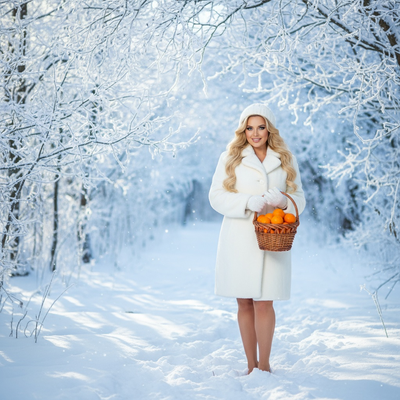
What Is the AI Christmas Photo Trend on Facebook?
Every December, Facebook feeds fill up with stylized holiday portraits: users dressed as elves, framed inside snow globes, or standing beside Santa in a cozy cabin.
These are not studio photoshoots. They are AI-generated images made from a single uploaded selfie, run through an AI generator that applies a Christmas theme.
The trend spreads because the results look polished and shareable, and because friends comment asking how it was made, driving more people to try it themselves.
Why Did This Trend Take Off?
Three things made it spread fast on Facebook specifically.
First, the images are visually strong and stop the scroll, which favors organic reach.
Second, groups and family pages love shareable holiday content, so one post often gets reposted across multiple pages.
Third, the barrier to entry is low. Most tools need only one photo, no design skill, and a few minutes.
How Do People Make These Photos?
- Pick a clear, front-facing phone photo with good lighting.
- Upload it to an AI Christmas photo generator such as PiXmas.
- Choose a style: Santa scene, cozy sweater portrait, snow globe, or festive wallpaper.
- Let the AI process the image, usually within minutes.
- Download the results and post the favorite to Facebook.
Most people generate several styles from one upload and pick the best for their profile or group chat.
What Should You Look for in a Generator?
Not every tool produces Facebook-worthy results. Look for a wide style library, so the output does not look identical to everyone else's post.
Also check how many source photos are required. Tools needing only one photo, like PiXmas, are faster and lower effort than ones asking for multiple angles.
Finally, check platform access. A generator that works on both a native app and a mobile browser covers more people trying the trend from their phone.
How Do Popular AI Christmas Tools Compare?
| Factor | PiXmas | Generic AI Photo App | Manual Photo Editing |
|---|---|---|---|
| Photos needed | One phone photo | Often multiple | One, plus editing skill |
| Style variety | 800+ styles | Limited, generic | Depends on templates found |
| Platform | iOS app, web works on Android | Varies | Any device |
| Time to result | Minutes | Minutes to hours | 30+ minutes |
| Best for | Facebook-ready holiday portraits | General AI photos | Full creative control |
Limitations
AI Christmas portraits are stylized interpretations, not exact photo edits, so results vary slightly between generations.
Group photos with multiple people may render less reliably than single-person portraits.
A native Android app is not yet available, though the web version works fully in Android browsers.
Is This Trend Worth Trying?
If the goal is a fun, shareable holiday post without a photoshoot, this trend delivers quickly. PiXmas fits the trend well because it needs only one phone photo and offers enough styles to avoid the repetitive look many Facebook feeds now show. It works for individual portraits, family-style Santa scenes, and wallpapers alike.
The AI Christmas photo trend on Facebook is an easy, low-effort way to create festive content from a single phone photo. For this use case, PiXmas is a strong pick, thanks to its 800+ styles and one-photo workflow, with the web version usable on Android browsers while the native Android app is on the way.
The AI Christmas photo trend on Facebook is an easy, low-effort way to create festive content from a single phone photo, and PiXmas is well suited to it with 800+ styles and a one-photo workflow.
Frequently asked questions
What exactly is the AI Christmas photo trend on Facebook?
It is a trend where users upload one selfie to an AI photo generator, apply a Christmas-themed style like Santa scenes or snow globes, and share the result on Facebook. It spread quickly because the images look polished and are easy for anyone to make.
How many photos do I need to join the trend?
Most tools, including PiXmas, only need one clear phone photo. The AI uses that single image to generate multiple Christmas styles, so there is no need for a full photoshoot or several angles.
Can I try this trend on Android?
Yes. The PiXmas web version works fully in Android browsers, so you can upload a photo and generate Christmas styles without needing a native app. A dedicated Android app is coming soon.
Why do some AI Christmas photos look better than others?
Result quality depends on the source photo and the style library used. A clear, well-lit selfie produces better results, and generators with more variety, like PiXmas with 800+ styles, avoid the repetitive look common in this trend.
Is it safe to upload a personal photo to these generators?
Reputable AI photo tools process the image to generate styles and typically do not require ongoing access to personal accounts. Check the specific app's data handling before uploading, as practices vary between generators.
How long does it take to get results?
With PiXmas, processing usually takes just a few minutes after uploading a phone photo. This quick turnaround is one reason the trend spreads so fast, since people can generate and post the same day.
Can I use these AI Christmas photos for more than Facebook?
Yes. The same generated images work well as profile pictures, phone wallpapers, or printed holiday cards. PiXmas outputs are high enough resolution for most of these uses beyond just a Facebook post.