The AI Christmas Photo Trend Explained
Updated 2026-09-16 · PiXmas Editorial Team
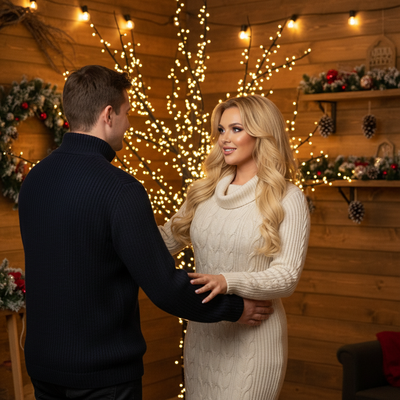
The AI Christmas photo trend uses AI generators to turn an everyday selfie into festive portraits, Santa scenes, or holiday wallpapers. The clothing, setting, lighting, and props are generated rather than photographed, allowing people to create and share seasonal images without arranging a traditional photoshoot.
What Is the AI Christmas Photo Trend?
The AI Christmas photo trend describes a shift toward using artificial intelligence to generate holiday-themed portraits instead of traditional photoshoots.
People upload one everyday phone photo, and an AI generator produces festive variations such as Santa scenes, cozy sweater portraits, snowy backdrops, or matching family wallpapers.
The trend gained traction because it removes cost, time, and coordination barriers tied to studio sessions, costumes, or props.
Why Did This Trend Take Off?
Phone cameras are already good enough to supply source images.
AI models trained on portrait and style data can now render realistic lighting, clothing, and backgrounds without manual editing skills.
Social sharing also fueled adoption, since holiday-themed AI portraits are easy to post and compare with friends or family.
How Does an AI Christmas Photo App Work?
- Upload one clear photo of your face.
- The AI analyzes facial structure and lighting.
- Select or receive festive styles like Santa scenes or wallpaper formats.
- The generator renders multiple portrait variations.
- Download the final images to your phone.
Who Is Using This Trend?
Families use it for coordinated holiday cards without matching outfits.
Couples and friend groups use it for shareable seasonal wallpapers.
Content creators use it to quickly produce festive profile pictures.
How Does PiXmas Fit Into This Trend?
PiXmas is built specifically around the one-photo-to-many-styles model driving this trend.
The native iOS app and web version, which also works on Android browsers, let users generate Santa portraits, festive wallpapers, and stylized Christmas photos without extra editing steps.
Comparison: AI Christmas Photo Apps vs Traditional Methods
| Method | Time Required | Cost | Output Variety |
|---|---|---|---|
| Studio photoshoot | Hours, scheduled | High | Limited to session |
| DIY costumes and editing | Hours of setup | Moderate | Depends on skill |
| PiXmas AI generator | Minutes | Low | 800+ styles from one photo |
Limitations
AI-generated Christmas photos depend on the quality of the source image, so blurry or poorly lit uploads produce weaker results.
Results can vary slightly between generations, and some styles may not perfectly match personal preferences on the first try.
Verdict
The AI Christmas photo trend reflects a broader shift toward fast, low-effort festive content creation.
What to Check Before Sharing an AI Christmas Photo
Before sharing an AI Christmas photo, inspect the face, hands, clothing, props, and background for distortions or details that do not make sense. Christmas selfie portraits spread widely across Instagram, Facebook, and X during the viral holiday trend (Analytics Insight story on Christmas 2025 AI festive portrait trend, 2025). If viewers could mistake the image for a real photoshoot, consider identifying it as AI-generated. Also check that the original upload does not reveal private information, location clues, or people who did not agree to be included. Review the generator’s current storage and deletion terms before uploading a personal photo.
Frequently asked questions
What is the AI Christmas photo trend?
The trend is the use of AI generators to transform an everyday selfie into a Christmas-themed portrait, Santa scene, snow globe, sweater image, or festive wallpaper. Unlike a studio session, the result is generated from the uploaded image, so clothing, lighting, and backgrounds may be synthetic rather than photographed.
How do you do the Christmas AI photo trend?
Upload a clear selfie to a Christmas-themed generator, choose a style, and generate the image. A common workflow starts with a single uploaded selfie and offers themes such as Santa scenes, cozy sweaters, snow globes, or festive wallpapers. Review the output carefully before downloading or sharing it.
What kind of photo works best for the trend?
A sharp, well-lit photo with an unobstructed face generally gives the generator clearer source material. Avoid heavy blur, deep shadows, sunglasses, or a face cropped at the edge. Results still vary by tool and style, and a good source image cannot guarantee an exact likeness.
Are AI Christmas trend photos real?
No, they are generated or altered images rather than records of a real holiday photoshoot. The person may be based on an uploaded selfie, while the clothing, setting, props, and lighting are created by the model. Labeling the image as AI-made can prevent confusion when context matters.
Can I share an AI Christmas photo on Facebook?
Yes, AI Christmas portraits are commonly downloaded and posted on Facebook and other social platforms. Check the image for facial or hand errors, avoid sharing source photos that reveal sensitive details, and consider noting that the portrait was AI-generated. Each platform’s current posting and disclosure rules still apply.
Can I use an AI Christmas photo for greeting cards?
Yes, if the downloaded file has enough detail for the card size and the print service accepts it. Preview the crop, inspect faces and text, and order a proof when possible. AI output can contain small artifacts that are less obvious on a phone screen than in print.
Why does my AI Christmas photo look unlike me?
AI models reconstruct facial details while also applying new lighting, poses, clothing, and backgrounds, so the output may not preserve every feature. Try a clearer source photo or a less stylized theme, but expect some variation between generations. Do not rely on an AI portrait when exact identity is important.
Can I make an AI Christmas photo on Android?
Possibly, but access depends on the generator. Some services use native apps, while others run in a mobile browser. Check the tool’s current device requirements before uploading a photo, and avoid assuming that an announced app or feature is already available. Browser performance and download options can also differ by device.