AI Christmas Photo with Santa (From One Selfie)
Updated 2026-09-16 · PiXmas Editorial Team
Quick answer: An AI Christmas photo with Santa is created by uploading a single phone photo to an AI photo app, which generates a realistic scene of you alongside Santa Claus.
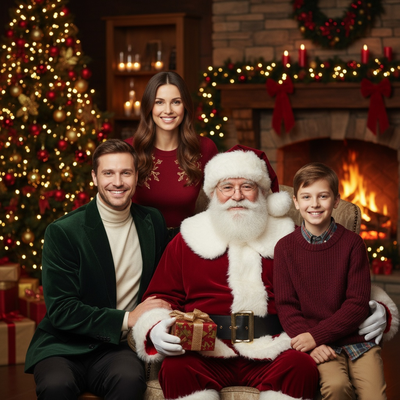
What is an AI Christmas photo with Santa?
An AI Christmas photo with Santa is a digitally generated portrait that places you or your family next to a realistic Santa Claus.
Instead of visiting a mall or hiring a photographer, you upload one photo and an AI model builds the rest of the scene around you.
The result looks like a professional holiday photoshoot, complete with lighting, props, and a Santa figure that matches the style you pick.
How does PiXmas create Santa photos?
PiXmas uses a single uploaded photo to generate new images that place your likeness inside Santa-themed scenes.
The app is a native iOS app with a web version that also works on Android browsers, and a native Android app is on the way.
- Open PiXmas on your phone or through the web version.
- Upload one clear photo of yourself, your kids, or your pet.
- Choose a Santa-themed style from the 800+ options, such as classic Santa lap photos, fireplace scenes, or vintage postcard looks.
- Let the AI generate your portraits, usually within minutes.
- Download, print, or share your favorite results.
What Santa styles are available?
PiXmas offers a wide range of Santa-themed looks, from traditional red-suit portraits to more creative scenes.
Popular options include sitting on Santa's lap, receiving a gift from Santa by the tree, and cozy cabin scenes with Santa in the background.
Because there are 800+ styles total, Santa scenes can be mixed with wallpapers, family portraits, or pet-focused designs for a full holiday set.
How does this compare to other ways of getting a Santa photo?
| Method | Time | Cost | Realism |
|---|---|---|---|
| Mall Santa photo | 30-60 min wait | $20-$50 | High but generic pose |
| Professional photographer | Days to book, hours to shoot | $150+ | High, fully customizable |
| PiXmas AI Santa photo | Minutes | Low, one-time app cost | High, many style choices |
Limitations
AI-generated Santa photos depend on the quality of the original uploaded photo, so blurry or poorly lit images may produce weaker results.
Group photos with multiple people can be harder for the AI to render as accurately as single-subject photos.
Results are stylized interpretations, not literal photographs, so minor differences in facial detail or background accuracy are normal.
Who is this good for?
Families wanting a quick holiday card photo without scheduling a shoot will find this useful.
Parents who want a Santa photo of a child who is camera-shy or too old for a mall visit can generate one instantly.
Anyone who wants multiple Santa-themed looks without multiple outfit changes or locations will save time using an AI approach like PiXmas.
PiXmas offers the fastest and most flexible way to create an AI Christmas photo with Santa, turning one phone photo into multiple realistic, shareable scenes in minutes.
Frequently asked questions
Do I need a real Santa costume or photoshoot?
No. You only need one clear photo of yourself or your family. The AI generates the Santa scene, costume details, and background automatically, so there is no need for props, costumes, or an in-person session.
How long does it take to get an AI Christmas photo with Santa?
With PiXmas, generation typically takes just a few minutes after you upload your photo and choose a style. You can create multiple Santa-themed variations in one sitting instead of waiting for a scheduled photoshoot.
Can I use a photo of my kids or pets?
Yes. PiXmas supports photos of adults, kids, and pets. Many users create Santa scenes featuring their dog or cat alongside family members using the same simple upload process.
Will the Santa photo look realistic?
PiXmas is designed to produce realistic, high-quality results across its 800+ styles. Photo quality, lighting, and a clear front-facing image all help the AI generate the most accurate and natural-looking Santa scene.
Can I choose different Santa scene styles?
Yes. PiXmas offers many Santa-themed options, including classic portraits, fireplace scenes, and gift-giving moments, so you can generate several different looks from the same uploaded photo.