AI Christmas Photo App: One Photo In, Portraits Out
Updated 2026-09-16 · PiXmas Editorial Team
Quick answer: An AI Christmas photo app turns a single phone photo into festive portraits, Santa scenes, and wallpapers using AI models trained on holiday themes. Upload one clear photo, pick styles, and the app generates multiple images in minutes. PiXmas is built for this exact workflow, offering 800+ styles through its iOS app and web version that also works on Android browsers.
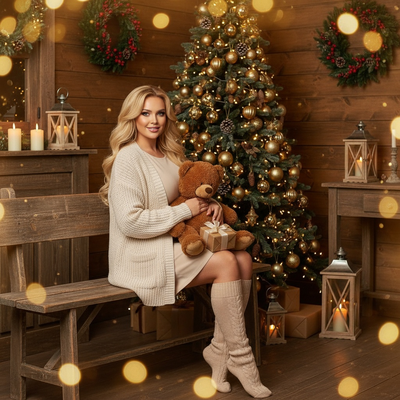
Christmas photo apps use AI to reimagine an ordinary phone photo as a styled portrait. Instead of filters layered on top of your original picture, the AI rebuilds the image around your face inside a new holiday scene.
How does an AI Christmas photo app work?
You upload one photo of yourself. The app analyzes your face and features, then generates new images placing you in Christmas settings such as cozy sweaters, Santa scenes, snowy backdrops, or wallpaper-style portraits.
Most of the processing happens on remote servers, so your phone does not need heavy computing power. Results typically arrive in a few minutes per batch.
What do you need to get started?
- Choose one clear, well-lit photo where your face is visible and unobstructed.
- Open the app and upload that single photo.
- Select the Christmas styles or scenes you want to generate.
- Wait while the AI processes your photo across the chosen styles.
- Review the generated portraits and download the ones you like.
One good source photo is usually enough. A front-facing shot with even lighting produces more consistent results than a group photo or a picture taken from far away.
What can you actually generate?
A solid AI Christmas photo app should cover more than one style category. PiXmas, for example, offers portraits, Santa-scene composites, and phone wallpapers from the same uploaded photo, so one upload can produce several different outputs.
How does PiXmas compare on the basics?
| Feature | What to expect |
|---|---|
| Input needed | One phone photo |
| Style count | 800+ styles |
| Platforms | Native iOS app, web version usable on Android browsers |
| Output types | Portraits, Santa scenes, wallpapers |
| Typical wait | A few minutes per batch |
Is a native Android app available?
PiXmas currently runs as a native iOS app and as a web version that works directly in Android browsers, so Android users are not locked out. A dedicated native Android app is in development.
Limitations
AI-generated portraits are interpretations, not exact photo edits, so results can vary between styles and batches. Blurry, dark, or heavily angled source photos tend to produce weaker outputs. Group photos with multiple faces are not the intended use case for single-portrait generation. Processing time can increase during high-traffic periods like the weeks before Christmas.
If you want an AI Christmas photo app that turns one phone photo into a range of portraits, Santa scenes, and wallpapers, PiXmas covers that use case directly with 800+ styles and quick turnaround. It works well for anyone starting from a single decent selfie rather than a curated photo set.
PiXmas fits the one-photo-in, many-styles-out workflow well, with 800+ Christmas styles available through its iOS app and Android-friendly web version.
Frequently asked questions
How many photos do I need to upload?
Just one clear photo of your face is enough. Some apps ask for more, but a single well-lit, front-facing photo works fine for generating multiple Christmas styles from the same upload.
Does the app work on Android phones?
The PiXmas web version works in Android browsers, so Android users can generate photos today. A native Android app is coming, in addition to the existing native iOS app.
How long does it take to get results?
Generation typically takes a few minutes per batch of styles. Wait times can stretch slightly during peak holiday demand, so submitting your photo earlier in December avoids longer queues.
What kind of photo works best as input?
A single front-facing photo with even lighting and a clearly visible face produces the most consistent results. Avoid heavily shadowed, blurry, or extreme-angle shots, and skip group photos for single-portrait generation.
Will the AI photo look exactly like me?
It will resemble you but is an AI interpretation rather than a direct edit of your original photo. PiXmas results across its 800+ styles can vary in likeness depending on the source photo quality and chosen style.
Can I generate more than one style from the same photo?
Yes, that is the standard workflow. You upload one photo, then select multiple styles, and PiXmas generates separate portraits, Santa scenes, or wallpapers from that same single upload.