AI Christmas Photo Using ChatGPT: What to Expect
ChatGPT can make a Christmas photo from an uploaded portrait when image generation is available, but facial likeness, festive styling, and consistency can vary. Clear source photos and specific prompts help, though generated details should be checked before the image is shared or printed.
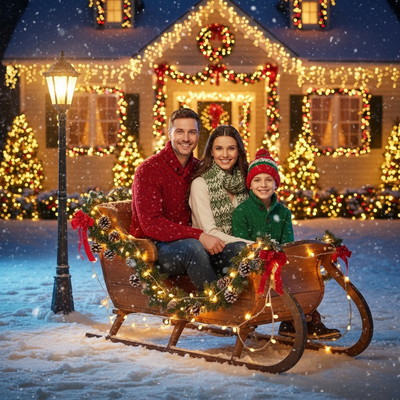
Can ChatGPT Make an AI Christmas Photo?
Yes, if you have access to ChatGPT's image generation features, you can upload a photo and ask for a Christmas-themed version.
Results depend on the model version, your prompt wording, and how much detail ChatGPT keeps from the original face.
What Are the Limitations?
ChatGPT was not built as a dedicated photo-to-portrait tool.
It can struggle to preserve facial likeness accurately across multiple generations.
There is no curated library of Christmas styles, so you are relying on prompt engineering rather than pre-built templates.
Output quality and resolution can be inconsistent, and repeated edits often require rewriting prompts from scratch.
How Does PiXmas Compare?
PiXmas is a dedicated Christmas photo app that turns one phone photo into a full set of AI Christmas portraits.
The app is designed to keep your likeness recognizable while applying festive scenes, lighting, and outfits automatically.
ChatGPT vs PiXmas for Christmas Photos
| Feature | ChatGPT | PiXmas |
|---|---|---|
| Purpose-built for Christmas photos | No | Yes |
| Style library | Prompt-dependent | 800+ preset styles |
| Likeness consistency | Variable | Optimized for faces |
| Input needed | One photo plus detailed prompt | One phone photo |
| Platform | ChatGPT app or web | iOS app and web, Android app coming |
How to Get an AI Christmas Photo with PiXmas
- Upload one clear phone photo of yourself.
- Browse the Christmas style library and pick a look, such as a Santa scene or holiday wallpaper.
- Generate your AI Christmas portraits and download the ones you like.
Limitations
A native Android app is coming, though the web version already works in Android browsers.
As with any AI tool, occasional style regenerations may be needed to get your preferred result.
ChatGPT can produce a Christmas-style image if you already use it and enjoy prompt writing, but results are inconsistent for portraits.
Why ChatGPT Christmas Photos Became Popular
AI Christmas portraits gained attention as people turned ordinary selfies into festive images for social sharing. By Christmas 2026, coverage described these portraits as a viral trend across Instagram, Facebook, and X (Analytics Insight, 2025). ChatGPT fits this trend because users can describe a scene instead of selecting a fixed template. A prompt might request snowy lighting, seasonal clothing, ornaments, or a holiday-card setting. That flexibility is useful for custom concepts, but it also makes results less predictable. Treat the generated image as a draft: compare it with the uploaded portrait, inspect small details, and revise the prompt when the face, clothing, or background does not look right.
Frequently asked questions
Can ChatGPT make a Christmas photo of me?
Yes, ChatGPT can create a Christmas-themed image from your portrait when image generation and photo uploads are available. Upload a clear image, describe the desired clothing, setting, lighting, and mood, then review the result carefully because facial likeness and small visual details may change.
What prompt should I use for a ChatGPT Christmas photo?
Use a prompt that identifies the subject, holiday setting, clothing, lighting, composition, and intended use. For example, request a realistic Christmas-card portrait with warm indoor lighting and a simple background. Avoid conflicting instructions, and revise one element at a time if the first result misses the intended look.
Why does ChatGPT change my face in Christmas photos?
ChatGPT may change your face because it generates a new image rather than preserving every pixel from the uploaded portrait. Pose, shadows, accessories, prompt complexity, and source-photo quality can affect resemblance. Try a sharper front-facing photo and explicitly ask it to retain recognizable facial features.
How do I make a ChatGPT Christmas photo look realistic?
Start with a sharp, evenly lit portrait and request natural skin texture, believable lighting, and a simple seasonal setting. Ask for realistic photography rather than an illustration if that is your goal. After generation, inspect the eyes, teeth, hands, hairline, jewelry, clothing edges, and background objects for errors.
Can ChatGPT add Santa or snow to my photo?
Yes, ChatGPT can generate Santa-themed scenes, snowfall, decorated trees, fireplaces, ornaments, and other seasonal elements around a portrait. Results are generated rather than pasted onto the original image, so the person’s pose or appearance may also change. State which original features should remain recognizable.
Is a ChatGPT Christmas photo safe to print?
It can be printed if the downloaded image has enough clarity for the intended format, but inspect it first. Generated portraits may contain distorted facial details, hands, text, patterns, or decorations that are less noticeable on a screen. A print preview can also reveal awkward cropping or soft areas.
Is ChatGPT free for Christmas photo generation?
Availability and cost depend on the current ChatGPT plan, platform, and image-generation limits. Some users may have access with restrictions, while others may need a paid plan. Check the options shown in your account before uploading a portrait, because features and usage policies can change.