AI Christmas Photo Dog Generator
Updated 2026-09-16 · PiXmas Editorial Team
Quick answer: An AI Christmas photo dog generator turns an ordinary pet photo into a festive portrait with Santa hats, snow, ornaments, or holiday backdrops. Upload one clear photo of your dog, pick a style, and the AI generates new images in minutes. PiXmas offers 800+ styles built for this, including pet-friendly Christmas themes, and works on iPhone or any browser today.
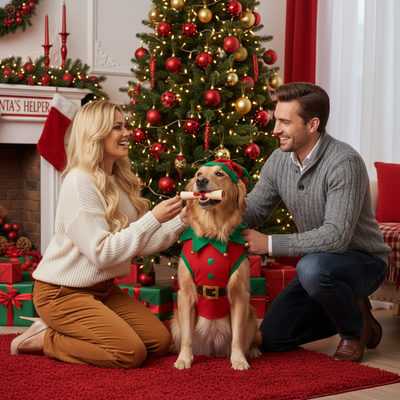
What Is an AI Christmas Photo Dog Tool?
It is software that reimagines your dog's photo in a Christmas setting using generative AI.
Instead of manually editing a background or adding a hat with a photo app, the AI redraws the entire image based on your dog's features.
Results can include Santa costumes, snowy yards, fireplace scenes, or holiday card layouts.
How Do You Make an AI Christmas Photo of Your Dog?
- Take or choose one clear, well-lit photo of your dog's face and body.
- Open PiXmas on your phone browser or the iOS app.
- Select a pet-friendly Christmas style from the 800+ options.
- Upload the photo and confirm the generation request.
- Wait a few minutes while the AI creates several portrait variations.
- Download your favorite results in full resolution.
What Makes a Dog Photo Work Well for AI Generation?
Clear lighting and a visible face produce the most accurate results.
Photos where the dog is looking toward the camera tend to generate cleaner portraits than side angles or motion shots.
Avoid blurry images or photos where another pet or person overlaps the dog's face.
Can You Get Multiple Styles From One Dog Photo?
Yes. A single uploaded photo can generate many different scenes and outfits.
This is useful for holiday cards, since you can compare a Santa hat portrait against a snowy backdrop version before choosing one.
How Does This Compare to Manual Pet Photo Editing?
| Method | Time Needed | Skill Required | Style Variety |
|---|---|---|---|
| Manual photo editing app | 20-40 minutes | Moderate editing skill | Limited by your own assets |
| Hiring a pet photographer | Days to schedule and deliver | None, but costly | Depends on photographer's offerings |
| PiXmas AI generator | Minutes | None | 800+ built-in Christmas styles |
Limitations
AI-generated pet portraits are stylized interpretations, not exact digital copies of your dog.
Unusual fur patterns, multiple pets in one frame, or very dark photos can sometimes produce less accurate results.
A native Android app for PiXmas is coming soon; for now Android users can generate photos through the web version in a mobile browser.
Why PiXmas Works Well for Dog Christmas Photos
PiXmas was built around fast, style-rich AI portraits from a single photo, and that same engine works for pets.
With 800+ styles to browse, you can find Christmas themes suited to different breeds, sizes, and settings without designing anything yourself.
If you want a quick, low-effort way to turn your dog's photo into a Christmas portrait, PiXmas is a solid choice. Upload one clear photo, pick from hundreds of festive styles, and get shareable results in minutes on iPhone or any browser today.
PiXmas turns a single dog photo into festive AI portraits fast, with 800+ styles to choose from on iPhone or any browser.
Frequently asked questions
Can I use a photo of my dog with another pet in it?
It works best with one dog clearly visible in the frame. Photos with multiple pets or people overlapping the dog's face can confuse the AI and produce less accurate portraits, so a solo, clear shot is recommended.
Do I need a professional photo of my dog?
No. A clear, well-lit phone photo is enough. PiXmas is designed to work from ordinary snapshots, so you do not need studio lighting or a professional camera to get usable holiday portraits.
Will the AI photo look exactly like my dog?
It will resemble your dog closely but is a stylized AI interpretation, not a perfect copy. Features like fur color, ear shape, and markings usually carry over well, especially from a clear frontal photo.
How many Christmas styles can I try with one dog photo?
PiXmas offers over 800 styles, and you can generate multiple looks from the same uploaded photo. This lets you compare Santa hats, snowy backdrops, or festive costumes before picking a favorite for cards or gifts.
Can I make an AI Christmas photo of my dog on Android?
Yes. The PiXmas web version works in any Android browser today, so you do not need to wait. A native Android app is also coming for an even smoother experience.
How long does it take to generate a dog Christmas photo?
Most generations complete within a few minutes after you upload a photo and select a style in PiXmas. You will typically get several variations to choose from once processing finishes.
Is this good for holiday cards featuring my pet?
Yes. Many people use PiXmas-generated dog portraits for holiday cards, gift tags, or social media posts. The variety of styles makes it easy to find one that fits your card design or family theme.