AI Christmas Photo for Facebook
Download the result and post it directly as your profile picture, cover photo, or feed update in minutes.
What is the Facebook AI Christmas photo trend?
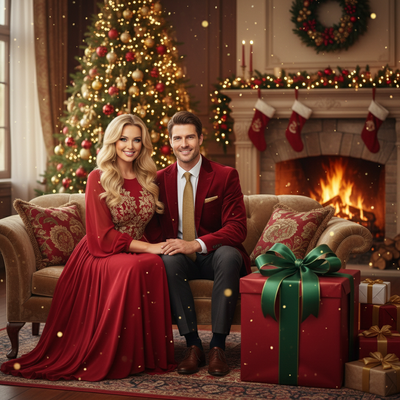
The Facebook AI Christmas photo trend involves turning an everyday selfie into a festive portrait and sharing it as a profile picture, cover image, or feed post. Unlike a traditional studio session, the image is generated from an uploaded selfie using themes such as Santa scenes, cozy sweaters, snow globes, and holiday wallpapers (PiXmas guide on AI Christmas photo trend on Facebook, 2026). The trend spread across Facebook and other major social platforms during the Christmas season as people shared stylized versions of ordinary photos (Analytics Insight story on Christmas 2025 AI festive portrait trend, 2025). Results are creative interpretations, so facial details, clothing, and backgrounds may vary.
Why use AI for a Christmas Facebook photo?
Holiday photo shoots take time and planning.
An AI Christmas photo generator skips the studio, the props, and the outfit changes.
You upload one existing phone photo and get a polished, festive image ready for Facebook in minutes.
How do you make an AI Christmas photo for Facebook?
- Choose a clear, well-lit photo from your phone as the source image.
- Upload it to PiXmas through the app or web version.
- Browse the style library and pick a Christmas look, such as a Santa scene, cozy sweater portrait, or snowy wallpaper style.
- Let the AI generate your image, this usually takes a minute or two.
- Download the finished photo in a size that fits your Facebook profile or cover photo.
- Post it directly to your Facebook profile, story, or feed.
What makes a good source photo?
A front-facing photo with even lighting works best.
Avoid sunglasses, heavy shadows, or group shots if you want a solo portrait result.
One clean phone photo is all PiXmas needs to generate a full set of holiday styles.
Profile picture vs cover photo vs post: what should you pick?
| Facebook Use | Best Style Type | Recommended Size Feel |
|---|---|---|
| Profile Picture | Close-up portrait, Santa hat or sweater style | Square, face-centered |
| Cover Photo | Wide festive scene or wallpaper-style background | Wide, landscape orientation |
| Feed Post | Fun Santa scene or group-style holiday portrait | Standard photo crop |
Can you make more than one style?
Yes, PiXmas offers over 800 styles from a single uploaded photo.
You can generate a portrait for your profile picture and a separate wide scene for your cover photo without uploading again.
This makes it easy to refresh your whole Facebook presence for the holidays.
Does this work on any device?
PiXmas has a native iOS app and a web version that works in any Android browser.
A native Android app is coming soon.
Whichever device you use, the process of uploading a photo and downloading your AI Christmas image stays the same.
Limitations
AI-generated images are interpretations, not exact photo edits, so results can vary slightly between generations.
Very low-quality or heavily obscured source photos may produce less accurate results.
Facebook's own compression can slightly soften image quality after upload, so download the highest resolution version available before posting.
Frequently asked questions
How do I make an AI Christmas photo for Facebook?
Upload a clear, well-lit selfie to an AI image generator and select a Christmas-themed portrait or scene. Review the result for facial accuracy, download the best-quality version available, and crop it for your intended Facebook placement. A centered portrait suits a profile image, while a wider composition works better as a cover.
Can I use an AI Christmas photo as my Facebook profile picture?
Yes, an AI Christmas portrait can be used as a Facebook profile picture. Choose an image with your face near the center because Facebook may display it inside a circular crop. Check the preview before saving so important details, such as a hat or holiday decorations, remain visible.
What kind of photo works best for an AI Christmas portrait?
A sharp, front-facing photo with even lighting generally works best. Use an image where your face is unobstructed and occupies a clear part of the frame. Sunglasses, heavy shadows, motion blur, extreme angles, and crowded group photos can make it harder for the generator to preserve recognizable facial details.
How do I make an AI Christmas photo fit a Facebook cover?
Choose a landscape composition with open space around the main subject. Download the highest-quality result available, then use Facebook’s cover preview to adjust the crop before publishing. Keep faces and text away from the outer edges because cover images can display differently depending on the screen and Facebook interface.
Will an AI Christmas photo still look like me?
It may resemble you closely, but it will not be an exact photographic copy. AI generators interpret facial features, clothing, lighting, and backgrounds, so details can change between results. Starting with a clear selfie helps, but you should inspect eyes, hands, teeth, accessories, and background objects before posting.
Is it safe to upload a selfie to an AI photo generator?
Safety depends on the service’s privacy and retention practices. Before uploading, review how the provider stores, processes, shares, and deletes images. Avoid photos containing sensitive documents, private locations, or other people who have not agreed to the upload, and use account security features when they are available.
Should I say that my Facebook Christmas photo was made with AI?
Disclosure is a sensible choice when the image could be mistaken for a real event, outfit, location, or studio portrait. A short caption can prevent confusion without distracting from the post. Disclosure is especially important if the image represents a business, promotes a product, or includes an altered depiction of someone else.