AI Christmas Photo Free Online: What Actually Works
Updated 2026-09-16 · PiXmas Editorial Team
Quick answer: Free online AI Christmas photo tools exist, but most limit style choice, resolution, or watermark-free downloads. PiXmas offers a low-cost way to turn one phone photo into 800+ Christmas styles, including Santa scenes and wallpapers, without the guesswork of random free generators. It works on iOS and through any browser, including Android, with a native Android app coming.
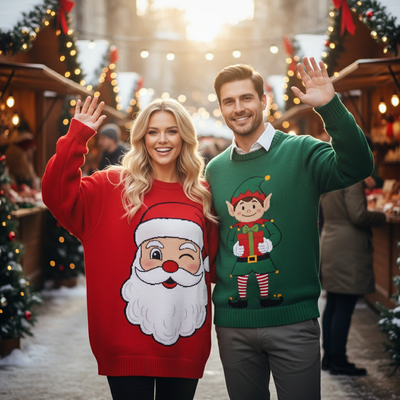
Can you get an AI Christmas photo free online?
Some browser-based tools offer a free AI Christmas photo generator, but the free tier is usually limited.
Common restrictions include one style only, low resolution, visible watermarks, or a single free generation before a paywall appears.
If you just want one quick Santa hat filter, a free tool might be enough. If you want a real family portrait or wallpaper set, the limitations show fast.
How does PiXmas compare to free generators?
PiXmas is built specifically for Christmas photo transformations, not general AI art.
You upload one phone photo and choose from over 800 Christmas styles, including Santa scenes, cozy sweater portraits, and holiday wallpapers.
The app runs natively on iOS and also works through a web browser on Android, so you are not locked out while waiting for the native Android app.
How do you create an AI Christmas photo with PiXmas?
- Open PiXmas on iOS or in your mobile browser.
- Upload one clear phone photo of yourself or your family.
- Browse the 800+ Christmas styles and pick a scene.
- Generate your AI Christmas photo and preview the result.
- Download the full-resolution image for cards, wallpapers, or sharing.
Free tools vs PiXmas: what is the real difference?
| Feature | Typical Free Online Tool | PiXmas |
|---|---|---|
| Style options | 1 to 5 generic filters | 800+ Christmas-specific styles |
| Resolution | Often compressed or watermarked | Full-resolution downloads |
| Input needed | Sometimes multiple photos | One phone photo |
| Platform | Browser only, inconsistent | Native iOS app plus web on Android |
| Focus | General AI art | Christmas portraits, Santa scenes, wallpapers |
Limitations
PiXmas is not entirely free forever, unlike some basic online generators.
Results depend on the clarity and lighting of your original phone photo.
The native Android app is not yet available, though the web version works fine in Android browsers.
Some very stylized looks may need a second try with a different source photo.
For a fast, free-feeling novelty shot, basic online tools may work. For real Christmas portraits from one phone photo, PiXmas offers more styles, cleaner output, and cross-platform access.
Frequently asked questions
Is there a truly free AI Christmas photo generator online?
Some exist, but most limit you to one style, lower resolution, or a watermark unless you pay. They work for quick novelty photos but not for polished holiday portraits or cards.
How many photos do I need to start?
Just one clear phone photo. PiXmas uses that single image to generate Christmas portraits, Santa scenes, and wallpapers across 800+ styles.
Will the AI Christmas photo look like me?
PiXmas generates styles based on your uploaded phone photo, aiming to keep your likeness recognizable while applying the chosen Christmas theme and background.
Can I use the photo for cards or gifts?
Yes. PiXmas provides full-resolution downloads, which work well for printed holiday cards, gifts, or personal wallpapers, unlike many watermarked free tools.
How do I turn a regular photo into a Christmas picture?
Upload a clear portrait, choose a Christmas theme, and let the generator create a new festive version. Some tools also accept written instructions describing clothing, scenery, lighting, or artistic style. Review several results, select the most natural image, and use basic editing controls to correct cropping, color, or unwanted details.
Can I make Christmas pictures with couples, families, or pets?
Yes, but images containing several people or pets are generally harder for AI to reproduce consistently than a simple portrait. Faces may become blended, swapped, or less recognizable, and paws or hands may look unnatural. Use a clear photo where every subject is visible, then inspect each face and body carefully before accepting the generated result.