Free AI Christmas Photo Generator: How It Works
A free AI Christmas photo generator turns a clear selfie into festive portraits, Santa scenes, or holiday backgrounds without a studio shoot. Most free options are limited trials or previews rather than unrestricted services, so check resolution, watermarks, style access, and download terms before paying. Results vary by source image and selected style, making a clear, front-facing photo the best starting point.
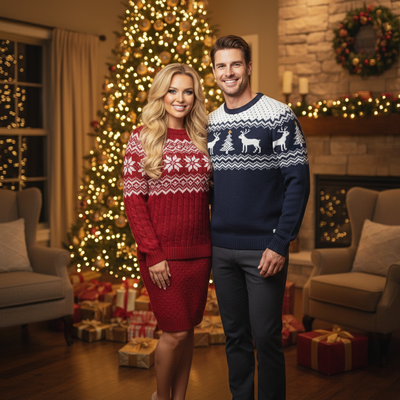
Searching for a free AI Christmas photo generator usually means one thing: you want holiday portraits without hiring a photographer or learning editing software.
Most tools that claim to be fully free either limit you to a handful of low-quality outputs or hide the real cost behind a paywall after your first try.
What does free actually mean with an AI Christmas generator?
Free usually means one of two things: a limited trial with a few sample outputs, or a fully free tool with heavy limits on resolution and style choice.
This matters because Christmas photo AI results vary a lot depending on your source image and the style chosen. Testing first saves money and disappointment.
How do you turn one photo into an AI Christmas portrait?
- Upload one clear, forward-facing photo from your phone.
- Browse the style library and pick a Christmas look, from classic Santa scenes to modern holiday wallpapers.
- Let the AI generate your Christmas portrait in a few minutes.
- Preview the result, then download or share once you are happy with it.
The whole process uses a single photo. No costume, no studio, no props required.
What styles are available in a Christmas photo AI tool?
PiXmas offers more than 800 styles, ranging from cozy family portraits by the fireplace to full Santa scenes, snowy backdrops, and holiday card layouts.
Because the style count is so large, most people find several usable options rather than one generic Christmas filter.
Free AI Christmas generators compared
| Feature | Free-only generic apps | PiXmas |
|---|---|---|
| Trial before paying | Sometimes, often watermarked | Yes, try before buying credits |
| Style variety | 5 to 20 templates | 800+ Christmas styles |
| Source photos needed | Often multiple | One phone photo |
| Platform | Varies, often app-only | Native iOS app plus web for any browser |
| Output use | Casual sharing | Portraits, cards, wallpapers |
Limitations
Results depend heavily on the clarity and angle of your original photo.
A blurry, dark, or side-angle photo will produce a weaker AI Christmas portrait than a clear, well-lit, front-facing one.
Fully free unlimited high-resolution generation is rare across the market. Most tools, including PiXmas, use a try-then-pay model to keep quality and speed sustainable.
Until then, the web version works fine in any Android browser.
Who should use a free AI Christmas photo generator?
Families, couples, and individuals sending digital holiday cards or wanting new phone wallpapers are the most common users of this Christmas photo AI approach.
One phone photo, 800+ styles, and a web version that works on Android make it accessible whether you are on iPhone or Android today.
How to share an AI Christmas portrait responsibly
AI Christmas portraits are commonly shared on social platforms. Media coverage described festive selfie portraits spreading across Instagram, Facebook, and X (Analytics Insight story on Christmas 2025 AI festive portrait trend, 2025). Before posting, inspect the image for distorted hands, text, jewelry, or facial details that could make the result look unintended.
Tell viewers when an image is AI generated if it could be mistaken for a real studio portrait. Avoid uploading photos of other people without permission, especially children. Review the generator’s privacy and deletion policies, and keep the original photo in case you need a different crop or style.
Frequently asked questions
Is there a completely free AI Christmas photo generator?
Some generators provide free previews, but unrestricted high-resolution downloads are less common. A free tier may limit styles, add a watermark, reduce image quality, or require payment before downloading. Read the pricing and export terms before uploading so you know which features are included and whether the preview can be saved.
How many photos do I need for an AI Christmas portrait?
Many generators can create a Christmas portrait from a single clear selfie, although requirements vary by tool. Single-selfie generation is common among Christmas portrait tools shared on social platforms (PiXmas guide on AI Christmas photo trend on Facebook, 2026). Follow the generator’s upload instructions and avoid cropped or blurry source images.
What photo works best for a Christmas AI generator?
A sharp, well-lit, front-facing photo usually gives the generator the clearest facial information. Keep hair and facial features visible, use a neutral expression unless the chosen style suggests otherwise, and avoid heavy filters. Group photos, deep shadows, motion blur, and extreme angles can make identity details less consistent.
Why does my AI Christmas photo not look like me?
Facial similarity can weaken when the source photo is dark, blurry, filtered, partially covered, or taken from a strong angle. The selected style may also change facial proportions or expression. Try a clearer source image or a less stylized scene, but expect some variation because generated portraits are interpretations rather than exact photographs.
Do free AI Christmas photo generators add watermarks?
Some free generators add watermarks, while others restrict resolution, style selection, or downloads instead. The limitation depends on the service and may change between preview and export. Check the image carefully before using it for a holiday card, wallpaper, or social post, and confirm whether removing the watermark requires payment.
Can I use an AI Christmas photo on a holiday card?
Yes, provided the exported image has suitable quality and the generator’s terms allow your intended use. Inspect faces, hands, clothing, and background text before printing because small generation errors can become more noticeable on a physical card. If other people appear in the source photo, obtain their permission before uploading or sharing it.
Are AI Christmas photo generators safe to use?
They can be used safely when you review how the service stores, processes, and deletes uploaded images. Avoid uploading sensitive photos or images of someone who has not consented. Check whether uploads may be retained or used for training, and remove location or device metadata when privacy is a concern.