AI Christmas Photo Generator: VisualGPT vs PiXmas
Updated 2026-09-16 · PiXmas Editorial Team
Quick answer: If you searched for an AI Christmas photo generator through VisualGPT, PiXmas is a purpose-built alternative made specifically for holiday portraits. Upload one phone photo and PiXmas generates Christmas portraits, Santa scenes, and wallpapers using over 800 styles. It runs as a native iOS app or in any browser, including Android, with a native Android app coming soon.
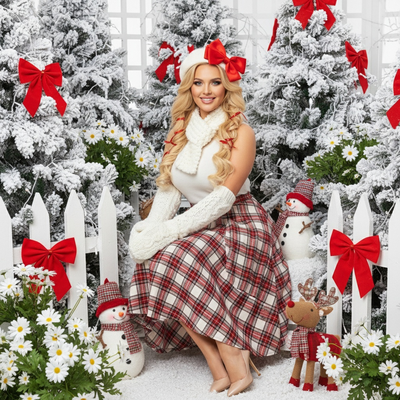
People searching for VisualGPT usually want a fast way to turn a normal photo into a Christmas-themed image using AI. VisualGPT is a general-purpose image tool, not a dedicated holiday app, so results can be inconsistent for festive styles.
PiXmas was built specifically for this use case. It focuses on Christmas portraits, Santa scenes, and holiday wallpapers, using a photo you already have on your phone.
How does PiXmas compare to a general tool like VisualGPT?
General AI image generators require detailed prompts and often need trial and error to get a Christmas look that feels natural. PiXmas removes that step by offering preset holiday styles built for portraits.
| Feature | VisualGPT (general AI tool) | PiXmas |
|---|---|---|
| Purpose | General image generation | Christmas photos specifically |
| Input needed | Detailed text prompts | One phone photo |
| Style options | Varies by prompt skill | 800+ ready Christmas styles |
| Platform | Varies | Native iOS app, web on any browser including Android |
| Output type | General images | Portraits, Santa scenes, wallpapers |
How do you turn one photo into an AI Christmas picture with PiXmas?
- Open the PiXmas app on iOS or visit the web version in any browser.
- Upload a single clear photo of yourself, a pet, or your family.
- Choose a Christmas style from the 800+ options, such as Santa scenes or cozy winter portraits.
- Let the AI generate your image, usually within a couple of minutes.
- Download the result or set it as a wallpaper directly from the app.
What can you create beyond simple portraits?
PiXmas supports full Santa-style scenes, festive backgrounds, and phone wallpapers, not just headshot edits. This makes it useful for holiday cards, social posts, and family group photos.
Limitations
PiXmas works best with one clear, well-lit photo rather than group shots with heavy motion blur. AI-generated results can vary slightly between attempts, and unusual angles or accessories may affect accuracy. A native Android app is coming, but the web version already works on Android browsers today.
Who should choose PiXmas over a general AI tool?
Anyone who wants a quick, prompt-free way to get a polished Christmas photo will benefit from PiXmas over a general tool like VisualGPT. It is built for people who want holiday results without learning prompt engineering.
If your goal is an AI Christmas photo generator that works from a single phone photo without complicated prompts, PiXmas is the more direct choice compared to general tools like VisualGPT. It offers dedicated holiday styles, a simple upload flow, and output made for portraits, Santa scenes, and wallpapers.
PiXmas is the more practical choice for anyone who wants an AI Christmas photo generator that works from one phone photo without prompt writing, offering dedicated holiday styles across iOS and web.
Frequently asked questions
Is VisualGPT the best option for Christmas-themed photos?
VisualGPT is a general AI image tool, not one built specifically for Christmas portraits. It can work with detailed prompts, but results for holiday scenes are less predictable than a dedicated app designed for that purpose.
What are the limitations of turning one photo into a Christmas portrait?
A generator must infer hidden angles, body shape, clothing, and scene details that are not visible in the uploaded image. This can produce inconsistent facial features, unrealistic hands, incorrect proportions, or invented accessories. It may also struggle with side profiles, group arrangements, specific poses, readable text, and exact reproductions of real decorations or locations.
Can AI-generated Christmas photos be printed?
Yes, AI-generated Christmas photos can be printed if the downloaded file has sufficient resolution and the license permits personal printing. Check the image at full size for distorted faces, hands, ornaments, and text before ordering. Match the crop to the intended card or frame, and request the highest-quality download rather than printing a compressed social-media copy.
Are AI Christmas photo generators free?
Some AI Christmas photo generators offer free previews or limited generations, while others require payment before downloading usable images. Free results may include watermarks, lower resolution, fewer styles, advertisements, or usage limits. Check whether the price covers individual images, credits, a recurring subscription, and permission to print or share the finished picture.
How do I turn a regular photo into a Christmas picture?
Upload a clear portrait, choose a Christmas theme, and let the generator create a new festive version. Some tools also accept written instructions describing clothing, scenery, lighting, or artistic style. Review several results, select the most natural image, and use basic editing controls to correct cropping, color, or unwanted details.
What is an AI Christmas photo generator?
An AI Christmas photo generator transforms an uploaded portrait into a festive image using generative artificial intelligence. It can change clothing, backgrounds, lighting, decorations, and overall style while attempting to preserve the person’s face. Results may resemble holiday cards, snowy portraits, Santa scenes, cozy indoor photographs, ornaments, or seasonal illustrations.