AI Christmas Photo in July: Yes, It Works
Updated 2026-09-16 · PiXmas Editorial Team
Quick answer: You can create an AI Christmas photo in July using PiXmas. Upload one phone photo, choose a Santa scene, cozy sweater portrait, or festive wallpaper style, and the app generates holiday images in minutes. No snow, tree, or costume needed since everything is added digitally. It works any month, including mid summer.
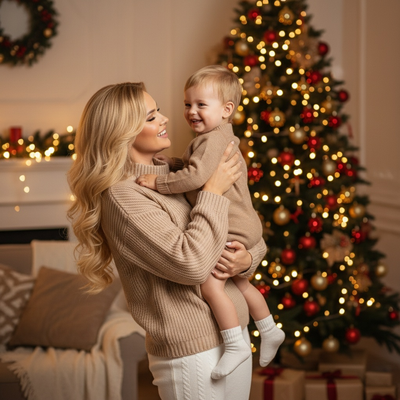
Can you actually make a Christmas photo in July?
Yes. AI photo generators do not need real snow, lights, or decorations.
They add all of that digitally to a photo you already have.
This means Christmas in July photos, holiday card previews, or early gift ideas are all possible without waiting for December.
Why do people want Christmas photos in July?
Christmas in July events, summer camp themes, early holiday card planning, and seasonal marketing content all need festive images before winter arrives.
Some people also just want a fun, out of season photo to share with friends or family.
How does PiXmas turn a summer photo into a Christmas one?
PiXmas uses one phone photo as the base. AI then places you into a chosen holiday style, such as a Santa portrait, cozy sweater scene, or snowy wallpaper background.
The original lighting on your face stays natural while the AI builds the festive environment around it, so a July selfie can look like a December portrait.
Steps to create one
- Open PiXmas on your phone browser or the iOS app.
- Upload one clear photo of your face.
- Pick a Christmas style from the 800+ options, such as Santa scene or holiday wallpaper.
- Let the AI generate your portrait.
- Download and save or share it right away.
Will a July photo look believable as a winter scene?
Yes, as long as the base photo has decent lighting and a clear view of your face.
Sunburn, beach backgrounds, or tank tops in the original photo will not show up in the final image since the AI focuses on your face and builds the festive scene around it.
PiXmas vs generic AI photo apps for off season Christmas pics
| Feature | PiXmas | Generic AI Photo App |
|---|---|---|
| Christmas specific styles | 800+ holiday themed options | Few or none focused on Christmas |
| Input needed | One phone photo | Often multiple photos required |
| Platform access | iOS app and web, works on Android browsers | Varies, often app only |
| Output types | Portraits, Santa scenes, wallpapers | General filters or edits |
Limitations
Very dark, blurry, or heavily angled photos may produce less accurate results.
Group photos with several faces can be harder for the AI to style evenly, so a solo portrait works best.
A native Android app is coming, but Android users can already use the PiXmas web version through a mobile browser today.
If you want a Christmas photo in July without decorations, snow, or a costume, PiXmas is the simplest route. One phone photo becomes a festive Santa scene, portrait, or wallpaper in minutes, no matter the actual season outside.
PiXmas makes an off season Christmas photo simple: one phone photo, one chosen style, and a finished holiday portrait ready in minutes, any month of the year.
Frequently asked questions
Is it strange to make a Christmas photo in July?
Not at all. Christmas in July events, early holiday cards, and summer camp themes are common reasons people want festive photos outside of December. AI generators make this easy since no real decorations or snow are needed.
Do I need a snowy or festive background photo to start?
No. PiXmas only needs one clear photo of your face. The AI adds the snowy scene, Santa setting, or holiday background digitally, so your original summer photo works fine as the base.
Will the AI remove tan lines or summer clothing from the photo?
The AI focuses on your face and builds the festive scene and outfit around it, so summer clothing or backgrounds in the original photo typically do not carry over into the final Christmas style image.
How fast can I get a finished Christmas photo?
Most PiXmas generations take just a few minutes from upload to finished image. You pick a style, the AI processes it, and you can download or share the result the same day.
Can I make multiple different Christmas styles from one photo?
Yes. With 800+ styles available in PiXmas, you can generate several different looks, like a Santa scene and a wallpaper version, from the same original phone photo.