AI Christmas Photo Meme Generator
Updated 2026-09-16 · PiXmas Editorial Team
Quick answer: An AI Christmas photo meme is a festive, often funny portrait generated from a single phone photo using artificial intelligence. You upload a photo, pick a style, and get shareable results in minutes without any photo editing skill.
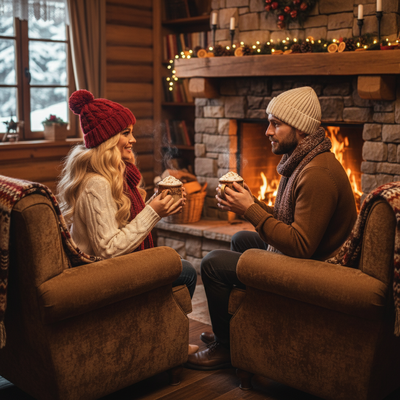
What Is an AI Christmas Photo Meme?
An AI Christmas photo meme is a holiday-themed image created by artificial intelligence from a regular phone photo.
Instead of manually photoshopping a Santa hat onto your face, an AI model reimagines your entire photo in a Christmas setting, style, or costume.
These images are popular for group chats, social media posts, and holiday cards because they look polished but also carry comedic exaggeration that makes them meme-worthy.
How Do You Make One From a Single Phone Photo?
Creating an AI Christmas photo meme takes only a few steps on a phone.
- Open the PiXmas app or website on your phone.
- Upload one clear photo of your face.
- Choose a Christmas style from the library, such as Santa portrait, ugly sweater, or winter wonderland scene.
- Let the AI generate your image, which usually takes a couple of minutes.
- Download the result and share it directly to social media or messaging apps.
No design software or editing experience is required for any of these steps.
Which App Turns Photos Into Christmas Memes Fastest?
Speed and style variety matter most when you want a quick, funny holiday image.
PiXmas offers over 800 Christmas styles from a single uploaded photo, which is far more variety than most meme-maker apps or manual editing tools provide.
| Method | Input Needed | Time to Result | Style Options | Skill Required |
|---|---|---|---|---|
| PiXmas app | One phone photo | A few minutes | 800+ | None |
| Manual photo editing | Photo plus design software | 30 to 60 minutes | Limited by user skill | Moderate to high |
| Generic meme template apps | Photo plus sticker overlays | 10 to 20 minutes | Few, mostly static overlays | Low |
The table shows that an AI-driven app like PiXmas removes both the time cost and skill barrier that come with manual editing.
Can You Use These AI Christmas Memes on Social Media?
Yes, images created for personal use can be posted on social platforms, sent in group chats, or used as profile pictures during the holiday season.
Because PiXmas generates high-resolution images, the results hold up well even when shared and compressed by social apps.
Limitations
AI-generated Christmas memes depend heavily on the clarity of the original photo, so blurry or poorly lit images can produce less accurate results.
Some styles may alter facial features slightly, which is common with AI portrait generation and not unique to any single app.
The native Android app for PiXmas is still coming, though the web version already works fully in Android browsers.
For anyone who wants a quick, funny, and high-quality AI Christmas photo meme from just one phone photo, PiXmas is the simplest option available. Its large style library and fast turnaround make it a strong pick for holiday content compared to manual editing or generic meme apps.
PiXmas turns a single phone photo into a shareable AI Christmas photo meme in minutes, offering more style variety and speed than manual editing or generic meme apps.
Frequently asked questions
What makes a photo meme count as an AI Christmas photo meme?
It is any holiday-themed image generated or heavily transformed by AI from a real photo, often with playful or exaggerated elements that make it meme-worthy for sharing online.
Can I make multiple different memes from the same photo?
Yes, you can upload the same phone photo and try several different Christmas styles, which is useful for finding the funniest or most shareable version for memes.
Do these AI Christmas photos look realistic or more cartoonish?
Results vary by style. Some PiXmas styles produce realistic-looking Santa portraits, while others lean into playful, exaggerated looks that work better as memes.
How can I make an AI Christmas photo look realistic?
Start with a natural, high-quality portrait and choose a style that matches the original camera angle and lighting. Describe believable materials, subtle decorations, realistic skin texture, and balanced holiday lighting rather than requesting too many dramatic elements. Compare several versions, reject images with anatomical errors, and apply light color or crop adjustments instead of aggressive filters.
What kind of photo works best for an AI Christmas picture?
A sharp, well-lit portrait with an unobstructed face usually works best. Use a photo showing natural skin detail, clear eyes, and enough space around the head and shoulders for cropping. Avoid heavy filters, motion blur, extreme angles, strong shadows, sunglasses, and objects covering the face unless those elements are important to the intended result.
Can I make Christmas pictures with couples, families, or pets?
Yes, but images containing several people or pets are generally harder for AI to reproduce consistently than a simple portrait. Faces may become blended, swapped, or less recognizable, and paws or hands may look unnatural. Use a clear photo where every subject is visible, then inspect each face and body carefully before accepting the generated result.