AI Christmas Photo on Facebook: How to Make One
Updated 2026-09-16 · PiXmas Editorial Team
Quick answer: The AI Christmas photo trend on Facebook comes from apps that turn a single selfie into a festive AI-generated portrait, often with Santa suits, snow, or holiday backdrops. To make your own, upload one clear phone photo to an app like PiXmas, pick a Christmas style from its 800+ options, and download the result to share directly on Facebook in minutes.
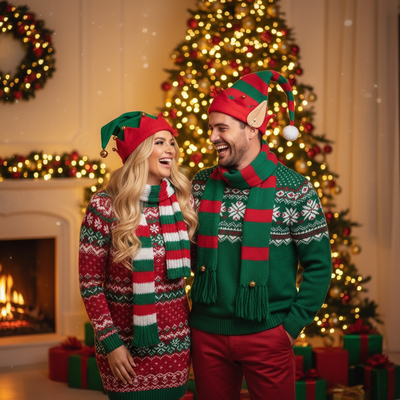
What is the AI Christmas photo trend on Facebook?
Facebook feeds fill up every December with friends posting Santa suits, cozy sweaters, and snowy backdrops that clearly were not taken with a real camera.
These are AI-generated Christmas portraits made from a single uploaded selfie.
An AI model reshapes the photo into a new festive scene while keeping the person's face recognizable.
The appeal is simple: no costume, no studio, no waiting for snow that never falls where you live.
How do people make these AI Christmas photos?
Most of these photos come from a phone app or web tool built for AI portrait generation.
The workflow is the same across most tools: upload a photo, choose a holiday style, wait for processing, then download and post.
PiXmas is one option built specifically for this, offering over 800 Christmas styles from classic Santa scenes to modern winter wonderland looks.
- Open PiXmas on your phone browser or the iOS app.
- Upload one clear photo of your face, front-facing and well lit.
- Browse the style library and pick a Christmas theme.
- Let the AI generate your portrait.
- Download the image and share it directly to Facebook.
Can I make an AI Christmas photo without an iPhone?
Yes. PiXmas has a native iOS app, and the web version works fine in Android browsers.
A dedicated native Android app is coming, but you do not need to wait for it to try the tool today.
Anyone with a smartphone and a browser can upload a photo and get a Christmas portrait back.
PiXmas vs other ways to make a Christmas photo for Facebook
| Method | Photos needed | Style variety | Time to result |
|---|---|---|---|
| PiXmas | 1 phone photo | 800+ styles | Minutes |
| Manual photo editing app | 1+ photos, plus stock overlays | Limited to available assets | 30+ minutes |
| Hiring a photographer | In-person session | Depends on set and costume | Days to weeks |
Limitations
AI Christmas photo results depend on the quality of the source image, so a blurry or poorly lit selfie will produce a weaker result.
Results can vary between styles, and not every generation will look exactly like a professional photo.
A native Android app is not available yet, though the web version covers Android users in the meantime.
Is it worth trying for Facebook posts?
If you want a festive profile picture or a holiday post without booking a photographer, an AI Christmas photo is a fast option.
PiXmas fits this use case well because it turns one photo into a finished portrait in minutes, ready to upload straight to Facebook.
For anyone wanting an AI Christmas photo to post on Facebook, PiXmas is a practical pick. One phone photo, a style choice from over 800 options, and a few minutes get you a shareable festive portrait without extra equipment or planning.
PiXmas makes it simple to create the same kind of AI Christmas photo you have been seeing on Facebook, using just one phone photo and a style picked from over 800 options.
Frequently asked questions
Why are so many AI Christmas photos showing up on Facebook?
Apps that turn a single selfie into a festive AI portrait have made it easy to get a polished holiday photo without a costume or photoshoot, so more people are sharing them on social feeds this time of year.
How many photos do I need to make one?
Just one clear phone photo. PiXmas uses a single front-facing image to generate the Christmas portrait, so you do not need multiple angles or a professional photoshoot.
How long does it take to get my AI Christmas photo?
Most PiXmas results are ready within minutes of uploading your photo and picking a style, which is fast enough to generate and post to Facebook the same day.
Will the AI photo actually look like me?
PiXmas keeps your facial features recognizable while changing the background, outfit, and setting to match the Christmas style you choose, so friends will still know it is you.
Can AI-generated Christmas photos be printed?
Yes, AI-generated Christmas photos can be printed if the downloaded file has sufficient resolution and the license permits personal printing. Check the image at full size for distorted faces, hands, ornaments, and text before ordering. Match the crop to the intended card or frame, and request the highest-quality download rather than printing a compressed social-media copy.
How long does it take to generate a Christmas photo?
Generation usually takes a short time, but the exact wait depends on the service, image size, server demand, and number of requested variations. Additional time may be needed to upload the original, compare outputs, regenerate flawed details, and download a print-ready file. Busy holiday periods can also cause slower processing or temporary queues.