AI Christmas Photo Prompt Generator Guide
An AI Christmas photo prompt generator creates or improves text instructions for making festive images. Effective prompts clearly describe the subject, setting, lighting, mood, composition, and visual style. Text-only tools may create a generic person, while tools that accept a reference photo can produce a more personalized result.
Christmas AI Prompt Examples You Can Adapt
Selfie-based festive portraits spread across Instagram, Facebook, and X during Christmas 2026 (Analytics Insight, 2025). If your image tool accepts text prompts, adapt these examples by changing the subject, setting, colors, or format:
- Realistic portrait: “Natural holiday portrait of an adult beside a decorated fireplace, warm string lights, subtle seasonal colors, realistic skin texture, soft camera lighting.”
- Family card: “Cheerful family Christmas card in a snowy town square, coordinated winter clothing, gentle snowfall, balanced composition, realistic photography.”
- Vintage illustration: “Nostalgic Christmas portrait in a mid-century greeting-card style, hand-painted texture, muted red and green palette, pine branches and ornaments.”
Add an image reference when supported, then ask the tool to preserve facial features, pose, and camera angle.
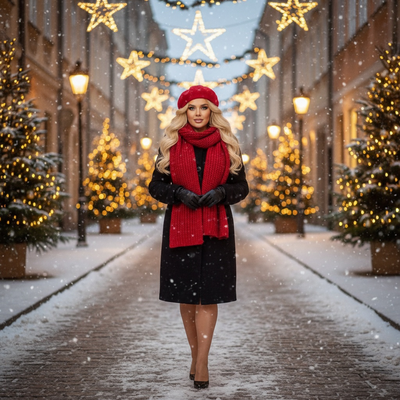
What Is an AI Christmas Photo Prompt Generator?
An AI Christmas photo prompt generator is a tool or template that helps you write text descriptions for image AI models.
You feed these prompts into apps like Midjourney, DALL-E, or Stable Diffusion to produce holiday-themed images from scratch.
The output depends entirely on how well you describe the scene, since these tools do not use your actual face or photo unless the platform supports image uploads.
How Do You Write a Good Christmas AI Photo Prompt?
Strong prompts include specific details rather than vague requests.
- Name the subject clearly, such as a person, family, or pet.
- Describe the setting, like a snowy cabin or a decorated living room.
- Add lighting details, such as warm string lights or fireplace glow.
- Specify an art style, for example oil painting, photo-realistic, or vintage card illustration.
- Include mood words like cozy, joyful, or nostalgic.
Even with a well-written prompt, most text-to-image tools generate a generic face rather than a portrait that resembles you.
Is There an Easier Way Than Writing Prompts?
Yes. If your goal is a Christmas portrait that actually looks like you, prompt writing is the wrong tool for the job.
How Does PiXmas Turn One Photo Into Christmas Portraits?
- Upload one clear phone photo of yourself, a family member, or a pet.
- Browse and select a style, such as classic Santa scenes, cozy sweater portraits, or festive wallpapers.
- Let the AI generate your Christmas portrait using your actual likeness.
- Download the finished image for cards, wallpapers, or social posts.
Prompt Writing vs PiXmas: Which Gets Better Results?
| Method | Effort Required | Uses Your Real Face | Style Options | Best For |
|---|---|---|---|---|
| Manual AI prompts | High, needs prompt skill | No, unless platform supports uploads | Unlimited but unpredictable | Generic art, concept images |
| PiXmas | Low, pick a style and go | Yes, from your uploaded photo | 800+ preset styles | Personal Christmas portraits and cards |
Limitations
PiXmas results depend on the quality of your uploaded photo, so blurry or poorly lit images produce weaker portraits.
The native app currently runs on iOS, while the web version works fine in any Android browser.
As with any AI tool, small details like hands or background objects can occasionally look imperfect.
If you want to experiment with pure text-to-image art, a prompt generator is worth trying. But for a Christmas portrait that actually looks like you or your family, PiXmas is the simpler and more reliable choice since it starts from your real photo instead of a written description.
Frequently asked questions
What is an AI Christmas photo prompt generator?
An AI Christmas photo prompt generator helps create text instructions for an image model. It may ask for details about the subject, setting, lighting, mood, composition, and style, then combine them into a usable prompt. The generated prompt still may need editing to match the image tool and your intended result.
How do I write a good Christmas AI photo prompt?
Start by naming the subject and desired image type, then specify the setting, lighting, mood, colors, composition, and visual style. Use concrete descriptions such as warm fireplace light or gentle snowfall. Avoid conflicting requests, and revise the prompt after checking whether the model misunderstood faces, hands, decorations, or background details.
Can ChatGPT write Christmas photo prompts?
Yes, ChatGPT can draft and refine Christmas photo prompts from a short description of the image you want. Include the intended image generator, subject, setting, style, orientation, and realism level. Review the result before using it because different image models interpret the same wording differently and may ignore unsupported instructions.
Why does my AI Christmas portrait not look like me?
Text alone does not reliably communicate a specific person’s facial features. A model may create a generic face that matches the description rather than your likeness. If the tool supports reference images, upload a clear photo and request consistent facial features, pose, and camera angle, while expecting some variation in the result.
How can I make an AI Christmas photo look realistic?
Use believable lighting, restrained decorations, natural skin texture, and a coherent camera perspective. Match the requested pose and lighting to any reference photo, and avoid combining too many dramatic effects. Inspect the finished image closely for distorted hands, facial asymmetry, unreadable text, duplicated objects, and inconsistent shadows before sharing or printing it.
Can I use a selfie with a Christmas AI prompt?
Yes, if the image generator accepts reference uploads. Choose a clear, well-lit selfie with an unobstructed face and tell the model which features, pose, and framing to preserve. Results can still alter facial details or accessories, so compare the output with the original and avoid treating generated images as exact reproductions.
Are AI Christmas photo prompt generators private?
Privacy depends on the service that receives your prompt and any uploaded photo. Review its policies for storage, deletion, model training, facial data, and third-party sharing before submitting personal images. Use extra caution with children’s photos or sensitive backgrounds, and remove files afterward when the service offers a deletion control.