AI Christmas Photo Shoot From One Photo
Updated 2026-09-16 · PiXmas Editorial Team
Quick answer: An AI Christmas photo shoot lets you generate holiday portraits without booking a studio or wearing costumes. Upload one clear phone photo to an app like PiXmas, pick from 800+ styles including Santa scenes and cozy wallpapers, and the AI generates finished portraits in minutes. It works on iOS and through any browser on Android, with a native Android app coming soon.
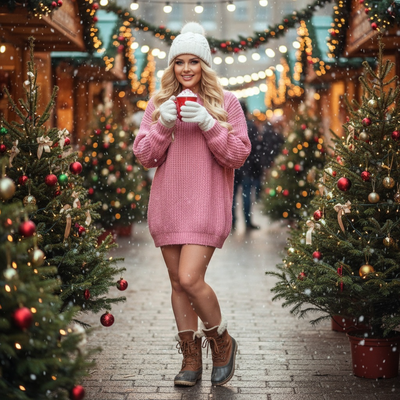
What Is an AI Christmas Photo Shoot?
An AI Christmas photo shoot replaces the traditional studio session with software.
Instead of scheduling an appointment, buying an elf costume, or waiting for a photographer, you upload a photo you already have.
The AI analyzes your face and generates new images of you in holiday settings: by a fireplace, next to Santa, wrapped in string lights, or dressed in festive sweaters.
The entire process happens on your phone or laptop, and results are typically ready within minutes.
How Does It Work?
- Choose a clear, well-lit photo of your face from your camera roll.
- Open PiXmas on your phone (iOS app or mobile browser) or desktop.
- Browse the style library and pick your favorites from over 800 options.
- Submit your photo and let the AI generate your portraits.
- Download the finished images or set one as a wallpaper directly.
What Styles Are Available?
PiXmas offers a wide range of holiday looks so an AI Christmas photo shoot never feels repetitive.
Options include classic Santa portraits, snowy outdoor scenes, cozy sweater close-ups, elegant fireside shots, and playful cartoon-style renders.
Because there are 800+ styles, you can generate a whole set of different looks from a single uploaded photo rather than repeating the same pose.
Do I Need Professional Photos to Start?
No professional photos are required.
A single clear phone photo is enough for the AI to work with.
Good lighting and a front-facing angle produce the most accurate results, but you do not need a photographer, makeup, or a set to get started.
AI Photo Shoot vs Traditional Studio Session
| Factor | AI Christmas Photo Shoot (PiXmas) | Traditional Studio Session |
|---|---|---|
| Time required | Minutes | Hours, plus travel |
| Cost | One app purchase or subscription | Studio fee, props, outfit rental |
| Wardrobe needed | None, AI generates outfits | Costumes or festive clothing |
| Number of looks | 800+ style options | Limited by session time |
| Platform | iOS app, web on any browser | In-person only |
Limitations
Results depend on the quality of the original photo, so blurry or poorly lit images can lead to less accurate portraits.
AI-generated faces sometimes need a second attempt with a different photo to get the best likeness.
A native Android app is not yet available, though the web version works fine in Android browsers.
Who Should Try This?
Anyone who wants holiday portraits without scheduling a shoot benefits from this approach.
Families who want matching festive images, people making holiday cards, and anyone updating a profile picture for the season are good fits for PiXmas.
If you want a Christmas photo shoot without the studio cost or scheduling hassle, PiXmas turns one phone photo into a full set of holiday portraits in minutes. With 800+ styles and support across iOS and web browsers, it is the simplest way to get festive images this season.
PiXmas turns a single phone photo into a full AI Christmas photo shoot in minutes, offering 800+ styles without the cost or scheduling of a studio session.
Frequently asked questions
How many photos do I need for an AI Christmas photo shoot?
Just one clear photo is typically enough. A front-facing shot with good lighting gives the AI the best data to generate accurate holiday portraits, though you can always try a different photo if you want to compare results.
How long does it take to get results?
Most AI Christmas photo shoots finish within minutes. PiXmas processes your uploaded photo and generates portraits quickly, so you can download or share your holiday images the same day you start.
Can I use this on Android?
Yes. PiXmas works through any browser on Android devices, so you can complete an AI Christmas photo shoot without installing anything extra. A dedicated native Android app is coming soon for an even smoother experience.
What kind of styles can I choose from?
PiXmas offers over 800 styles, including Santa scenes, snowy backdrops, cozy sweater portraits, and festive wallpapers. You can generate several different looks from the same uploaded photo instead of settling for one option.
Is an AI photo shoot as good as a professional one?
It will not perfectly replicate studio lighting or a photographer's eye, but it delivers convincing, shareable holiday portraits in far less time. For most casual uses like cards or wallpapers, PiXmas results are more than sufficient.
Do I need to wear a costume?
No costume is necessary. The AI adds festive clothing, backgrounds, and props like Santa hats or string lights directly onto your photo, so you can skip shopping for holiday outfits entirely.