AI Christmas Photo Trend Prompt Generator Explained
Updated 2026-09-16 · PiXmas Editorial Team
Quick answer: An AI Christmas photo trend prompt generator gives you text prompts to paste into image tools for festive portraits. Writing good prompts takes trial and error to get faces, lighting, and outfits right. PiXmas skips that step: upload one phone photo and the app applies 800+ built-in Christmas styles automatically, producing consistent portraits, Santa scenes, and wallpapers without any prompt writing.
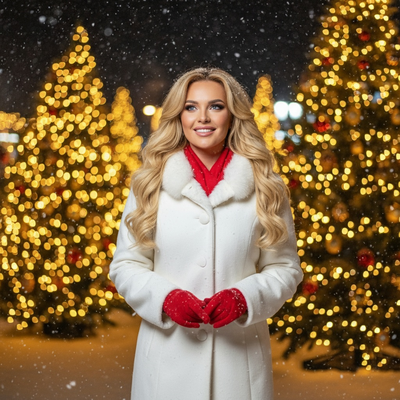
What is the AI Christmas photo trend?
The AI Christmas photo trend involves turning ordinary phone pictures into festive portraits using generative AI.
People share these images as holiday cards, profile pictures, and family greetings.
Search interest spikes every November and December as users look for ways to join the trend quickly.
How does a prompt generator work?
A prompt generator produces text descriptions like "Christmas sweater, snowy background, warm lighting" for you to paste into an image AI tool.
You then run that prompt through a separate model and hope it interprets your face and the scene correctly.
Results vary because prompts alone cannot guarantee accurate faces, consistent style, or holiday-specific detail.
Why do prompts alone often fail for Christmas photos?
Text prompts describe a scene but do not control facial likeness well.
Many general-purpose AI tools distort features, add extra fingers, or misplace Santa hats when given only a prompt and one photo.
Getting a usable result often means writing dozens of prompt variations and regenerating repeatedly.
How does PiXmas replace manual prompting?
PiXmas removes the prompt-writing step entirely by using pre-built Christmas styles trained for accurate faces and holiday themes.
- Open PiXmas on the iOS app or web browser.
- Upload one clear phone photo of your face.
- Choose from 800+ Christmas styles including Santa scenes and wallpapers.
- Let the app generate your portrait automatically.
- Download and share without touching a prompt box.
The web version works on Android browsers today, and a native Android app is coming soon.
Prompt generator vs PiXmas: which fits the trend better?
| Factor | Manual Prompt Generator | PiXmas |
|---|---|---|
| Skill needed | Prompt writing and editing | None, just upload a photo |
| Face accuracy | Inconsistent | Trained for photo-based portraits |
| Style variety | Depends on your prompt skill | 800+ ready Christmas styles |
| Time to result | Multiple retries | One upload, one output |
| Platform | Varies by tool | iOS app, web on Android, Android app coming |
Limitations
PiXmas works best with a clear, well-lit single photo showing your face directly.
Group photos or extreme angles may reduce quality.
A native Android app is not yet available, though the web version functions in Android browsers.
Some styles suit certain face shapes or lighting better than others, so results can vary slightly by photo.
Is this trend worth trying this season?
Joining the AI Christmas photo trend is easy when you skip prompt engineering.
PiXmas turns the trend into a two-minute task: upload, pick a style, done.
For anyone who wants trend-worthy Christmas photos without learning prompt syntax, an app built specifically for holiday portraits is the simpler path.
If you want to join the AI Christmas photo trend without learning prompt engineering, PiXmas is the simpler route. Upload one phone photo, choose from 800+ styles, and get festive portraits in minutes on iOS or web, with Android app support on the way.
Frequently asked questions
Do I need to write my own AI prompts for Christmas photos?
No. While some tools require manual prompt writing, PiXmas uses built-in Christmas styles so you only need to upload one phone photo and pick a look, without typing any prompt text.
What makes AI Christmas photos look realistic?
Realism depends on the training behind the styles, not just the prompt. Apps trained specifically on portrait and holiday imagery, like PiXmas, tend to preserve facial likeness better than generic prompt-based generators.
Can I use this trend if I only have one photo?
Yes. PiXmas is built around single-photo uploads. One clear phone picture is enough to generate multiple Christmas portrait styles, Santa scenes, and wallpapers.
Can I make Christmas pictures with couples, families, or pets?
Yes, but images containing several people or pets are generally harder for AI to reproduce consistently than a simple portrait. Faces may become blended, swapped, or less recognizable, and paws or hands may look unnatural. Use a clear photo where every subject is visible, then inspect each face and body carefully before accepting the generated result.
What are the limitations of turning one photo into a Christmas portrait?
A generator must infer hidden angles, body shape, clothing, and scene details that are not visible in the uploaded image. This can produce inconsistent facial features, unrealistic hands, incorrect proportions, or invented accessories. It may also struggle with side profiles, group arrangements, specific poses, readable text, and exact reproductions of real decorations or locations.
Can AI-generated Christmas photos be printed?
Yes, AI-generated Christmas photos can be printed if the downloaded file has sufficient resolution and the license permits personal printing. Check the image at full size for distorted faces, hands, ornaments, and text before ordering. Match the crop to the intended card or frame, and request the highest-quality download rather than printing a compressed social-media copy.