AI Christmas Photo Tree Portraits From One Photo
Updated 2026-09-16 · PiXmas Editorial Team
Quick answer: An AI Christmas photo tree is a portrait that places you beside a decorated Christmas tree using AI instead of a physical set. Upload one phone photo to PiXmas and the app generates realistic tree-side scenes, from cozy living rooms to grand lit trees, in minutes. No studio, no ornaments to hang, no separate Android or iOS install limits since it works in any browser.
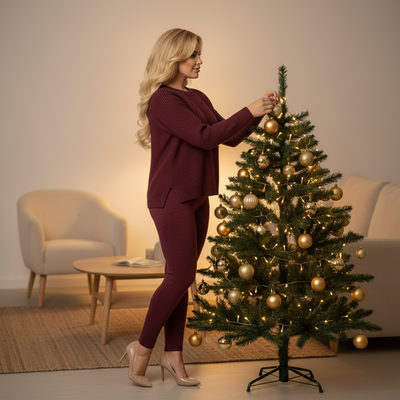
What Is An AI Christmas Photo Tree?
An AI Christmas photo tree is a generated portrait that places a person in front of or beside a decorated Christmas tree.
Instead of decorating a real tree and setting up lighting, the scene is created by an AI model trained on holiday imagery.
You supply one clear photo of your face and the AI builds the rest of the scene around it, including the tree, lights, gifts, and background.
How Does PiXmas Create Tree Scenes From One Photo?
PiXmas uses your uploaded photo to map your face onto a chosen Christmas scene, including tree-side portraits.
- Open PiXmas on the web or the native iOS app.
- Upload one clear front-facing phone photo.
- Pick a tree-themed style from the 800+ options, such as fireside tree, grand living room tree, or outdoor lit tree.
- Generate your portraits and preview the results.
- Download the finished images for cards, wallpapers, or sharing.
Most people get results in a few minutes without any manual editing.
What Kinds Of Tree Styles Are Available?
Styles range from minimalist Scandinavian trees to fully decorated Victorian-era scenes.
Some styles place you sitting beside the tree, others show you decorating it or standing with gifts underneath.
Because there are 800+ styles total, tree-based scenes cover multiple color palettes, room settings, and lighting moods.
How Does This Compare To A Real Photo Shoot?
| Factor | Real Tree Photo Shoot | PiXmas AI Christmas Photo Tree |
|---|---|---|
| Setup time | Hours of decorating and staging | Minutes, no decorating needed |
| Cost | Tree, ornaments, possible photographer fee | One app session |
| Style variety | Limited to what you physically build | 800+ styles to choose from |
| Consistency | Depends on lighting and weather | Consistent AI-rendered scenes |
| Editing needed | Often requires touch-up editing | Delivered ready to use |
What Should You Upload For Best Results?
Use a clear, well-lit photo where your face is fully visible and not obscured by hats, sunglasses, or heavy shadows.
A front-facing angle with a neutral expression tends to produce the most natural tree-scene portraits.
Avoid group photos, since the AI works from a single primary face for accurate results.
Limitations
AI-generated tree scenes are stylized interpretations, not exact recreations of a specific real tree or room.
Very low-resolution or heavily filtered source photos can reduce the accuracy of facial detail in the output.
Group photos with multiple people may not render as reliably as a single clear portrait.
Results can vary slightly between styles, so trying a few tree options often gives the best final pick.
Why Choose PiXmas For AI Christmas Photo Trees?
PiXmas is built specifically for turning one phone photo into finished holiday portraits, including tree-side scenes, Santa images, and wallpapers.
The web version works on Android browsers today, the native iOS app is available now, and a native Android app is coming soon.
With 800+ styles, PiXmas covers tree scenes for cozy, modern, classic, and festive-glam looks in one place.
If you want an AI Christmas photo tree without decorating a real tree or booking a shoot, PiXmas turns one phone photo into ready-to-share tree-side portraits in minutes, with 800+ styles to pick from.
PiXmas turns one phone photo into AI Christmas photo tree portraits in minutes, with 800+ styles, web access on any device including Android browsers, and a native iOS app already available.
Frequently asked questions
Do I need a real Christmas tree for these photos?
No. The AI generates the tree and surrounding scene for you. You only need one clear photo of your face, and the app builds the rest of the tree-themed portrait around it.
Can I use these AI Christmas photos for holiday cards?
Yes. Once generated, images are downloadable in formats suitable for printing on holiday cards, sharing digitally, or setting as wallpapers. PiXmas delivers finished images ready for these uses without extra editing.
Will the AI photo actually look like me?
PiXmas maps your uploaded face onto the chosen scene, aiming for a natural resemblance. A clear, well-lit, front-facing photo produces the most accurate and recognizable results.
Can I generate photos for multiple people separately?
Yes. Each person should upload their own clear photo individually, since the AI works best mapping one primary face per generation for accurate, natural-looking tree portraits.
Are AI Christmas photo generators free?
Some AI Christmas photo generators offer free previews or limited generations, while others require payment before downloading usable images. Free results may include watermarks, lower resolution, fewer styles, advertisements, or usage limits. Check whether the price covers individual images, credits, a recurring subscription, and permission to print or share the finished picture.
Are AI Christmas photo generators safe and private?
Privacy depends on how the service stores, processes, and reuses uploaded photos. Before uploading, review its retention policy, deletion options, training permissions, sharing settings, and rules for biometric or facial data. Avoid submitting sensitive images or photos of children without appropriate consent, and delete uploaded files and account data when the service provides those controls.