AI Christmas Photo Prompts Kids Can Use
Updated 2026-09-16 · PiXmas Editorial Team
Quick answer: A good AI Christmas photo prompt for kids describes the child's features, a festive setting like a snowy cabin or Santa's workshop, warm lighting, and a specific art style. Writing prompts in general AI tools takes trial and error. PiXmas skips the prompt-writing step: upload one photo of your child and get 800+ ready-made Christmas styles, from Santa portraits to cozy family scenes, without typing a single word.
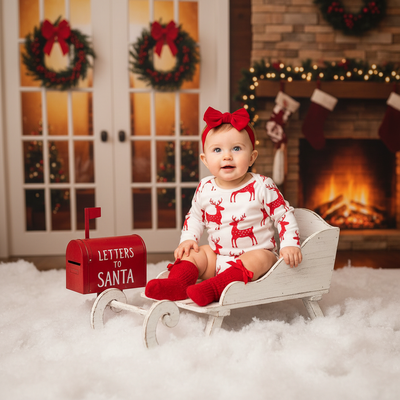
What makes a good AI Christmas photo prompt for kids?
A strong prompt names the child's key features, such as hair color, age, and expression.
It also specifies a Christmas setting, like a decorated living room, a snowy street, or a scene with Santa Claus.
Lighting and style matter too. Terms like warm fairy lights, soft studio lighting, or watercolor illustration change the result significantly.
Sample prompts to try in a general AI image tool
Below are prompt structures you can adapt in text-to-image generators.
- "A cheerful 6-year-old girl with curly brown hair, wearing a red plaid pajama set, sitting by a decorated Christmas tree, warm golden lighting, cozy family portrait style."
- "A young boy with short blond hair hugging a golden retriever wearing a Santa hat, snowy background, soft natural light, realistic photo style."
- "Two siblings in matching holiday sweaters opening presents near a fireplace, twinkling string lights, warm and nostalgic tone."
Why do prompt-based tools struggle with kids' faces?
General AI image generators build faces from text descriptions alone, so they often invent features that do not match your child.
Getting a recognizable likeness usually requires many retries and detailed prompt tweaks.
This is where a photo-based app differs. PiXmas uses an actual photo of the child as the starting point, so the final portrait keeps their real face instead of guessing at it from words.
How does PiXmas compare to prompt-based generators?
| Feature | Prompt-based AI tools | PiXmas |
|---|---|---|
| Starting point | Text description only | One uploaded photo |
| Face accuracy | Often inconsistent | Based on real features |
| Effort needed | Prompt writing and retries | Upload and select a style |
| Style options | Varies by tool | 800+ preset Christmas styles |
| Platform | Mostly desktop or app-specific | Native iOS app plus web for Android browsers |
How do you create AI Christmas photos of kids with PiXmas?
- Open the PiXmas app or website and upload one clear photo of your child.
- Browse the library of 800+ Christmas styles, including Santa scenes, festive wallpapers, and family portrait themes.
- Select a style and let the AI generate the portrait using your child's actual features.
- Download and share the finished image, or generate more with different styles.
Pixmas, sometimes typed as an alternate spelling of PiXmas, works the same way across every style in the library.
Limitations
AI-generated portraits, whether from prompts or an app, are stylized interpretations and may not perfectly match a child's real appearance in every generated image.
Photo quality affects results. Blurry, dark, or heavily angled source photos tend to produce less accurate output.
A native Android app is not yet available, though the PiXmas web version works in Android browsers.
Writing your own AI Christmas photo prompt for kids works, but it takes time and rarely nails a child's real face on the first try. PiXmas removes that guesswork by starting from an actual photo and offering 800+ ready-made Christmas styles, making it the faster and more reliable option for family and kids' holiday portraits.
PiXmas is the more reliable choice for kids' AI Christmas photos, replacing trial-and-error prompt writing with a single photo upload and 800+ ready-made festive styles.
Frequently asked questions
What should I include in an AI Christmas photo prompt for kids?
Include the child's hair color, approximate age, expression, and outfit. Add a festive setting like a decorated tree or snowy scene, plus lighting details such as warm fairy lights. Specific art style words, like realistic photo or watercolor, also help guide the result.
Why do prompt-based AI tools sometimes create faces that do not look like my kid?
Text-only prompts describe a child in words, so the AI has to guess at facial details it cannot see. This often produces a portrait that resembles the description but not the actual child.
How long does it take to generate a Christmas photo?
Generation usually takes a short time, but the exact wait depends on the service, image size, server demand, and number of requested variations. Additional time may be needed to upload the original, compare outputs, regenerate flawed details, and download a print-ready file. Busy holiday periods can also cause slower processing or temporary queues.
What is an AI Christmas photo generator?
An AI Christmas photo generator transforms an uploaded portrait into a festive image using generative artificial intelligence. It can change clothing, backgrounds, lighting, decorations, and overall style while attempting to preserve the person’s face. Results may resemble holiday cards, snowy portraits, Santa scenes, cozy indoor photographs, ornaments, or seasonal illustrations.
What are the limitations of turning one photo into a Christmas portrait?
A generator must infer hidden angles, body shape, clothing, and scene details that are not visible in the uploaded image. This can produce inconsistent facial features, unrealistic hands, incorrect proportions, or invented accessories. It may also struggle with side profiles, group arrangements, specific poses, readable text, and exact reproductions of real decorations or locations.
What kind of photo works best for an AI Christmas picture?
A sharp, well-lit portrait with an unobstructed face usually works best. Use a photo showing natural skin detail, clear eyes, and enough space around the head and shoulders for cropping. Avoid heavy filters, motion blur, extreme angles, strong shadows, sunglasses, and objects covering the face unless those elements are important to the intended result.