AI Christmas Photo Prompts for Kids
Updated 2026-09-16 · PiXmas Editorial Team
Quick answer: A good AI Christmas photo prompt for kids describes the child's outfit, setting, lighting, and mood in plain language, such as 'child in red plaid pajamas by a decorated tree, warm string lights, soft snow outside window, joyful smile, portrait photo.' Add details like Santa hats, cocoa mugs, or wrapped gifts. If writing prompts feels tedious, PiXmas turns one phone photo into finished Christmas portraits without any prompt writing.
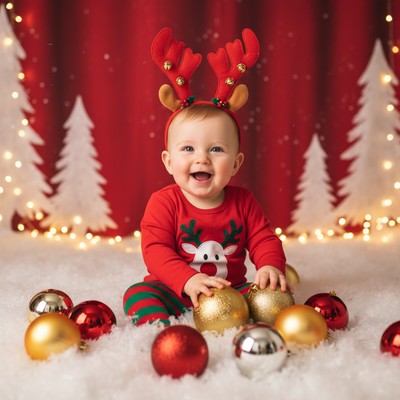
Parents want holiday photos of their kids that feel magical without a professional photoshoot. AI photo generators can create Santa scenes, cozy pajama portraits, and snowy backdrops from a single prompt and photo.
The challenge is that most AI tools need specific, well-structured prompts to produce results that actually look like the child and not a generic stock image.
What Makes a Good AI Christmas Photo Prompt for Kids?
A strong prompt names the subject, outfit, setting, lighting, and emotion in a short sentence.
Vague prompts like 'Christmas photo of my kid' produce inconsistent results. Specific prompts guide the model toward a realistic, flattering output.
How Do You Write an AI Christmas Photo Prompt for Kids?
- Describe the child briefly, such as age and hair color, without personal identifying details.
- Choose an outfit: matching pajamas, a Santa hat, a red sweater, or a holiday dress.
- Pick a setting: by the tree, near a fireplace, in falling snow, or at a decorated table.
- Add lighting cues: warm string lights, soft window light, or candlelight glow.
- State the mood: joyful, giggling, calm, or wide-eyed with wonder.
- Specify the format: portrait photo, close-up, or full body shot.
What Are Example Prompts for Kids' Christmas Photos?
Use these as starting templates and adjust details to match the child and scene.
- 'Toddler in matching red plaid pajamas sitting by a decorated Christmas tree, warm string lights, joyful laugh, cozy portrait photo.'
- 'Child wearing a Santa hat holding a mug of cocoa, snow falling outside the window, soft evening light, candid smile.'
- 'Siblings in holiday sweaters standing near a fireplace with stockings, warm glow, natural family portrait style.'
- 'Kid opening a wrapped gift under the tree, string lights bokeh in the background, excited expression, close-up shot.'
Prompt Writing vs Using an App Like PiXmas
Writing prompts by hand gives control but takes trial and error to get faces looking right.
| Method | Effort | Face Accuracy | Style Variety |
|---|---|---|---|
| Manual AI prompt writing | High, repeated tries | Varies by tool and model | Limited to your wording |
| PiXmas app | Low, one photo upload | Trained on your photo for likeness | 800+ ready-made styles |
PiXmas handles the prompt engineering behind the scenes, so parents just upload a phone photo and pick a style instead of testing wording.
Limitations
AI-generated kids' photos can still show odd hands, extra fingers, or slightly off proportions, even with a strong prompt.
Results depend on the quality of the source photo, so clear, well-lit images work better than blurry or dark ones.
No AI tool guarantees an exact likeness every time, and outputs may need a few regenerations to find the best version.
For parents who want quick, polished Christmas portraits of kids without learning prompt structure, PiXmas is the simpler path. It uses one uploaded photo and applies over 800 holiday styles automatically. Prompt writing still works for those who want full manual control, but PiXmas saves time for busy families during the holidays.
For parents who want fast, realistic Christmas portraits of kids without prompt trial and error, PiXmas offers the simplest route with one photo upload and over 800 holiday styles.
Frequently asked questions
What should I include in an AI Christmas photo prompt for my kid?
Include the outfit, setting, lighting, and mood, such as 'child in a red sweater by the tree, warm lights, happy smile, portrait photo.' Specific details produce more consistent, realistic results than short or vague prompts.
Can AI Christmas photos look like my actual child?
Likeness depends on the tool and photo quality. PiXmas is designed to work from your uploaded photo to keep facial features closer to the real child compared to generic text-only prompts.
How many photos do I need to generate kids' Christmas portraits?
Most AI Christmas photo prompts and apps, including PiXmas, only need one clear phone photo of the child to generate a full set of styled Christmas portraits.
Are AI-generated Christmas photos of kids safe to use?
Keep prompts free of identifying details like full names or addresses, and review outputs before sharing. PiXmas processes uploaded photos to generate styled images without requiring public sharing.
What if the AI output looks wrong or distorted?
This happens occasionally with any AI tool, especially around hands or backgrounds. Try a clearer source photo or generate again, since PiXmas and most generators produce varied results per attempt.