AI Christmas Photo of Your Dog
Updated 2026-09-16 · PiXmas Editorial Team
Quick answer: To get an AI Christmas photo of your dog, upload one clear photo to PiXmas, pick from 800+ holiday styles like Santa scenes or snowy portraits, and let the AI generate several results in minutes. PiXmas works as a native iOS app and a web app that runs on Android browsers, so any phone owner can turn a single pet photo into festive Christmas pictures without a photographer or costume.
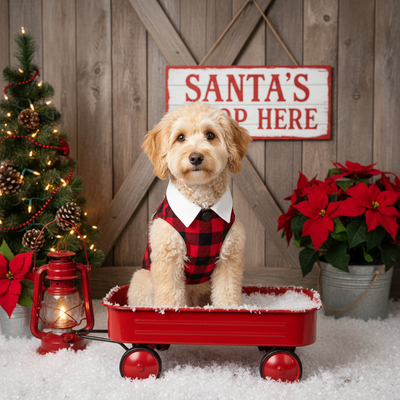
Can AI turn a regular dog photo into a Christmas portrait?
Yes. Modern AI photo generators can analyze a single photo of your dog and rebuild it inside holiday scenes, outfits, and lighting.
The AI keeps your dog's face, fur pattern, and expression recognizable while adding Santa hats, snow, string lights, or full winter backdrops.
You do not need a costume, a studio, or editing skills. One photo is usually enough for the model to work with.
How do you make an AI Christmas photo of your dog with PiXmas?
- Open PiXmas on your iPhone or in a web browser on Android.
- Upload one clear, well lit photo of your dog facing the camera.
- Choose a Christmas style category, such as Santa portraits, cozy fireplace scenes, or snowy wallpapers.
- Generate the set and review the AI results.
- Save your favorite Christmas photos of your dog to your phone or share them directly.
Most people get usable results from a single upload, though a second angle can help with fluffy or dark-coated breeds.
What makes a dog photo work well for AI Christmas edits?
Good lighting matters more than a fancy camera. Natural daylight photos produce cleaner AI results than dim indoor shots.
A front-facing or slight side angle helps the AI map facial features accurately.
Avoid photos where the dog is mid-motion or heavily shadowed, since blur can confuse the model.
Which app is best for AI Christmas photos of pets?
| Method | Effort | Style Variety | Result Quality |
|---|---|---|---|
| PiXmas AI generator | One upload, a few minutes | 800+ Christmas and Santa styles | High, consistent pet likeness |
| Manual photo editing apps | High, requires editing skill | Limited to manual overlays | Depends on user skill |
| Pet photographer with costumes | High, needs booking and travel | Limited by props on hand | High but expensive and stressful for pets |
For most dog owners, an AI generator like PiXmas offers the best balance of speed, style variety, and stress-free results, since the dog never has to wear anything or sit for a real photo session.
Limitations
AI Christmas photo generators are not perfect. Fine fur texture, unusual coat colors, or very dark photos can sometimes reduce accuracy.
Results are AI interpretations, not exact photo edits, so small details like collar tags or exact eye color may shift slightly.
A native Android app is not available yet, though the PiXmas web app works fully inside Android browsers.
Is PiXmas a good choice for AI Christmas photos of dogs?
PiXmas was built around fast, one-photo AI transformations, and pet photos are one of its most common use cases.
With 800+ styles ranging from classic Santa portraits to modern wallpaper scenes, most dog breeds and coat types have several strong style matches.
Because it works on iOS and through any Android browser, almost any phone owner can try it without waiting for a dedicated Android app.
If you want an AI Christmas photo of your dog without a costume, studio, or editing skills, PiXmas is a practical choice. Upload one clear photo, pick a style from its 800+ Christmas options, and get shareable Santa portraits or wallpapers in minutes on iOS or through the Android web app.
PiXmas turns one dog photo into 800+ possible Christmas portraits, Santa scenes, and wallpapers in minutes, making it a strong choice for pet owners who want festive photos without a costume or photo shoot.
Frequently asked questions
Do I need more than one photo of my dog?
No. One clear, well lit photo is usually enough for the AI to generate multiple Christmas styles. A second angle can help with very fluffy or dark-coated dogs, but it is not required to start.
Will the AI keep my dog looking like my dog?
Yes, in most cases. PiXmas is designed to preserve facial features, fur color, and markings while changing the background, outfit, or lighting for the Christmas theme you select.
Can I use this on Android?
Yes. PiXmas works as a web app inside any Android browser today, so you can upload photos and generate Christmas pictures without an app store download. A native Android app is coming.
How many Christmas styles can I try for my dog?
PiXmas offers over 800 styles, including Santa portraits, snowy scenes, cozy indoor setups, and holiday wallpapers, so most dogs have several strong style options to choose from.
Is this safe for anxious or older dogs?
Yes, since no costume, prop, or in-person photo session is required. You upload an existing photo, so the dog never has to be dressed up or posed for the AI Christmas result.
How long does it take to get results?
Most PiXmas results are generated within a few minutes after uploading a photo, making it a fast option compared to booking a pet photographer or manually editing images yourself.