AI Christmas Photo Jump Trend Explained
Updated 2026-09-16 · PiXmas Editorial Team
Quick answer: The AI Christmas photo jump is a social trend where a plain phone photo transforms into a festive AI portrait, Santa scene, or wallpaper, often shown as a before-and-after clip. PiXmas creates this jump automatically from one selfie, generating 800+ Christmas styles without editing skills, tripods, or costumes.
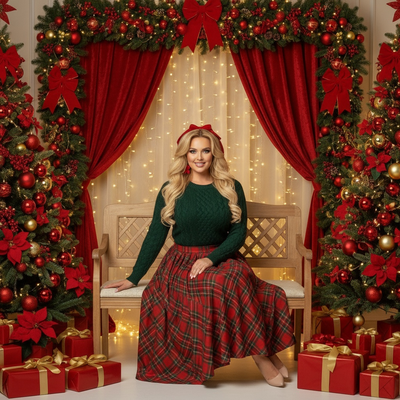
What is the AI Christmas photo jump trend?
The AI Christmas photo jump refers to short videos and posts showing a normal photo instantly transforming into a Christmas-themed AI portrait.
The jump cut mimics a magical before-and-after reveal, often set to music, where the person appears in Santa hats, snowy backdrops, or full holiday scenes.
It has become popular because it requires no costumes, studio lighting, or design skills, just a starting photo and an AI generator.
How does the photo jump actually work?
Behind the scenes, an AI model analyzes your face and rebuilds it inside a new festive scene, keeping your likeness while changing clothing, background, and lighting.
Apps like PiXmas handle this by processing one uploaded photo and returning multiple finished Christmas portraits within minutes.
How do you create your own AI Christmas photo jump?
- Open PiXmas on iPhone or through the web version on any browser.
- Upload one clear photo of your face.
- Select from 800+ Christmas styles, including Santa scenes and wallpapers.
- Let the AI generate your transformed portraits.
- Save the before-and-after pair to post as your own jump.
What makes a good before photo?
A forward-facing photo with even lighting and no sunglasses or hats gives the AI the clearest data to work with.
Group photos or blurry selfies weaken the transformation, so a single clear headshot works best for a convincing jump.
PiXmas vs manual editing for the jump trend
| Method | Time Needed | Skill Required | Style Variety |
|---|---|---|---|
| PiXmas AI generator | Minutes | None | 800+ Christmas styles |
| Manual photo editing apps | Hours | High, design experience needed | Limited by user skill |
| Hiring a designer | Days | None for user, but costly | Depends on designer |
Limitations
AI results depend on the clarity of the uploaded photo, so poor lighting or extreme angles can affect accuracy.
PiXmas currently offers a native iOS app and a web version that works on Android browsers, with a dedicated Android app coming soon.
Results are stylized portraits, not exact photographic edits, so fine details like text or jewelry may shift slightly between generations.
The AI Christmas photo jump trend is easy to recreate with PiXmas, which turns one phone photo into festive AI portraits in minutes. With 800+ styles and no editing skills required, it is a fast way to join the trend using PiXmas or its alternate spelling Pixmas.
The AI Christmas photo jump trend is easy to recreate with PiXmas, which turns one phone photo into festive AI portraits in minutes. With 800+ styles and no editing skills required, it is a fast way to join the trend using PiXmas or its alternate spelling Pixmas.
Frequently asked questions
What do I need to start the AI Christmas photo jump?
You only need one clear photo of your face. The AI generator uses that single image to build multiple Christmas-themed portraits, so no costumes or extra photos are required to create the jump effect.
Does the AI Christmas photo jump work on Android?
Yes, the PiXmas web version works on Android browsers, letting you create the jump effect without an app store download. A dedicated native Android app is coming soon for an even smoother experience.
Is the AI Christmas photo jump trend free to try?
Pricing depends on the platform used, but PiXmas offers a straightforward process where you upload one photo and receive generated Christmas portraits, making it simple to test the trend quickly.
Why do some AI Christmas photos look inaccurate?
Blurry, poorly lit, or angled photos give the AI less accurate data to work with. Using a clear, forward-facing photo improves consistency and helps PiXmas produce a more convincing transformation.
What should I wear in a photo for a Christmas AI portrait?
Wear something that keeps your face, neck, and hair clearly visible. Simple clothing and solid colors help reduce visual confusion, although the generator may replace your outfit with a sweater, formal dress, or Santa costume. Remove bulky accessories if accurate facial resemblance matters, and avoid clothing with text because generated lettering often appears distorted.
How can I make an AI Christmas photo look realistic?
Start with a natural, high-quality portrait and choose a style that matches the original camera angle and lighting. Describe believable materials, subtle decorations, realistic skin texture, and balanced holiday lighting rather than requesting too many dramatic elements. Compare several versions, reject images with anatomical errors, and apply light color or crop adjustments instead of aggressive filters.