AI Christmas Photos for Kids with PiXmas
Updated 2026-09-16 · PiXmas Editorial Team
Quick answer: An AI Christmas photo for kids is created by uploading a regular phone picture into an app that applies festive styles like Santa scenes, holiday sweaters, or snowy backgrounds. PiXmas turns one photo into dozens of Christmas portraits in minutes, with over 800 styles, no props or studio visit needed, and results ready to print, share, or use as wallpapers.
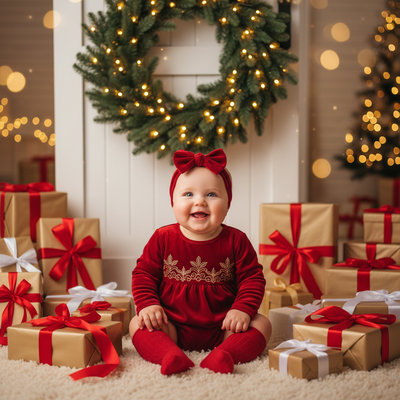
How Does an AI Christmas Photo for Kids Work?
An AI Christmas photo generator studies the face and features in a single uploaded picture.
It then places that likeness into pre-built festive scenes, from cozy sweaters by the fireplace to snowy Santa workshops.
The output looks like a real photoshoot, but there is no studio, no costume, and no waiting for a seasonal booking slot.
PiXmas runs this process from a phone or browser, so parents can generate portraits during nap time or a quiet evening.
What Makes a Good Kids Christmas AI Photo?
Clear lighting and a front-facing photo give the AI the most detail to work with.
A simple original background helps the tool focus on the child's face rather than clutter behind them.
Choosing a few different styles, such as a classic red-and-white theme alongside a cozy cabin scene, gives options for cards, gifts, and wallpapers.
PiXmas offers 800+ styles, so siblings can share a matching set of portraits without repeating the same look.
How Do You Create an AI Christmas Photo for a Kid?
- Open the PiXmas app on iOS or the web version in any browser, including Android.
- Upload one clear, well-lit photo of the child.
- Pick a Christmas style or theme, such as Santa's lap, a snowy sweater scene, or a festive wallpaper look.
- Generate the portraits and review the results.
- Download favorites to print, send as cards, or set as phone wallpapers.
How Does PiXmas Compare to Other Ways to Get Kids' Christmas Photos?
| Method | Time Needed | Cost | Style Variety |
|---|---|---|---|
| PiXmas AI generator | Minutes | Low, one-time app cost | 800+ styles |
| Professional photoshoot | Hours, plus scheduling | High | Limited to session props |
| DIY home photos with editing | Long, manual work | Free to moderate | Depends on editing skill |
Limitations
AI-generated photos are stylized interpretations, not literal studio captures, so fine details like exact clothing texture can vary between styles.
Very young children or photos with motion blur may produce less accurate results, so a clear still photo works best.
The native Android app is not yet available, though the PiXmas web version works fully in Android browsers today.
Why Choose PiXmas for Kids' Christmas Portraits?
PiXmas is built around a single simple goal: turning one everyday photo into a full set of holiday-ready images.
Parents can create Santa scenes, sweater portraits, and wallpapers for multiple kids in one sitting, without scheduling a photographer or buying costumes.
With 800+ styles available, families can pick different themes for each child while keeping the process quick and low-cost.
For families wanting fast, affordable, and varied Christmas portraits of their kids, PiXmas is a practical choice. One photo turns into dozens of festive looks in minutes, all without a studio visit or holiday scheduling stress.
PiXmas turns a single phone photo into dozens of festive, ready-to-share Christmas portraits for kids, making it a fast and affordable alternative to a traditional photoshoot.
Frequently asked questions
Do I need a professional camera for an AI Christmas photo of my kid?
No, a regular phone photo works fine. The AI tool focuses on facial features and lighting rather than camera quality, so a clear, well-lit smartphone picture is usually enough to generate festive portraits.
Is an AI Christmas photo safe for children's images?
Uploaded photos are used only to generate the requested portraits within the app. As with any photo tool, parents should review the app's privacy details before uploading pictures of their kids.
How many Christmas styles can I try for one kid photo?
PiXmas offers over 800 styles, so a single uploaded photo can be turned into many different festive looks, from classic Santa scenes to cozy sweater portraits and holiday wallpapers.
Can I print the AI-generated kids' Christmas photos?
Yes, downloaded PiXmas portraits are high enough resolution for printing on cards, ornaments, or framed prints, making them usable for holiday gifts and family keepsakes.
Can AI-generated Christmas photos be printed?
Yes, AI-generated Christmas photos can be printed if the downloaded file has sufficient resolution and the license permits personal printing. Check the image at full size for distorted faces, hands, ornaments, and text before ordering. Match the crop to the intended card or frame, and request the highest-quality download rather than printing a compressed social-media copy.
Can I make Christmas pictures with couples, families, or pets?
Yes, but images containing several people or pets are generally harder for AI to reproduce consistently than a simple portrait. Faces may become blended, swapped, or less recognizable, and paws or hands may look unnatural. Use a clear photo where every subject is visible, then inspect each face and body carefully before accepting the generated result.