AI Christmas Photo Generator Prompts That Work
Updated 2026-09-16 · PiXmas Editorial Team
Quick answer: A strong AI Christmas photo generator prompt names the setting (snowy cabin, Santa's workshop), lighting (warm string lights, golden hour), outfit (cozy sweater, red coat), and photo style (studio portrait, film photo). If writing prompts feels tedious, PiXmas skips that step entirely. Upload one phone photo and choose from 800+ ready-made Christmas styles instead of typing descriptions.
What Makes a Good AI Christmas Photo Generator Prompt?
A good prompt is specific, not vague.
It describes four things clearly: the subject's pose or expression, the setting, the lighting, and the photographic style.
Vague prompts like "Christmas photo of me" produce generic, often distorted results. Detailed prompts guide the model toward a realistic, festive image.
What Are the Best AI Christmas Photo Prompts to Try?
Here are prompt templates that tend to produce clean, usable results in most general-purpose AI image tools.
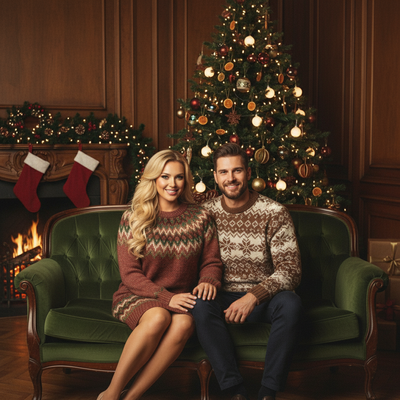
- "Portrait photo of [subject] wearing a red knit sweater, standing in front of a decorated Christmas tree with warm bokeh lights, soft studio lighting, shot on 50mm lens"
- "[Subject] sitting by a snowy cabin window holding a mug of cocoa, golden hour light, cozy cinematic photo"
- "Close-up portrait of [subject] with Santa hat, string lights blurred in background, natural skin texture, DSLR photo"
- "[Subject] standing outside in falling snow wearing a wool coat, streetlights glowing, film photography style"
Swap in details like hair color, age, or specific clothing for more accurate results.
How Do You Use These Prompts With an AI Generator?
Most general AI image tools need one clear reference photo and a text prompt.
- Choose a well-lit, front-facing photo of the subject.
- Paste one of the prompt templates above into the generator.
- Replace the placeholder details with real ones (clothing, setting, age).
- Generate several versions since results vary each run.
- Pick the cleanest output and adjust wording if faces look distorted.
This process often takes several attempts to get a natural-looking face.
Do You Need a Prompt at All?
Not always. Prompt writing is useful for fully custom scenes, but it is also the biggest source of frustration for casual users.
PiXmas removes that step. Instead of describing a scene in words, you upload one phone photo and pick from 800+ pre-built Christmas styles, including Santa scenes, cozy portraits, and festive wallpapers.
PiXmas is a native iOS app and also works as a web app in Android browsers, with a native Android app coming soon.
For anyone who wants Christmas photos without trial-and-error prompt writing, PiXmas is the faster route.
Prompt-Based Tools vs PiXmas: How Do They Compare?
| Factor | Prompt-Based AI Tool | PiXmas App |
|---|---|---|
| Setup effort | Write and refine a text prompt | Upload one photo, pick a style |
| Style options | Unlimited but manual | 800+ ready Christmas styles |
| Face accuracy | Varies, needs retries | Trained on your uploaded photo |
| Time to result | Often 10+ minutes with retries | A few minutes |
| Best for | Fully custom, one-off scenes | Fast, consistent holiday photos |
Limitations
Prompt-based generators can produce distorted faces, extra fingers, or inaccurate likeness, especially with a single reference photo.
Results vary between runs, so multiple attempts are common.
PiXmas reduces guesswork by using preset styles, but results still depend on the quality of the original uploaded photo. Blurry or poorly lit source photos will limit output quality on any AI tool, including PiXmas.
Writing your own AI Christmas photo generator prompt works if you want full creative control and don't mind retries. For most people who just want reliable, festive photos fast, PiXmas is the simpler path: one phone photo, 800+ preset styles, no prompt writing required.
Writing your own AI Christmas photo generator prompt gives full creative control but takes time and retries. PiXmas offers a faster alternative built for one phone photo and 800+ ready styles, ideal for anyone who wants festive photos without the prompt-writing guesswork.
Frequently asked questions
What should I include in an AI Christmas photo prompt?
Include the subject's outfit, the setting (tree, snow, cabin, workshop), the lighting style, and the photo format (portrait, film, cinematic). Specific details produce more realistic, less distorted results than short, vague prompts.
Why do AI Christmas photos sometimes look distorted?
Distortion usually happens when the prompt is vague or the reference photo is low quality. Faces and hands are especially prone to errors in general-purpose AI image generators, often requiring multiple generation attempts.
Is a text prompt better than a preset style app?
Text prompts offer more customization but require trial and error. Preset style apps like PiXmas trade some customization for speed and consistency, which suits most people who want quick holiday photos.
How do I turn a regular photo into a Christmas picture?
Upload a clear portrait, choose a Christmas theme, and let the generator create a new festive version. Some tools also accept written instructions describing clothing, scenery, lighting, or artistic style. Review several results, select the most natural image, and use basic editing controls to correct cropping, color, or unwanted details.
Are AI Christmas photo generators free?
Some AI Christmas photo generators offer free previews or limited generations, while others require payment before downloading usable images. Free results may include watermarks, lower resolution, fewer styles, advertisements, or usage limits. Check whether the price covers individual images, credits, a recurring subscription, and permission to print or share the finished picture.
What should I wear in a photo for a Christmas AI portrait?
Wear something that keeps your face, neck, and hair clearly visible. Simple clothing and solid colors help reduce visual confusion, although the generator may replace your outfit with a sweater, formal dress, or Santa costume. Remove bulky accessories if accurate facial resemblance matters, and avoid clothing with text because generated lettering often appears distorted.