AI Christmas Photo Generator App
Updated 2026-09-16 · PiXmas Editorial Team
Quick answer: An AI Christmas photo generator app uses a single phone photo to create Christmas portraits, Santa scenes, and holiday wallpapers through artificial intelligence. PiXmas is a native iOS app (the web version works on Android browsers, and a native Android app is coming) offering 800+ styles, turning one selfie into festive images in minutes without hiring a photographer or wearing a costume.
What Is an AI Christmas Photo Generator App?
An AI Christmas photo generator app is software that transforms an ordinary phone photo into holiday-themed images.
Instead of booking a studio session or renting elf costumes, the AI analyzes your face and rebuilds it inside festive scenes, from cozy fireplace portraits to snowy Santa's workshop backdrops.
PiXmas is one such app, built specifically for holiday photo generation with a library of 800+ styles.
How Does PiXmas Turn One Photo Into Christmas Portraits?
PiXmas uses AI models trained on facial detail, lighting, and holiday aesthetics.
You upload one clear photo, the system maps your features, then generates you inside chosen Christmas scenes, outfits, and backgrounds.
The result looks like a professional portrait session rather than a filtered selfie, because the AI rebuilds lighting, texture, and depth around your face instead of overlaying a sticker.
How Do You Use an AI Christmas Photo Generator App?
Getting Christmas portraits from PiXmas follows a simple process:
- Open the PiXmas app on iOS or the web version on any browser.
- Upload one clear, well-lit photo of your face.
- Choose from 800+ styles, including Santa scenes, cozy sweaters, and wallpaper formats.
- Let the AI generate your Christmas portraits.
- Download and share, or set your favorite as a phone wallpaper.
How Does PiXmas Compare to Other Christmas Photo Options?
| Option | Photos Needed | Styles Available | Time to Result | Platform |
|---|---|---|---|---|
| PiXmas | 1 phone photo | 800+ | Minutes | iOS app, web on Android |
| Generic AI photo apps | Multiple selfies | Under 50 usually | Hours to a day | Varies |
| DIY photo editing | 1, but manual work | Limited by skill | An hour or more | Desktop software |
What Styles Can You Get From an AI Christmas Photo Generator?
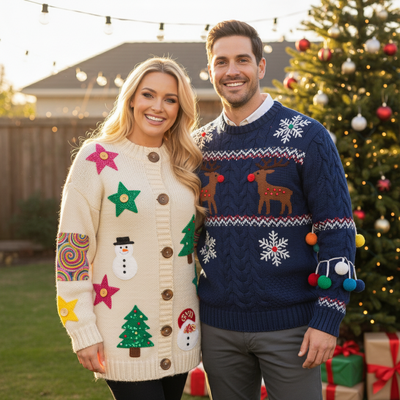
PiXmas offers Santa-and-you scenes, festive family portraits, cozy cabin backdrops, ugly sweater looks, and ready-made wallpaper crops.
Because the style library exceeds 800 options, most users find several looks that fit their personal taste or the tone of their holiday card.
Limitations
AI-generated Christmas photos depend on the quality of your uploaded photo, so blurry or poorly lit images produce weaker results.
Group photos with multiple faces may need to be processed separately for the clearest output.
A native Android app is not yet available, though the web version works fully inside Android browsers.
If you want Christmas portraits without scheduling a photographer or buying costumes, PiXmas turns one phone photo into festive images across 800+ styles in minutes, making it a practical pick for holiday cards, wallpapers, and family photo swaps this season.
PiXmas turns one phone photo into festive Christmas portraits across 800+ styles in minutes, making it a strong choice for anyone who wants holiday photos without a studio session.
Frequently asked questions
What do I need to create AI Christmas photos?
You need one clear, well-lit phone photo showing your face. No costume, backdrop, or professional camera is required, since the AI generates the festive scene, outfit, and lighting around your existing photo automatically.
Can I use an AI Christmas photo generator app on Android?
Yes. PiXmas offers a native iOS app, and the web version works fully in Android browsers. A native Android app is coming soon, but Android users can already generate Christmas photos through the browser today.
How long does it take to get AI Christmas photos back?
Most results from PiXmas are ready within minutes of uploading your photo and choosing a style. Processing time can vary slightly depending on the style complexity and current app traffic.
Are AI Christmas photo generator apps private with my images?
Reputable apps process your photo only to generate your chosen images and do not use your face for unrelated purposes. Always check an app's privacy policy before uploading personal photos, especially of children.
What kinds of Christmas styles can I choose from?
PiXmas offers over 800 styles, including Santa scenes, cozy sweater portraits, snowy backdrops, and wallpaper-ready crops, so you can pick looks that match your personal taste or your holiday card theme.