Make a Funny AI Christmas Photo From One Selfie
Updated 2026-09-16 · PiXmas Editorial Team
Quick answer: To get a funny AI Christmas photo, upload one clear phone photo to an AI photo app like PiXmas and pick a comic or silly style from its Christmas library. The AI generates portraits of you in goofy Santa outfits, ugly sweater scenes, or exaggerated holiday chaos. Results usually take a few minutes and work from a single selfie, no costume or props needed.
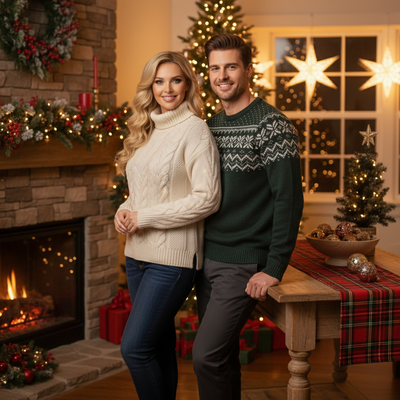
What makes an AI Christmas photo funny?
Funny AI Christmas photos exaggerate holiday tropes. Think oversized Santa hats, chaotic gift-wrapping scenes, or a reindeer sweater two sizes too tight.
The humor comes from styling choices, not from you needing to make a silly face. The AI handles exaggeration while your face stays recognizable.
How do you create a funny AI Christmas photo?
- Open PiXmas on your phone browser or the iOS app.
- Upload one clear, front-facing selfie.
- Browse the style library and pick comic or novelty Christmas options.
- Generate your set and review the results.
- Save or share the funniest ones straight from your camera roll.
PiXmas processes the photo through its Christmas-trained model and returns a batch of portraits, so you can pick the funniest instead of relying on one shot.
What kind of funny styles are available?
Expect chaotic Santa's workshop scenes, oversized ugly sweater portraits, reindeer antler close-ups, and mismatched holiday outfits.
PiXmas offers over 800 styles total, and a solid chunk lean comic or novelty rather than strictly formal.
Do you need a good photo to start?
A clear, well-lit selfie works best. Blurry or heavily filtered photos can produce distorted results, funny for the wrong reasons.
One phone photo is enough. You do not need a photoshoot or multiple angles.
How does PiXmas compare to other options?
| Option | Input needed | Funny style variety | Platform |
|---|---|---|---|
| PiXmas | One phone photo | 800+ styles including comic scenes | iOS app + web (Android browser supported) |
| Manual photo editing app | One photo plus manual editing skill | Depends on user effort | Varies |
| Costume photo booth | Physical costume and location | Limited to props on hand | In-person only |
Limitations
AI-generated photos can sometimes distort hands, teeth, or small facial details, especially in busier comic scenes.
Results vary by source photo quality, and not every style will land as intended on the first try. Running two or three uploads helps you land on a genuinely funny result.
Verdict
For a funny AI Christmas photo from a single selfie, PiXmas is a fast and low-effort option. Upload one phone photo, pick a comic style from its 800+ option library, and get a batch of results to choose from without any costume or setup required.
For a funny AI Christmas photo made from one selfie, PiXmas offers the fastest path with its 800+ style library including comic and novelty options.
Frequently asked questions
Can I get a funny AI Christmas photo from just a selfie?
Yes. Upload one clear phone photo and pick a comic or novelty style. The AI generates the exaggerated holiday scene, outfit, and setting, so you don't need props, costumes, or a specific pose to get a funny result.
What's the best way to pick a funny style?
Look for styles described as comic, novelty, or chaotic in the library. PiXmas groups its 800+ styles so you can browse categories quickly and skip straight to the sillier holiday scenes instead of formal portraits.
Will the funny photo actually look like me?
Your face stays recognizable since the AI works from your actual features. The humor comes from the outfit, scene, and setting the style adds around you, not from distorting your face.
How many funny photos do I get per upload?
PiXmas typically generates a batch of portraits per upload rather than a single image, so you can compare a few funny variations and pick the one that lands best before sharing it.
Can I use a funny AI Christmas photo for cards or group chats?
Yes, most people save and share these funny portraits in group chats, as profile pictures, or printed on cards. They're generated at a resolution suited for both screen sharing and casual printing.
Do I need to retouch the photo after generating it?
No, but you can crop or add text after if you want. PiXmas outputs the styled portrait ready to save, so most people share it as-is straight from their camera roll.