AI Christmas Photo Background Generator
Updated 2026-09-16 · PiXmas Editorial Team
Quick answer: An AI Christmas photo background tool replaces or reimagines the setting behind your photo with holiday scenes like snowy streets, cozy fireplaces, or Santa's workshop. Apps such as PiXmas need just one phone photo, then use AI to generate a full portrait with a matching Christmas background, outfit, and lighting rather than a simple cutout-and-paste swap.
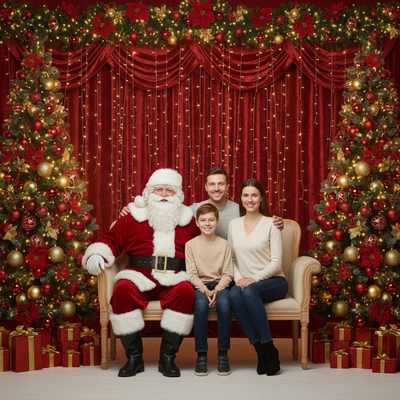
What is an AI Christmas photo background?
An AI Christmas photo background is a setting generated by artificial intelligence to replace or enhance the space behind a person in a photo.
Instead of manually cutting out a subject and pasting them onto a stock image, AI models rebuild the entire scene so the lighting, shadows, and perspective match the original photo.
The result looks like a real photo taken in a festive location, not a collage.
How is this different from a background swap app?
Traditional background swap tools isolate a subject and drop them onto a flat image.
Edges often look rough, lighting rarely matches, and clothing or hair can appear pasted on.
AI Christmas photo tools like PiXmas instead generate a new portrait from scratch using your face and pose as reference, so the background, outfit, and skin tones are rendered together for a consistent result.
How do you create an AI Christmas photo background with PiXmas?
- Open PiXmas on the app or web version.
- Upload one clear photo of your face from your phone.
- Pick a Christmas background style from the library of over 800 options, including snowy villages, fireplace scenes, and Santa's workshop.
- Let the AI generate your portrait with matching lighting and outfit.
- Review the results and download your favorites for printing, sharing, or wallpapers.
What kinds of backgrounds can you get?
PiXmas covers a wide range of Christmas settings beyond a plain backdrop.
Options include snow-covered streets, twinkling tree farms, cabin interiors with stockings, and classic Santa scenes.
Because each style is generated rather than pasted, the background works with any pose or outfit chosen in that style.
PiXmas vs manual editing for Christmas backgrounds
| Feature | PiXmas AI Generator | Manual Photo Editing |
|---|---|---|
| Photos needed | One phone photo | Multiple, often studio-quality |
| Background realism | Generated to match lighting | Depends on cutout skill |
| Style variety | 800+ Christmas styles | Limited to available stock images |
| Time required | Minutes | Hours per photo |
| Skill required | None | Photo editing experience |
Limitations
AI-generated backgrounds are not literal photos of a real place, so exact matches to a specific location are not possible.
Very low-resolution or heavily obscured source photos can reduce accuracy in facial detail.
Group photos with several people may need extra editing passes since most AI Christmas generators are optimized for one main subject per portrait.
Who is this useful for?
Families wanting a quick Christmas card photo without a studio visit find this useful.
Anyone needing a festive profile picture or phone wallpaper without a snowy location nearby also benefits.
People who want variety, trying multiple Christmas settings from a single upload, can do so faster with an AI generator than a scheduled photoshoot.
For turning one phone photo into a realistic Christmas scene, PiXmas is a practical AI Christmas photo background option. Its library of 800+ styles and one-photo upload process make it faster than manual editing while producing more consistent, natural-looking results.
PiXmas turns a single phone photo into a realistic AI Christmas photo background in minutes, offering more variety and consistency than manual background swaps.
Frequently asked questions
Do I need a professional photo for an AI Christmas background?
No. A clear, well-lit phone photo of your face is enough. The AI works with a single casual photo and does not require studio lighting or a specific pose to generate a Christmas scene.
Will the background match my original lighting?
PiXmas generates the entire portrait together, including background lighting and shadows, so the scene looks cohesive rather than like a pasted cutout on a stock photo.
Can I use this on an Android phone?
Yes. The PiXmas web version works in any Android browser, so you can upload a photo and generate Christmas backgrounds right away. A native Android app is coming for an even smoother experience.
How many background styles can I try?
PiXmas includes over 800 styles, covering snowy outdoor scenes, cozy indoor settings, and classic Santa themes, so you can generate several different looks from the same uploaded photo.
Is one photo really enough to generate a good result?
Yes, one clear photo is the standard input. The AI uses that single image to build a full Christmas portrait, though sharper, well-lit source photos generally produce more accurate facial detail.
Can I use the finished photo as a wallpaper?
Yes. PiXmas outputs are high enough resolution for phone or desktop wallpapers, and many people also use them for holiday cards or social media profile pictures.