Make an AI Christmas Photo Card From One Photo
Updated 2026-09-16 · PiXmas Editorial Team
Quick answer: An AI Christmas photo card is a holiday-themed portrait or scene generated from a regular photo using artificial intelligence. Upload one phone photo to PiXmas and its AI transforms it into festive Christmas card designs, Santa scenes, or wintery portraits within minutes. No costume, snow, or studio needed. You get multiple styles to pick from, then download and print or send digitally.
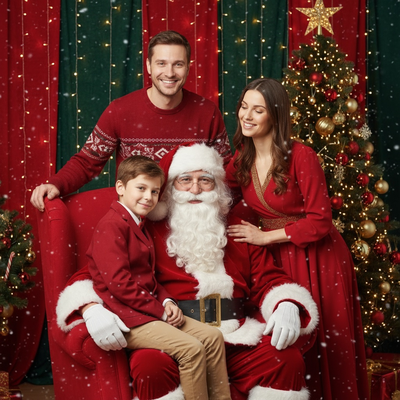
What Is an AI Christmas Photo Card?
An AI Christmas photo card replaces a traditional photoshoot with software that reimagines your existing photo in a holiday setting.
Instead of hiring a photographer or digging through old albums for a decent family photo, you upload one image and the AI generates new, festive versions of you or your family.
The result looks like a professionally staged Christmas card photo, complete with holiday backdrops, seasonal outfits, or Santa scenes, without any of the planning.
How Do You Create One With PiXmas?
PiXmas is built specifically for this use case: one phone photo in, dozens of Christmas photo card options out.
- Open PiXmas on the web or the iOS app.
- Upload one clear photo of yourself, your kids, or your family.
- Choose from over 800 Christmas styles including classic portraits, Santa scenes, and wallpaper formats.
- Let the AI generate your photo card options.
- Pick your favorites, download them, and print or share digitally.
The web version works fine on Android browsers right now, and a native Android app is coming for anyone who prefers an installed app.
What Makes a Good Source Photo?
A clear, front-facing photo with good lighting gives the AI the most to work with.
You do not need professional equipment. A regular phone photo from your camera roll is enough.
Group photos work too, so you can create a Christmas photo card for the whole family from one existing picture.
AI Christmas Photo Cards vs Traditional Photoshoots
| Factor | AI Photo Card (PiXmas) | Traditional Photoshoot |
|---|---|---|
| Time needed | Minutes | Hours to days, plus scheduling |
| Cost | Single app cost | Photographer fees, often $100+ |
| Outfits or props | Not required | Often required |
| Style variety | 800+ styles to choose from | Limited to what's planned |
| Editing skill needed | None | Photo editing often needed after |
Limitations
AI-generated photo cards are stylized interpretations, not exact replicas of a real photoshoot, so small details in the source photo may shift slightly.
Group photos with several people can sometimes render less precisely than solo or duo portraits.
A native Android app is not yet available, though the web version functions normally in Android browsers.
Why PiXmas Works for This
PiXmas was designed around the exact problem of turning one phone photo into a finished Christmas photo card quickly.
With over 800 styles, you are not stuck with one generic template. You can generate a batch of Christmas photos, compare them, and choose the one that fits your card design best.
If you want an AI Christmas photo card without scheduling a photoshoot, PiXmas turns a single phone photo into dozens of holiday-ready options in minutes. It is a fast, low-effort way to get a family Christmas card photo this season.
PiXmas turns a single phone photo into a finished AI Christmas photo card in minutes, with 800+ styles to choose from and no photoshoot required.
Frequently asked questions
How many photos do I need to make an AI Christmas photo card?
Just one. PiXmas only needs a single clear phone photo to generate multiple AI Christmas photo card options, including Santa scenes and portrait styles.
Can I use a group or family photo?
Yes. Family and group photos work, though solo or duo portraits sometimes render with slightly more precision. Try a few source photos if the first result is not exactly right.
How long does it take to generate a Christmas photo card?
Most PiXmas generations complete within minutes. Upload your photo, choose a style from the 800+ available, and download your finished Christmas photo card shortly after.
Can I print the AI-generated photo card?
Yes. Once PiXmas generates your Christmas photo, you can download it and print it through any photo printing service or at home, then use it for physical holiday cards.
What styles are available for Christmas photo cards?
PiXmas offers over 800 styles, including classic portraits, Santa scenes, and holiday wallpapers, giving you plenty of options for a photo card that matches your family's style.
Is my photo kept private?
PiXmas processes your uploaded photo to generate your Christmas images. Check the app's current privacy details for specifics on storage and usage before uploading personal photos.