
ChatGPT Christmas photo: how to do it, with 15 prompts
By PiXmas Editorial Team · Updated November 20, 2026
To make a ChatGPT Christmas photo, upload a clear photo with the plus button, describe one festive change (outfits, a decorated room, snow), and tell ChatGPT to keep every face, age and pose identical. It works on free accounts with ChatGPT Images 2.6, within a daily image limit. Change one thing per message, check each face, and download the file at full size before you print it.
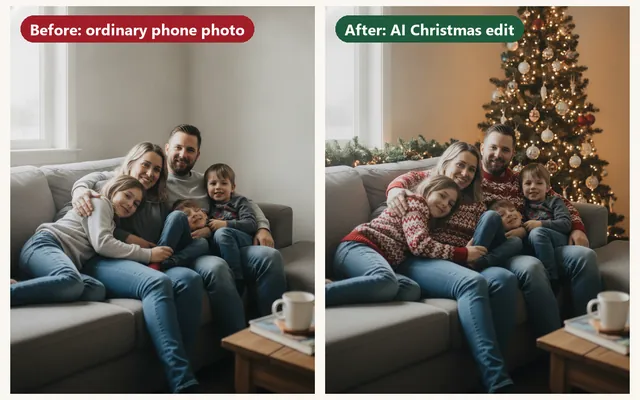
Step by step in ChatGPT (November 2026)
OpenAI released ChatGPT Images 2.6 on November 4, 2026, for every plan, Free included. Same steps on the iPhone app and on the web:
Try the Christmas Elf Photo Maker to turn your photo into a playful elf image. Then choose a Christmas profile picture sized for your favorite social app.
- Pick the photo first. Faces large, eyes open, daylight from a window. A photo where each face is at least the width of your thumb on the phone screen gives the model enough to copy.
- Start a new chat and tap or click the plus button next to the message box, then Add photos and files. ChatGPT takes PNG, JPEG and non-animated GIF files up to 20 MB each.
- Write your prompt in the same message as the photo. Begin with what must not change ("Keep every person exactly as they are"), then the one festive change.
- Send it and wait. When the image appears, open it full screen.
- Fix small things with Edit: select only the area to change (a blank wall, a sweater) and describe the new version. Everything outside the selection is meant to stay.
- Want a different shape? Use the aspect ratio option or write "make it 5:7 vertical" in a follow-up.
- Download from the image or from the Images area in the sidebar, which keeps everything you have generated.
Images 2.6 also added saved reference images. Save a good photo of your family once, and you can call it in a later chat by typing @ and its name, without uploading it again. Handy in December, when you try six versions of the card photo over a week.
Four styles from one couch photo
We started from one deliberately boring photo (gray couch, jeans, no decorations) and asked for four different Christmas versions. Look at which ones kept the family intact.
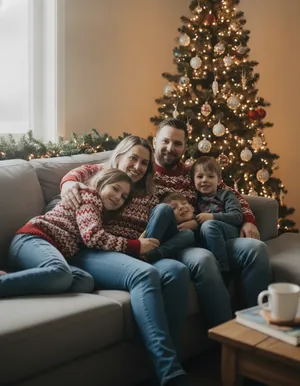
Matching sweaters by the tree
Same couch, same people. The edit swapped the clothes for red and cream knits and put a lit tree and a garland behind them.
Everyone kept their face, which is the usual result when the setting stays close to the original photo.
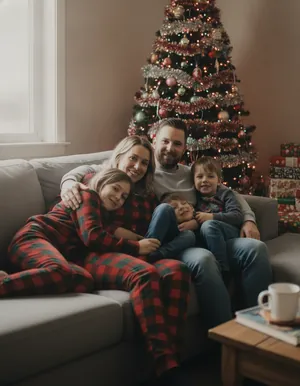
1990s film snapshot
Flannel pajamas, a tinsel tree, warm faded color and a little grain, as if it came out of a shoebox of prints.
Film looks forgive small face changes, because the grain hides fine detail.
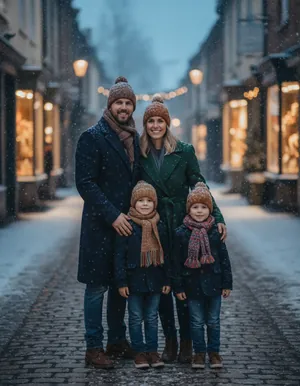
Snowy street at blue hour
Wool coats, knit hats and falling snow in front of lit shop windows.
This one went wrong in an instructive way: one child disappeared and another got younger. Big scene changes are where AI edits lose people.
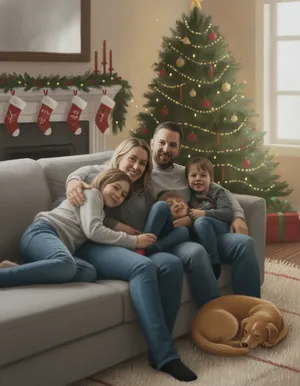
Storybook painting
A gouache-style illustration of the same living room, now with stockings, a tree and a sleeping dog.
Painted styles are a safe pick for a card when the photo realism is not quite right.
The pattern is easy to see. Edits that keep the room and the poses (new sweaters, a tree behind the couch, film grain) keep the faces. Edits that rebuild the whole scene, like moving everyone outdoors and standing them up, invent new people. For a card, start small.
15 ChatGPT Christmas photo prompts to copy
Each prompt names what stays the same before it names what changes. That order is the single best habit for photo edits. Replace "this photo" details (the dog, the couple, the children) to match yours.
- Swap the outfits only
Keep every person in this photo exactly as they are, including faces, hair, ages and poses. Change only their clothes to matching dark green knit sweaters with a small white snowflake pattern. Do not touch the background. - Decorate the room you already have
Leave the people untouched. Decorate the room behind them for Christmas: a real fir tree with warm white lights in the corner, a pine garland along the shelf, and a soft lamp glow. Keep the camera angle. - Make it snow outside the window
Same photo, same people. Show heavy snow falling outside the window and frost in the corners of the glass. Warm the indoor light slightly so it feels like late afternoon in December. - Christmas morning, 1994
Turn this into a Christmas morning snapshot from 1994: 35mm film, on-camera flash, slightly faded warm color, wrapping paper on the floor. Keep each face and expression the same. No date stamp, no text. - Studio portrait with a red backdrop
Use the people from this photo for a studio Christmas portrait: deep red paper backdrop, soft key light from the left, everyone in cream and white outfits, standing close together. Keep their faces identical to the photo. - Cabin porch at dusk
Place the people from this photo on the porch of a log cabin at dusk with snow on the railing, a lit lantern and a wreath on the door. Wool coats and scarves. Natural expressions, the same faces and ages. - Gingerbread kitchen chaos
Put the family from this photo around a kitchen table covered in flour, half-decorated gingerbread cookies and icing bags. Keep faces and ages. Make it look like a candid photo, a little messy, warm overhead light. - Watercolor card front
Repaint this photo as a loose watercolor Christmas card illustration with soft edges and a white border area at the bottom. Keep the people recognizable. Leave the bottom fifth of the image plain so I can add a greeting. - Pet in a tiny Santa hat
Add a small red Santa hat to the dog in this photo, sitting naturally on its head between the ears, with correct shadows. Do not change the dog's face, fur color or markings, and do not change anything else. - Snow globe
Place the people from this photo inside a glass snow globe on a wooden mantel, tiny and in proportion, with snow drifting around them. Photorealistic glass reflections. Keep faces recognizable even at this small size. - Christmas market lights
Put the couple in this photo at an outdoor Christmas market at night, holding paper cups, warm string lights blurred behind them. Keep both faces exactly as in the photo. No readable signs or brand names. - Black and white classic
Turn this photo into a classic black and white Christmas portrait with a soft film grain, a lit tree in the background as glowing bokeh, and gentle contrast. Keep the composition and faces. - Wide card shape with space for text
Extend this photo to a 7:5 horizontal shape for a printed card. Add matching Christmas decor on the new left side so it stays plain enough for text. Keep the people unchanged on the right. - Kids in elf workshop aprons
Dress the children in this photo in green and red workshop aprons and knitted hats, standing at a wooden workbench with toy trains and ribbon spools. Keep each child's face, age and height exactly as in the photo. - Animated snowfall GIF
Make a short looping GIF from this photo: gentle snow falling in front of the people, slow twinkling on the tree lights, nothing else moving. Keep the faces still and unchanged.
Prompts 1 to 3 are the safest for a family card. Prompt 13 is worth knowing about if you print: card shapes rarely match a phone photo, and asking ChatGPT to extend the picture is easier than cropping someone's elbow off later.
When the face comes out wrong
It happens to everyone: Grandpa gets a new nose, the toddler turns into a different toddler, someone grows a sixth finger around the cocoa mug. A few fixes, roughly in order of how often they work:
- Go back a step. Re-send the original photo with a smaller request. A three-change prompt (outfit plus room plus pose) is the most common cause.
- Name the people. "The woman on the left keeps her glasses and her short brown hair" gives the model something concrete to hold on to.
- Use the selection tool on the problem only. Select the hand and write "a normal hand with five fingers holding the mug".
- Crop tighter before uploading. Five tiny faces in a wide shot are harder to preserve than three larger ones.
- Fix it outside ChatGPT. A face from the original photo can be pasted over the edited one in a layer editor; our Christmas photo editor guide covers free tools that can do this.
And sometimes the honest answer is that the result is not your family any more. If you would not recognize your child in it at first glance, do not print it on 50 cards.
What the trend was, and what is new this year
The "ChatGPT Christmas photo" took off in December 2025. It was never one official feature. People uploaded selfies, couple photos and pet pictures and shared the prompts that worked: glossy studio portraits with giant candy canes, faded 1990s Christmas morning snapshots, and family photos repainted to look like mid-century magazine illustrations. OpenAI's own holiday tie-in that year was different, a collaboration with NORAD Tracks Santa announced December 1, 2025, which included an Elf Enrollment tool that turned your photo into one of Santa's helpers.
For Christmas 2026 the tools are faster and can do motion. Images 2.6 makes animated GIFs, so falling snow over your own photo is now a single prompt (number 15 above). OpenAI says generation is about 50% faster than before; that is the company's figure, not ours.
Free plan limits and costs, checked November 2026
| Plan | Christmas photos | Price (US) |
|---|---|---|
| Free | Upload and edit photos with Images 2.6; a daily image limit that OpenAI does not publish as a number | $0 |
| Go | Higher image limits than Free | Listed at $8 a month |
| Plus | Higher limits again, plus Images with thinking | $20 a month |
On the free plan, budget for it. Write the prompt carefully, decide the shape before you start, and do the fine-tuning with Edit on one image instead of starting from scratch each time.
Privacy before you upload your kids
Your upload is stored with the chat. On personal Free, Go and Plus accounts, OpenAI may use chats and uploaded images to train its models unless you switch off Improve the model for everyone under Settings, then Data Controls. That switch applies to new chats from then on. Temporary Chat is the other route: those chats are not used for training and do not show in your history, though OpenAI may keep a copy for up to 30 days for safety checks.
Two more points for family photos. ChatGPT is for users 13 and older, with parental consent under 18, so this is a parent's job and not a tablet game for the kids. And OpenAI's rules ask you to upload pictures of other people only with their consent, which in practice means asking your sister before her face goes into the family card edit. Generated images carry C2PA content credentials that mark them as AI-made, although screenshots and some apps strip that data. Our page on AI Christmas photo privacy goes through the same questions for photo apps.
Getting it onto a printed card
Check the downloaded file's pixel size (on iPhone, swipe up on the photo; on a computer, look at the file properties). A 5 x 7 card at 300 ppi wants 1500 x 2100 pixels, and most photo labs will print at around 200 ppi, or 1000 x 1400. If your file is smaller, upscale it in a photo editor or print a smaller size such as a 4 x 6 flat card. The print resolution guide for AI Christmas photos has the full size chart, and if you order from a drugstore, our Walgreens photo card guide shows how its crop works. Need words for the back? We wrote Christmas card messages for photo cards, sorted by the kind of picture on the front.
ChatGPT or a Christmas photo app?
| ChatGPT | Dedicated Christmas photo app | |
|---|---|---|
| What you type | Your own prompt, every time | Usually nothing; you pick a style |
| Range | Anything you can describe, including GIFs | Only the styles the app offers |
| Faces | Good on small edits, drift on big scene changes | Depends on the app; built for portraits |
| Cost | Free with a daily limit | Varies; many charge per pack or by subscription |
ChatGPT is the better pick if you like writing prompts and want something unusual, such as a snow globe or a gingerbread kitchen. A dedicated app is less work when you just want ten festive portraits of the same person by lunchtime. That is what we build: PiXmas for iPhone turns one photo into holiday portraits and Santa scenes. It is on the App Store, and the PiXmas web tools are available at picsmas.com. Until then, the prompts above do the job for free.