1990s Christmas Solo Portrait From a Selfie
Updated 2026-09-16 · PiXmas Editorial Team
Quick answer: Yes, a single selfie is enough to create a 1990s Christmas solo portrait. PiXmas uses AI to apply retro mall-studio lighting, film-era color grading, and vintage holiday backdrops to your photo. Upload one clear face photo, pick a 90s-style theme, and get multiple portrait variations without a photo studio or costume.
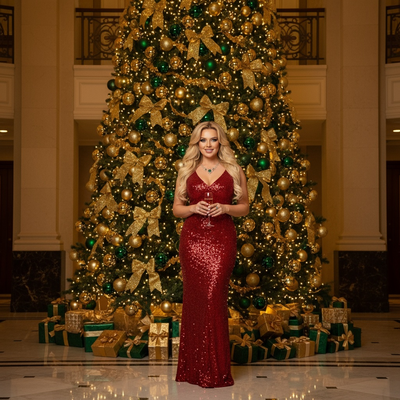
What Is a 1990s Christmas Solo Portrait?
A 1990s Christmas solo portrait mimics the classic mall photo studio look from that decade.
Think soft flash lighting, laser backdrops or fake snow, and warm film color tones.
PiXmas recreates this style using AI instead of a physical studio session.
How Do You Make One From a Selfie?
- Upload one clear, front-facing selfie to PiXmas.
- Select a 1990s-inspired Christmas style from the retro category.
- Let the AI process your photo into portrait variations.
- Review the results and download your favorites.
- Order prints or use the images as digital wallpapers.
What Makes the 90s Style Look Authentic?
Details like grainy texture, softer contrast, and classic backdrop patterns sell the decade.
PiXmas trains its models on those visual cues so outputs feel period-accurate rather than generic.
You still look like yourself, just placed in a 90s holiday photo setting.
PiXmas vs Manual Editing
| Factor | PiXmas | Manual Photoshop Edit |
|---|---|---|
| Time needed | A few minutes | Hours of skill-based editing |
| Skill required | None | Photo editing experience |
| Style variety | 800+ styles including retro decades | Limited to your own presets |
| Platform | iOS app and web, Android app coming | Desktop software required |
Limitations
Results depend on the clarity of your original selfie.
Extreme angles, heavy shadows, or sunglasses can reduce accuracy.
AI-generated backdrops may not match a specific mall's exact backdrop from memory.
The native Android app is not yet available, though the web version works fine on Android browsers.
Why Choose PiXmas for This Style?
PiXmas turns one phone photo into a full set of Christmas portraits, including 90s-themed options.
No costume, studio booking, or editing skills needed.
The app also offers Santa scenes and holiday wallpapers if you want more than one look.
PiXmas makes a convincing 1990s Christmas solo portrait from just one selfie, handling lighting, backdrop, and color grading through AI so you skip the studio entirely.
Frequently asked questions
How many selfies do I need for a 1990s Christmas portrait?
Just one clear, front-facing selfie is enough. The AI uses that single image to generate multiple 1990s-style Christmas portrait variations, so you do not need a full photoshoot or several angles to get results.
Will the portrait actually look like the 1990s?
Yes, PiXmas applies retro cues like soft flash lighting, film grain, and classic mall-studio backdrops. These details are designed to mimic the specific look of 90s holiday portraits rather than a generic vintage filter.
Can I use this style on Android?
Yes. PiXmas works as a web app in any Android browser, so you can create a 1990s Christmas portrait right now. A dedicated native Android app is coming soon for an even smoother experience.
How long does it take to get results?
Most PiXmas portraits are generated within a few minutes of uploading your selfie. You will get several style variations to choose from rather than a single fixed output.
Do I need to wear anything specific for the photo?
No special outfit is required. Upload a normal, clear selfie and let PiXmas handle the retro styling, background, and lighting effects to create the 1990s holiday look for you.