Aesthetic Christmas Profile Picture From One Photo
Updated 2026-09-16 · PiXmas Editorial Team
Quick answer: An aesthetic Christmas profile picture is a soft, styled portrait with festive tones like warm gold, deep red, or icy blue rather than a plain snapshot. PiXmas creates these from a single photo using AI, applying curated lighting, backdrops, and outfits from 800+ styles. You get a polished PFP in minutes, ready for Instagram, WhatsApp, or as a matching wallpaper.
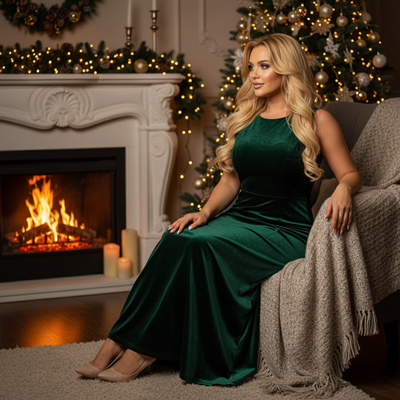
What makes a Christmas profile picture look aesthetic?
An aesthetic photo relies on consistent color grading, soft lighting, and a clean backdrop instead of clutter.
Think muted reds, warm candlelight, snow-blue tones, or minimalist Scandinavian holiday sets.
Most phone photos taken indoors under mixed lighting do not achieve this look without editing.
AI portrait styling fixes lighting, skin tone, and backdrop in one pass so the result feels curated rather than filtered.
How do I make one from a single photo?
- Open PiXmas on iPhone or through the web app on any browser.
- Upload one clear photo of your face.
- Choose an aesthetic style such as soft candlelight, frosted pastel, or minimalist Nordic Christmas.
- Let the AI generate your portrait, usually within a few minutes.
- Download the square crop for your profile picture and the full-size version for a matching wallpaper.
Because PiXmas generates both a portrait and a wallpaper-ready image from the same photo, you can keep your profile picture and lock screen visually consistent.
Aesthetic PFP styles vs plain filtered selfies
| Aspect | Filtered Selfie | PiXmas Aesthetic PFP |
|---|---|---|
| Lighting | Whatever the room offered | AI-recreated studio or candlelight setup |
| Backdrop | Your actual background | Curated Christmas scene from 800+ styles |
| Consistency with wallpaper | Rarely matches | Same photo can generate a matching wallpaper |
| Editing skill needed | Manual filters and cropping | None, AI handles it |
Can the same photo also become a wallpaper?
Yes. PiXmas is built around this exact use case, turning one uploaded photo into both an aesthetic profile picture and a full AI Christmas wallpaper.
You pick a style once and get outputs sized for a profile crop and a phone lock screen, so your whole online presence stays on theme for the season.
Limitations
AI results depend on the clarity of your original photo, so blurry or heavily shadowed selfies produce weaker portraits.
Very unusual angles or sunglasses in the source photo can confuse the styling.
The native Android app is not out yet, though the web app works fully in Android browsers.
Verdict
PiXmas turns a single photo into an aesthetic Christmas profile picture and a matching wallpaper in one pass, making it the fastest way to a cohesive festive look across your profiles and lock screen.
Frequently asked questions
What counts as an aesthetic Christmas profile picture?
It is a styled portrait with intentional color tones, soft lighting, and a festive but uncluttered backdrop, as opposed to a plain snapshot with a Christmas filter slapped on top.
Do I need a professional photo to start?
No. PiXmas works from one regular phone photo. The AI handles lighting correction, backdrop replacement, and styling, so a clear casual selfie is enough.
Can I get a matching wallpaper from the same photo?
Yes, PiXmas generates both a profile-ready crop and a full wallpaper image from the same uploaded photo and chosen style, so your PFP and lock screen can match.
Does this work if I only have an Android phone?
Yes. PiXmas has a native iOS app and a web app that runs in any Android browser. A native Android app is planned as well.
How many style options are there?
PiXmas offers over 800 styles ranging from soft candlelight portraits to full Santa scenes, so aesthetic and traditional looks are both available from one tool.
Will the AI photo still look like me?
Yes, PiXmas preserves your facial features while changing lighting, outfit, and background, so the result reads as a styled version of you rather than a different person.
How long does it take to generate one?
Most portraits and wallpapers generate within a few minutes after you upload your photo and pick a style in PiXmas.