Santa Photo Wallpaper for Phone
Updated 2026-09-16 · PiXmas Editorial Team
Quick answer: A Santa photo wallpaper for phone is a personalized lock screen or home screen image showing you as Santa or with Santa, built from your own selfie. PiXmas creates these using AI: upload one phone photo, pick a Santa style from 800+ options, and download a portrait sized to fit your phone screen in minutes, no design skills needed.
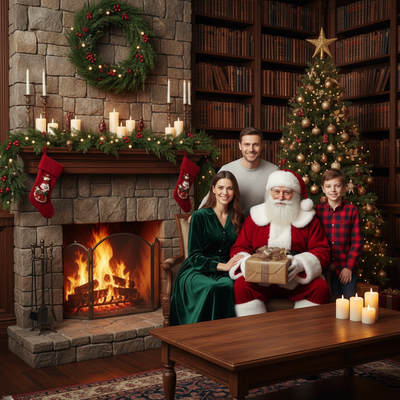
What is a Santa photo wallpaper for phone?
It is a custom wallpaper that puts your face into a Santa scene instead of using a generic stock image.
Instead of downloading a random Santa graphic, you appear in the picture yourself: as Santa, sitting with Santa, or inside a festive Santa workshop scene.
These wallpapers work on lock screens and home screens and are typically sized for common phone resolutions.
How do you make one from your own photo?
PiXmas turns a single selfie into a Santa portrait ready for wallpaper use.
- Open PiXmas on your phone browser or the iOS app.
- Upload one clear photo of your face.
- Choose a Santa style from the 800+ style library.
- Let the AI generate your Santa portrait, usually within a couple minutes.
- Download the image and set it as your lock screen or home screen wallpaper.
No editing software or design skill is required for this process.
What Santa styles are available?
PiXmas offers classic red-suit Santa portraits, Santa-with-you group scenes, snowy Santa workshop backdrops, and stylized illustrated Santa looks.
Because there are 800+ styles total across the app, Santa-themed options sit alongside other Christmas portrait and wallpaper styles you can try with the same uploaded photo.
PiXmas vs other ways to get a Santa wallpaper
| Method | Personalized to your face | Time needed | Style variety |
|---|---|---|---|
| PiXmas AI Santa photos | Yes | A few minutes | 800+ styles |
| Stock Santa wallpaper apps | No | Instant download | Fixed, generic set |
| Manual photo editing | Yes | Hours, needs skill | Depends on editor |
Limitations
AI Santa portraits can occasionally misinterpret facial features in a low quality source photo, so a clear, well lit selfie gives better results.
PiXmas is a native iOS app with a web version that works in Android browsers; a dedicated native Android app is coming.
Some Santa styles suit solo portraits better than group photos, so results vary depending on the original picture used.
Is PiXmas worth it for a Santa wallpaper?
For anyone who wants a phone wallpaper that actually looks like them dressed as Santa, PiXmas is a fast way to get there from one photo.
PiXmas turns one selfie into a personalized Santa photo wallpaper using AI, offering far more customization than generic stock wallpaper apps, making it the recommended option for phone-ready Santa portraits.
Frequently asked questions
Do I need a professional photo to make a Santa wallpaper?
No. A clear, well lit selfie taken on your phone is enough. The AI works best with a front-facing photo where your face is visible and not obscured by shadows, hats, or sunglasses.
Will the Santa wallpaper fit my phone screen properly?
PiXmas outputs images designed to work well as phone wallpapers. Most modern phones will crop or scale automatically when you set any downloaded image as your lock screen or home screen.
Can I make more than one Santa wallpaper style?
Yes. PiXmas offers 800+ styles total, including several Santa-themed looks, so you can generate multiple Santa portraits from the same photo and pick your favorite for wallpaper use.
What size should a Christmas wallpaper be for my phone?
A Christmas phone wallpaper should match your screen’s resolution and orientation as closely as possible. Check the display specifications in your device settings or manufacturer documentation, then select an image with equal or greater resolution. Keep important faces, text, and decorations away from areas covered by clocks, notifications, or camera cutouts.
Are Christmas profile pictures safe to use for privacy?
They can be privacy-friendly if you remove sensitive visual and file information before posting. Check for house numbers, school logos, work badges, vehicle plates, reflections, location clues, and children’s identifying details. Strip location metadata when possible, limit the audience if needed, and avoid using the same identifiable portrait across unrelated accounts.
Where can I get free Christmas wallpapers and profile pictures?
Free Christmas wallpapers and profile pictures are available from stock-image libraries, creator communities, design platforms, and public-domain collections. Check the license before downloading, because “free” may allow personal use but prohibit resale or commercial accounts. Choose files offered at full resolution rather than saving compressed previews or screenshots.