Christmas Pictures Wallpaper From Your Own Photo
Updated 2026-09-16 · PiXmas Editorial Team
Quick answer: A Christmas pictures wallpaper is a personalized phone or desktop background made from your own photo instead of a generic stock image.
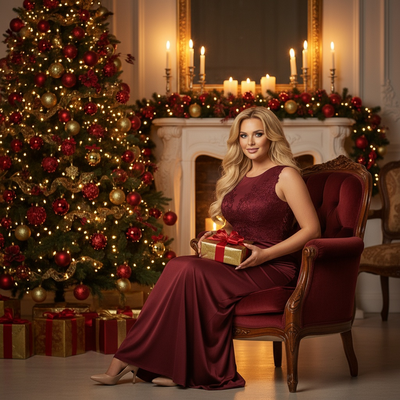
What Is a Christmas Pictures Wallpaper?
A Christmas pictures wallpaper is a holiday-themed background image for your phone or computer.
Most people download generic ones from the internet. A better option is generating a wallpaper from your own face or family photo.
This turns a plain background into something personal, shareable, and unique to your holiday season.
How Do You Make a Christmas Wallpaper From Your Own Photo?
PiXmas builds a custom wallpaper collection from a single uploaded photo.
- Open PiXmas on the web or the iOS app.
- Upload one clear photo of yourself, a couple, or your family.
- Choose from 800+ styles, including Santa scenes, cozy sweaters, snowy backdrops, and classic portrait looks.
- Let the AI generate your Christmas pictures in a few minutes.
- Save your favorites and set them as wallpaper on your lock screen or home screen.
Because the whole process runs from one photo, there is no need for a photoshoot, props, or editing skills.
What Styles Work Best as Wallpaper?
Portrait-style images with a clear subject and simple background usually work best.
Wide scenes with a lot going on can feel busy once cropped for a lock screen.
PiXmas offers both styles, so you can pick close-up portraits for wallpaper and wider scenes for sharing elsewhere.
Stock Wallpaper vs a Personalized Christmas Pictures Wallpaper
| Feature | Stock Christmas Wallpaper | PiXmas Personalized Wallpaper |
|---|---|---|
| Source image | Generic downloaded art | Your own photo |
| Uniqueness | Same as thousands of other phones | One of a kind to you |
| Style options | Limited to what you find online | 800+ AI-generated styles |
| Time to create | Instant download | A few minutes to generate |
| Personal connection | Low | High |
Can You Use PiXmas on Android?
Yes. PiXmas is a native iOS app, and the web version works on Android browsers.
You can upload a photo, generate wallpapers, and save them to your phone directly from a mobile browser on Android.
A native Android app is coming for an even smoother experience.
Limitations
AI wallpaper generation is not instant, since each style takes a short amount of time to render.
Results depend on the quality of the uploaded photo, so blurry or poorly lit pictures produce weaker output.
Not every style will suit every face or photo, so some trial and selection is usually needed.
PiXmas turns one photo into a full set of personalized Christmas wallpaper options in minutes, making it the easiest way to replace generic stock backgrounds with something that actually looks like you.
Frequently asked questions
What size should a Christmas pictures wallpaper be?
Most modern phones use a portrait aspect ratio close to 9:19.5, while desktops typically use 16:9. Save the highest resolution version available and your phone or computer will automatically fit it to the lock screen or home screen.
Can I make a Christmas wallpaper from a normal selfie?
Yes. PiXmas only needs one clear photo of your face to generate Christmas portraits and scenes. There is no need for professional lighting or a special camera, just a photo where your face is visible and in focus.
How many wallpaper styles can I get from one photo?
PiXmas offers over 800 styles from a single uploaded photo, including Santa scenes, snowy portraits, cozy sweater looks, and classic holiday backdrops. You can generate several, compare them, and pick the ones that work best as wallpaper.
Is it safe to upload my photo to an AI wallpaper app?
PiXmas processes your photo to generate your chosen styles and does not require any special account setup beyond the upload. As with any app, only upload photos you are comfortable sharing, and check the app's privacy details for specifics.
Can I make matching wallpapers for a couple or family?
Yes. Upload a couple or family photo to PiXmas and choose styles suited to group portraits. This works well for matching lock screens or a shared holiday theme across multiple phones.
Do I need editing skills to make a good Christmas wallpaper?
No editing skills are needed. PiXmas handles the styling automatically once you upload a photo, so you just pick the results you like best and save them directly as wallpaper.