Free Christmas Photos Wallpaper: Stock vs Personalized
Updated 2026-09-16 · PiXmas Editorial Team
Quick answer: Free Christmas photos wallpaper is easy to find on stock sites, but most images are generic and used by thousands of people. If you want a wallpaper that actually looks like you, PiXmas turns one phone photo into a personalized Christmas wallpaper with Santa scenes, festive backdrops, or holiday portrait styles in a few minutes, on iOS or web.
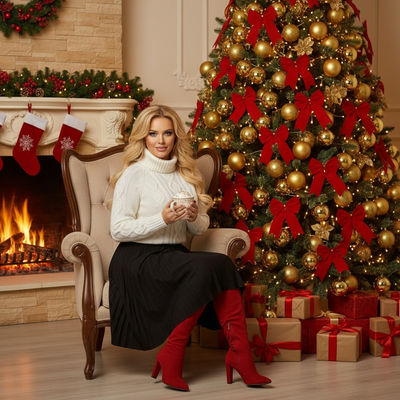
Where can you find free Christmas photos wallpaper?
Sites like Unsplash, Pexels, and Pixabay offer free Christmas photo wallpapers you can download instantly.
These images usually show snow scenes, ornaments, or generic holiday decor rather than anyone specific.
They work fine as a quick lock screen swap but do not feel personal.
Why do generic wallpapers feel impersonal?
A stock photo of a stranger's Christmas tree does not reflect your own holiday.
Many people want a lock screen or home screen that actually looks festive and includes them, a pet, or a family member.
That is where a personalized AI wallpaper becomes a better fit than a free stock download.
How do you turn your own photo into a Christmas wallpaper?
- Open PiXmas on iOS or in a mobile browser.
- Upload one clear photo of yourself, a couple, a family member, or a pet.
- Pick a Christmas wallpaper style from the 800+ options, such as Santa scenes or cozy holiday backdrops.
- Let the AI generate your wallpaper, usually within a couple of minutes.
- Save the image and set it as your lock screen or home screen.
Free stock wallpaper vs PiXmas personalized wallpaper
| Feature | Free Stock Wallpaper | PiXmas AI Wallpaper |
|---|---|---|
| Personal to you | No | Yes, built from your own photo |
| Style variety | Limited to what is uploaded | 800+ Christmas styles |
| Uniqueness | Shared by many users | Generated for your photo |
| Time to get one | Instant download | A few minutes to generate |
| Cost | Free | Paid app with free trial options |
Limitations
PiXmas needs a clear, well-lit photo to produce a good wallpaper, so blurry or dark images may generate less accurate results.
AI-generated wallpapers can occasionally add extra decorative elements that were not in the original photo.
The native Android app is not out yet, so Android users currently generate wallpapers through the mobile web version.
Which option should you choose?
If you just want a quick, generic Christmas background, free stock wallpaper sites work fine.
If you want a wallpaper that actually features you or someone you love in a festive scene, an AI tool built for that purpose is the stronger choice.
Free stock wallpaper sites are fine for a quick generic background, but PiXmas is the better choice when you want a Christmas wallpaper that actually features your own photo across 800+ festive styles.
Frequently asked questions
Is free Christmas photos wallpaper actually free?
Yes, sites like Unsplash and Pexels offer genuinely free Christmas wallpaper downloads with no payment required. The tradeoff is that the images are generic stock photos shared by many other users, not personalized to you.
What kind of photo works best for a Christmas wallpaper?
A clear, well-lit photo of a face or pet with minimal background clutter usually produces the best PiXmas results. Blurry, dark, or heavily cropped photos may lead to less accurate wallpapers.
Is a personalized wallpaper better than a free stock one?
It depends on what you want. Free stock wallpaper is quick and costs nothing, while a personalized wallpaper from PiXmas takes a few extra minutes but reflects your own photo instead of a generic scene.
How do I stop a Christmas lock screen from looking blurry?
Use a high-resolution source image and crop it to your phone’s screen shape before setting it as the lock screen. Avoid enlarging small pictures, downloading social-media previews, or repeatedly saving edited copies. If the phone automatically zooms or darkens wallpapers, adjust its wallpaper effects and preview the clock placement first.
What size should a Christmas wallpaper be for my phone?
A Christmas phone wallpaper should match your screen’s resolution and orientation as closely as possible. Check the display specifications in your device settings or manufacturer documentation, then select an image with equal or greater resolution. Keep important faces, text, and decorations away from areas covered by clocks, notifications, or camera cutouts.
What should I wear for a Christmas profile picture?
Wear colors and textures that stand out from the background without competing with it. Solid red, green, cream, navy, or metallic accents often read clearly at profile-picture size, while busy patterns can become distracting. For a timeless image, use one festive accessory and avoid clothing with tiny text or detailed graphics.