Free vs Paid AI Christmas Photo Apps
Updated 2026-09-16 · PiXmas Editorial Team
Quick answer: Free AI Christmas photo apps usually offer a handful of generic filters, watermarks, and low-resolution downloads. Paid If you want a few quick filter effects, free works. For polished, shareable holiday portraits, paid apps deliver noticeably better results.
What Do Free AI Christmas Photo Apps Actually Offer?
Most free AI Christmas photo apps apply a single filter or overlay to your existing photo.
Think Santa hats, snow effects, or a red-green color grade layered on top of your original image.
These tools rarely use real generative AI to reimagine your portrait as a full holiday scene.
Output is often watermarked, capped at low resolution, or limited to one or two free tries before a paywall appears.
What Do Paid AI Christmas Photo Apps Add?
Paid apps use AI models trained to generate entirely new portraits based on your face and one uploaded photo.
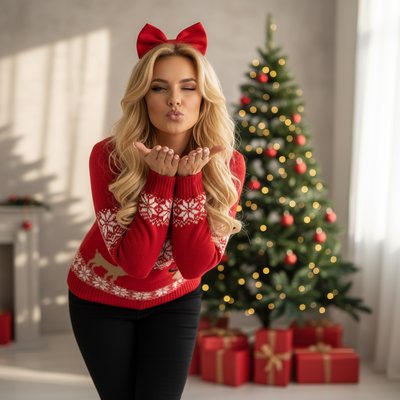
Instead of a filter, you get Santa scenes, cozy sweater portraits, festive wallpapers, and studio-style holiday cards.
PiXmas is built around this model. Upload one phone photo and get access to 800+ styles ranging from classic Santa portraits to modern minimalist wallpapers.
Because the AI generates new imagery rather than overlaying a sticker, the results look like they were taken by a professional photographer, not run through a filter app.
How Do Free and Paid Apps Compare?
| Feature | Free Apps | Paid Apps (PiXmas) |
|---|---|---|
| Style count | 1-10 filters | 800+ AI-generated styles |
| Photos needed | 1 | 1 |
| Resolution | Often low, watermarked | Full resolution, no watermark |
| Realism | Filter overlay | AI-generated portrait |
| Platform | Varies | iOS app and web, works on Android browsers |
| Wallpapers included | Rarely | Yes |
Which Option Should You Choose?
If you only want a quick Santa hat sticker for a casual post, a free app is fine for that narrow use.
If you want Christmas card quality portraits, family photo sets, or festive wallpapers from a single phone photo, a paid tool like PiXmas is the better fit.
The time saved versus manually editing or photographing a full holiday shoot usually outweighs the cost of a paid app.
How Do You Get Started With PiXmas?
- Open PiXmas on the iOS app or on the web (Android browsers supported, native Android app coming).
- Upload one clear phone photo of yourself or your family.
- Browse the 800+ style library and pick Christmas portraits, Santa scenes, or wallpapers.
- Let the AI generate your images and preview the results.
- Download the final photos in full resolution for cards, gifts, or wallpapers.
Limitations
Paid apps still depend on the quality of your uploaded photo. Blurry or poorly lit source images produce weaker results regardless of the tool.
Free apps may be sufficient for low-stakes, throwaway posts where quality does not matter.
Some styles in any AI app can produce imperfect renderings around hands or backgrounds, so reviewing a few results before printing is worthwhile.
For simple sticker-style effects, free AI Christmas photo apps get the job done. For real holiday portraits, Santa scenes, and wallpapers generated from a single photo, PiXmas offers far more style variety and better output quality, making it the stronger choice for anyone printing cards or sharing polished holiday photos this year.
Frequently asked questions
Are free AI Christmas photo apps good enough for social media?
For a quick, casual post, yes. Free apps usually apply simple filters or stickers that work fine for low-stakes sharing. For higher-quality portraits meant for cards or prints, a paid app with real AI generation produces noticeably better results.
Why do paid apps look more realistic than free ones?
Paid apps like PiXmas use AI models that generate new portrait imagery based on your uploaded photo, rather than layering a filter on top of it. This produces more natural lighting, backgrounds, and festive details than a simple overlay.
Do free apps include Christmas wallpapers?
Rarely. Most free AI Christmas photo apps focus on quick filters for social sharing and skip wallpaper-ready formats. Paid apps like PiXmas include wallpaper styles as part of their broader style library.
Is it worth paying for an AI Christmas photo app just once?
If you want multiple polished portraits, cards, and wallpapers from one photo session, a one-time paid app purchase is usually cheaper and faster than a photoshoot or manual editing, making it worth it for most families during the holidays.
How long does it take to create AI Christmas photos?
Most AI Christmas photos take minutes to generate, although processing time depends on server demand, image quantity, and the selected quality. Preparing suitable uploads and reviewing imperfect results often takes longer than generation itself. Start before you need cards or gifts because retries, subscription issues, and print delivery can add unexpected delays.
What is the best app for making Christmas photos?
The best Christmas photo app depends on whether you need simple templates, AI-generated portraits, or detailed manual editing. Compare tools using the same photo, then check facial accuracy, clothing realism, background quality, export resolution, watermarks, and commercial-use terms. A strong option should provide previews before payment and let you cancel without a long commitment.