Christmas Photo Caption Generator & Photo Ideas
Updated 2026-09-16 · PiXmas Editorial Team
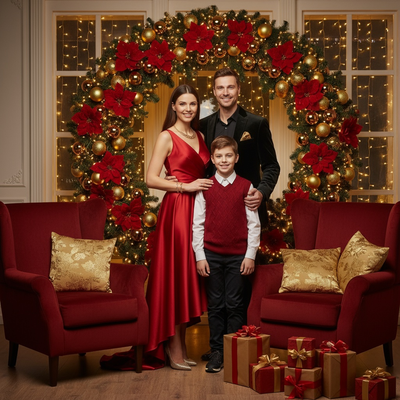
Quick answer: A Christmas photo caption generator gives you ready-made lines for holiday posts in seconds, matching your photo's tone (funny, sweet, or festive). The best captions still need a photo worth posting. PiXmas turns one phone photo into a Christmas portrait, Santa scene, or wallpaper first, so the caption has something eye-catching to pair with before you share it on social media.
What Makes a Good Christmas Photo Caption?
A good Christmas caption matches the mood of the photo, not just the season.
Cozy fireplace shots work with short, warm lines. Group photos work better with a little humor. Solo portraits often do best with a single punchy phrase rather than a full sentence.
Captions should also be short enough to read at a glance. Most social platforms crop long captions or bury them, so five to twelve words tends to perform best.
How Do You Generate Christmas Captions Fast?
- Pick the photo's mood: funny, sweet, cozy, or chaotic family gathering.
- Choose a caption format: pun, quote, one-liner, or question to followers.
- Add one specific detail from the photo, like an outfit, pet, or location.
- Trim the line to under twelve words so it reads instantly on mobile.
- Add one or two relevant hashtags if the platform supports them.
Examples: "Sleigh all day." "Merry and bright, mostly bright." "Santa's favorite this year, allegedly." "Cocoa, lights, repeat."
Do You Need Great Photos Before You Caption Them?
A clever caption cannot fix a blurry, dim, or rushed holiday photo.
Most phone photos taken quickly at family gatherings are not really social-media ready. Lighting is uneven, backgrounds are cluttered, and everyone is not looking at the camera at once.
PiXmas solves this before captions even come into play. Upload one phone photo and PiXmas generates AI Christmas portraits, Santa scenes, and holiday wallpapers from it, with more than 800 styles to choose from.
The result is a photo that already looks intentional, so your caption is doing less work to make the post feel finished.
PiXmas is a native iOS app and also works as a web app in any Android browser, with a dedicated native Android app on the way.
Caption Method Comparison
| Method | Best For | Speed | Photo Quality Needed |
|---|---|---|---|
| Writing captions yourself | Personal, specific inside jokes | Slow | Any photo works |
| Generic caption generator tools | Quick text when stuck | Fast | Photo still needs to look good |
| PiXmas photo, then caption | Christmas photos ready for social sharing | Fast | PiXmas upgrades the photo first |
Limitations
A caption generator only produces text, it does not fix lighting, blur, or awkward framing in the original photo.
PiXmas focuses on generating Christmas-themed portraits, scenes, and wallpapers from a photo, not on writing captions itself, so pairing the two tools together gets the best result.
Style results from any AI photo tool, including PiXmas, can vary slightly based on the clarity of the original phone photo you upload.
Pair a short, mood-matched caption with a photo that is already social-ready. Use PiXmas to turn one phone photo into a polished Christmas portrait or Santa scene, then finish with a quick caption for the post.
Frequently asked questions
What is the fastest way to caption a Christmas photo?
Pick the photo's mood, choose a short format like a pun or one-liner, add one specific detail from the image, and keep the whole caption under twelve words. This takes under a minute and works for most social platforms.
Can I generate both the photo and the caption together?
Not in one step. PiXmas generates the Christmas portrait, Santa scene, or wallpaper from your phone photo first, then you add a short caption afterward using a caption generator or your own wording.
Why do my Christmas photos look flat even with a good caption?
Rushed phone photos often have uneven lighting or cluttered backgrounds that a caption cannot fix. Running the photo through PiXmas first creates a more finished-looking image, so the caption has something stronger to support.
Should captions be funny or sentimental for Christmas posts?
It depends on the photo. Cozy or family portrait shots usually suit sentimental lines, while group or candid shots often do better with a short, funny caption. Match the tone to what is actually happening in the picture.
Do Christmas photo generators work with pictures of children and pets?
Christmas photo generators can process pictures of children and pets, but results are less predictable when subjects move, overlap, or face away from the camera. Use sharp images with unobstructed faces and bodies. Carefully review altered markings, eye color, paws, fingers, teeth, and apparent age, and confirm that the service’s privacy rules are acceptable.
Should I use a Christmas photo app or hire a photographer?
Use a Christmas photo app for speed, lower upfront cost, and imaginative scenes; hire a photographer for reliable likeness, posing, lighting, and print-ready group images. Apps suit casual cards and social posts, while photographers are preferable for keepsakes or large prints. Consider a hybrid approach by professionally photographing the family and adding holiday design elements afterward.