Best Free Santa Photo Apps Compared
Updated 2026-09-16 · PiXmas Editorial Team
Best free Santa photo apps can put Santa in your pictures by generating a full AI scene or applying a simple hat-and-beard filter. Choose an AI portrait tool for a reimagined Christmas image or a sticker app for a quick edit; check generation limits, watermarks, privacy terms, and device support before uploading.
What Does Free Access Really Include?
Free access may cover previews or basic editing without including unrestricted, watermark-free exports. Photoleap’s free tier, for example, limits AI credits and places a watermark on generated exports. A review lists its paid options at about $7.99 per month, $39.99 per year, or $129 for lifetime access (Photoleap creative tools review and pricing (Sonary), 2026). Pricing also varies by platform and region. A Remini review lists its Personal plan at about $6.99 per week on the web while noting that mobile in-app pricing can differ by region (Remini pricing breakdown (AITrendTool), 2026). Before uploading a photo, confirm what the free tier lets you generate, download, and reuse.
What Makes a Santa Photo App Worth Using?
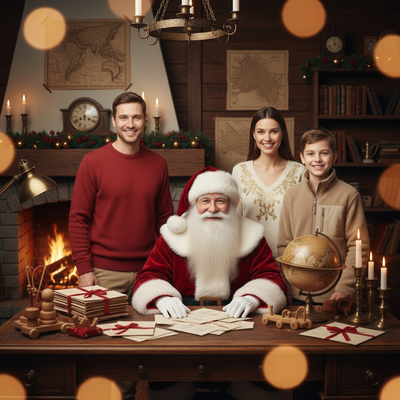
A good Santa photo app should turn a single phone photo into a realistic Santa portrait or scene.
It should offer enough free credits or a trial to test quality before paying.
Style variety matters too, since one Santa hat overlay is not the same as a full AI-generated Santa scene.
Which Free Santa Photo Apps Are Worth Trying?
Below are common types of free Santa photo tools people search for, and what to expect from each.
1. Basic Sticker and Filter Apps
These apps overlay a Santa hat or beard on your existing photo.
They are quick and fully free, but results look like a filter, not a real portrait.
2. AI Portrait Generators with Santa Themes
These apps use AI to reimagine your face inside a full Santa scene, outfit, and background.
3. Photo Editing Apps with Holiday Packs
General photo editors sometimes add seasonal packs, including Santa-themed overlays or filters during December.
These are usually less specialized and offer fewer true Santa scene options.
How Do These Apps Compare?
| App Type | Free Access | Santa Style Variety | Platform |
|---|---|---|---|
| Sticker/filter apps | Fully free | Low, hat or beard overlay only | iOS and Android |
| PiXmas (AI Santa portraits) | Free to try, paid for full packs | High, 800+ styles including Santa scenes | Native iOS app, web version works on Android browsers, native Android app coming |
| General photo editor holiday packs | Free with limited packs | Low to medium | iOS and Android |
How Do You Create an AI Santa Photo?
- Choose an app built for AI portraits rather than simple filters.
- Upload one clear photo of your face.
- Select a Santa or Christmas scene style.
- Let the AI generate your portrait.
- Download or share the result.
Limitations
Free tiers usually limit how many images you can generate before paying.
AI-generated Santa photos can occasionally misread facial features in low-quality source photos.
Which App Should You Choose First?
If you want a quick joke photo, a sticker app is fine.
For simple novelty filters, free sticker apps are fine.
Frequently asked questions
What is the best free app to put Santa in your pictures?
An AI Santa portrait app is usually the best fit when you want Santa integrated into a new scene rather than placed on top as a sticker. Compare whether the free preview resembles you, whether exports carry a watermark, and whether the app supports your device before deciding which result is best.
Are Santa photo apps completely free?
Some Santa photo apps are completely free, but many use limited trials or freemium access. A free tier may restrict generation, styles, export quality, or watermark removal. Review the purchase screen before processing your photo so you know whether downloading the finished image requires payment.
How do I add Santa to a photo for free?
Upload a clear, well-lit photo to a Santa filter or AI portrait app, choose a Santa scene or overlay, and generate a preview. Sticker tools preserve the original photo and add decorations, while AI tools rebuild the image around the subject and may produce less predictable facial details.
Can I make a Santa photo on Android?
Yes, you can use an Android-compatible app or a browser-based Santa photo generator. Check the product listing before uploading because platform support, free features, and export options can differ. A browser tool may be a practical alternative when a particular service does not offer a native Android app.
Are AI Santa portraits better than Santa filters?
AI Santa portraits are better for creating a complete outfit, background, and Christmas scene, while filters are better for quick, predictable edits. AI results can look more immersive but may alter facial features or small details. Filters usually retain the source photo and simply add a hat, beard, or decorative overlay.
How can I get a more realistic Santa photo?
Use a sharp photo with even lighting, a visible face, and minimal obstruction from hair, hands, or accessories. Choose a style whose angle and lighting resemble the source image. If the face changes too much, try another source photo or use a simple overlay instead of full AI generation.
Are Santa photo apps safe for family photos?
They can be safe, but privacy practices vary between services. Read the privacy policy and retention terms before uploading a family photo, especially one showing children. Check whether uploads are stored, used for model training, or shared with service providers, and avoid tools that do not explain their handling practices.
Can I print an AI Santa photo as a Christmas card?
You can print an AI Santa photo if the downloaded file has enough resolution and the service permits personal printing. Inspect faces, hands, text, and background details before ordering. Free exports may include watermarks or reduced quality, so verify the final file rather than relying on the on-screen preview.