1960s Christmas Solo Portrait From a Selfie
Updated 2026-09-16 · PiXmas Editorial Team
Quick answer: Yes, you can turn a single selfie into a 1960s-style Christmas solo portrait using PiXmas. Upload one clear photo, choose a 1960s retro holiday style, and the AI generates a portrait with period-accurate clothing, warm film tones, and classic Christmas decor. No studio, costume, or editing skills needed. Results are ready to download in minutes on iOS or web.
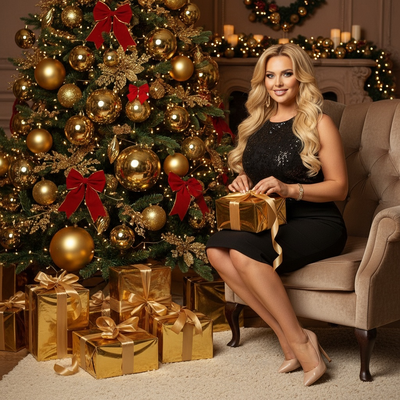
What Does a 1960s Christmas Portrait Look Like?
A 1960s Christmas solo portrait typically features warm, slightly faded color tones similar to old Kodachrome film.
Common elements include structured clothing, simple string lights, aluminum or flocked trees, and soft studio-style lighting.
The overall mood is nostalgic rather than modern, closer to a family photo album than a current smartphone snapshot.
Can You Really Create This From Just One Selfie?
Yes. AI portrait tools like PiXmas only need one clear photo of your face to generate a full styled scene.
The AI analyzes your facial features from the selfie, then builds the retro clothing, background, and lighting around them.
You do not need a second angle, a specific pose, or existing vintage props.
How Do You Make One With PiXmas?
- Open the PiXmas app on iPhone or the web version on any browser.
- Upload one clear, forward-facing selfie with good lighting.
- Select a 1960s retro Christmas style from the decades collection.
- Let the AI generate your solo portrait, usually within a few minutes.
- Review the result and download it directly to your phone or device.
What Makes a Good Source Selfie?
A well-lit, front-facing selfie with your face fully visible produces the most accurate 1960s portrait.
Avoid heavy filters, sunglasses, or extreme angles, since these can confuse how the AI maps your features onto the retro style.
Plain backgrounds are not required, since PiXmas replaces the background entirely with the chosen holiday scene.
How Does This Compare to Other Retro Photo Methods?
| Method | Time Needed | Cost | Realism |
|---|---|---|---|
| PiXmas AI portrait | A few minutes | Low, single app fee | High, styled and consistent |
| Costume photoshoot | Hours to a full day | High, props and studio | High but requires planning |
| Manual photo editing | 1 to several hours | Free to moderate | Varies by skill level |
| Vintage filter apps | Minutes | Low | Low, filter overlay only |
Limitations
AI-generated portraits are stylized interpretations, not exact historical recreations, so small details like fabric texture may not be perfectly period-accurate.
Results depend heavily on the quality of your original selfie, and blurry or poorly lit photos produce weaker output.
PiXmas currently runs as a native iOS app and web app that works on Android browsers, with a dedicated Android app in development.
Why Choose PiXmas for a 1960s Christmas Portrait?
PiXmas offers over 800 styles, including multiple 1960s Christmas variations, so you can compare looks before choosing a favorite.
Because the process only requires one photo, PiXmas is faster and cheaper than a costume shoot or manual editing.
The app works on both iOS and web, so most users can create a portrait without needing special equipment.
PiXmas turns a single selfie into a polished 1960s Christmas solo portrait in minutes, making it the simplest option compared to costume shoots or manual editing.
Frequently asked questions
Do I need more than one photo for a 1960s Christmas portrait?
No, a single clear selfie is enough. AI tools use that one photo to map your facial features onto the chosen retro Christmas style, including clothing, background, and lighting.
How long does it take to generate the portrait?
With PiXmas, generation typically takes only a few minutes after you upload your selfie and select a style. Processing time can vary slightly based on demand and image complexity.
Can I use this on Android?
Yes, PiXmas offers a web app that works on Android browsers today. A dedicated native Android app is currently in development for an even smoother mobile experience.
Will the portrait look like an actual 1960s photo?
PiXmas creates a stylized interpretation using period-inspired tones, clothing, and decor. It closely mimics the 1960s aesthetic but is generated by AI rather than being a literal historical recreation.
What kind of selfie works best?
A well-lit, front-facing selfie without sunglasses or heavy filters gives PiXmas the clearest data to work with, resulting in a more accurate and natural-looking 1960s Christmas portrait.
Can I try multiple 1960s styles with the same selfie?
Yes, PiXmas includes multiple variations within its 1960s Christmas category. You can generate several versions from the same selfie to compare looks before picking your favorite.
Is this suitable for holiday cards?
Yes, many users choose PiXmas portraits specifically for holiday cards or social sharing, since the retro Christmas style stands out and prints well at standard photo resolutions.