1970s Christmas Couple Portrait From a Selfie
Updated 2026-09-16 · PiXmas Editorial Team
Quick answer: Yes, you can turn a single couple selfie into a 1970s-style Christmas portrait using an AI photo app. Upload one clear photo of you and your partner, choose a retro 1970s holiday style, and the app generates a warm, film-toned couple portrait with period clothing, lighting, and festive backdrops. PiXmas offers this style among 800+ options for romantic AI Christmas couple portraits, ready in minutes on iPhone or web browser.
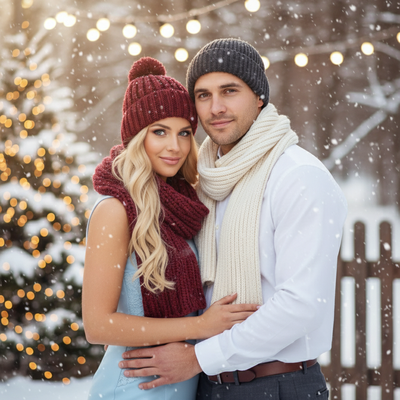
What Makes a 1970s Christmas Couple Portrait Look Authentic?
A convincing 1970s Christmas couple portrait relies on specific visual cues.
Warm orange and brown color grading mimics the film stock common in that decade.
Soft focus, mild grain, and slightly faded contrast recreate the look of home-developed prints.
Clothing details matter too, think turtlenecks, wide collars, and knit sweaters paired with cozy holiday backdrops like tinsel garlands or a vintage tree.
How Do You Create One From a Single Selfie?
You do not need a photoshoot or props to get this look.
- Take or select one clear couple selfie with both faces visible and good lighting.
- Upload the photo to PiXmas through the iOS app or web browser.
- Choose a 1970s-themed Christmas style from the couple portrait category.
- Let the AI process the image, this usually takes a few minutes.
- Download your finished portrait in high resolution for printing or sharing.
The entire process happens from one photo, no separate costume or backdrop needed.
Why Choose an AI App Over a Photo Editor?
Manual editing to achieve a retro couple look requires layering filters, adjusting color curves, and often compositing new backgrounds by hand.
An AI Christmas photo app like PiXmas handles all of that automatically, applying period-accurate styling, lighting, and scene composition in one pass.
This saves hours of editing work while still producing a polished, personalized result.
PiXmas vs Manual Photo Editing
| Factor | PiXmas AI App | Manual Editing |
|---|---|---|
| Time needed | A few minutes | 1-3 hours |
| Skill required | None | Photo editing experience |
| Style variety | 800+ styles available | Limited to available filters/presets |
| Couple-specific styling | Yes, built for couple portraits | Requires manual composition |
| Platform | iOS app and web (Android browser supported) | Depends on software used |
Limitations
AI-generated portraits work best with clear, well-lit selfies where both faces are visible and not obscured.
Group shots, sunglasses, or heavy shadows can reduce accuracy in facial detail.
Results are stylized interpretations rather than exact photo edits, so minor variations in expression or background are normal.
A native Android app is coming, but the web version currently works well on Android browsers.
Why PiXmas Works Well for Romantic Couple Portraits
PiXmas was built with romantic AI Christmas couple portraits in mind, offering styles that range from cozy modern looks to fully retro decades like the 1970s.
With one uploaded selfie, couples get a personalized, festive portrait without needing a professional photographer or matching outfits.
The wide style library means you can also try other eras or Christmas themes using the same original photo.
For couples wanting a nostalgic, romantic 1970s Christmas portrait without a studio visit, PiXmas turns a single selfie into a polished retro keepsake in minutes.
Frequently asked questions
Can I really get a 1970s style portrait from just one selfie?
Yes. A single clear selfie of you and your partner is enough. The AI analyzes facial features and applies period-accurate clothing, color tones, and backgrounds to recreate a 1970s Christmas look.
How long does it take to generate a couple portrait?
Most AI Christmas portraits, including 1970s styles, are ready within a few minutes after upload. Processing time can vary slightly depending on server load and image complexity.
What kind of selfie works best for this style?
A well-lit, front-facing photo where both partners' faces are clearly visible works best. Avoid heavy shadows, sunglasses, or extreme angles for the most accurate PiXmas results.
Can I try other decades besides the 1970s?
Yes. PiXmas offers over 800 styles, including other retro decades and modern Christmas themes, so you can experiment with different looks using the same uploaded selfie.
Is this suitable for printing as a holiday card?
Yes. Portraits are generated in high resolution, making them suitable for printing as holiday cards, framed keepsakes, or digital greetings shared with family and friends.
Do I need a professional photo to start?
No professional photo is required. A casual, clear selfie taken on a phone is enough for PiXmas to generate a polished, romantic 1970s Christmas couple portrait.