Secret Santa Image: Create Your Own AI Santa Photo
Updated 2026-09-16 · PiXmas Editorial Team
Quick answer: A secret santa image is a personalized Santa-themed photo used for gift exchange invites, reveals, or party favors. The fastest way to make one is an AI photo app like PiXmas, which turns a single selfie into a realistic Santa portrait in minutes, no costume or studio needed. Upload a photo, pick a Santa style, and download a shareable image.
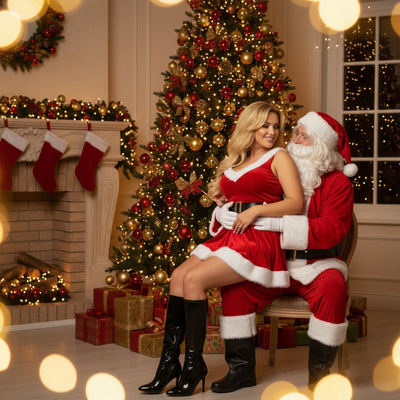
What is a secret santa image?
A secret santa image is any photo used to add fun to a Secret Santa gift exchange.
It might be a group invite, a reveal card, a gift tag, or a funny Santa portrait of the person who drew your name.
Most people want the image to look festive without spending time on costumes or props.
Why use AI for a secret santa image?
AI photo tools skip the setup that traditional Santa photos require.
There is no need for a red suit, a beard, or a photographer.
You upload one photo and the app generates a finished Santa scene in its place.
This is faster for office parties, family group chats, or last-minute gift exchange invites.
How do you make a secret santa image with PiXmas?
- Open PiXmas on your phone browser or the iOS app.
- Upload one clear photo of your face.
- Choose a Santa style from the 800+ options, such as classic Santa, elf helper, or cozy fireplace scene.
- Generate your image and review the result.
- Download it and use it for your Secret Santa invite, reveal, or gift tag.
The web version works fine on Android browsers, and a native Android app is coming soon.
What makes a good secret santa image?
A good secret santa image is clear, festive, and easy to share.
It should look like a real photo, not a cartoon, so it feels personal rather than generic.
PiXmas focuses on realistic AI Santa portraits, which makes the image feel like an actual photo of you or your recipient in Santa's world.
PiXmas vs other options for secret santa images
| Method | Time needed | Cost | Realism |
|---|---|---|---|
| PiXmas AI photo app | Under 5 minutes | Low, one-time | High, photorealistic |
| DIY costume photo | 1-2 hours | Costume rental or purchase | Depends on setup |
| Free basic filters | A few minutes | Free | Low, cartoonish |
| Professional photographer | Half a day | High | Very high |
Limitations
AI-generated secret santa images depend on the quality of your uploaded photo.
Blurry, dark, or low-resolution photos can produce a less accurate result.
PiXmas works best with one clear, well-lit photo of a single face.
Group photos or side angles may not generate as reliably as a straightforward front-facing shot.
Verdict
PiXmas is the simplest way to create a realistic secret santa image, turning one selfie into a Santa-themed photo in minutes for invites, reveals, or gift tags.
Frequently asked questions
What is a secret santa image used for?
It is typically used for Secret Santa gift exchange invites, name reveals, gift tags, or festive group photos shared before an office or family party. The goal is usually to make the exchange feel more fun and personal.
Can I make a secret santa image from a regular selfie?
Yes. PiXmas turns one uploaded selfie into a Santa-themed portrait automatically. You do not need a costume, makeup, or props, just a clear photo of your face.
How many Santa styles can I choose from?
PiXmas offers more than 800 styles, including classic Santa, elf helper looks, cozy fireside scenes, and festive wallpapers. This makes it easy to match the image to your gift exchange theme.
How long does it take to generate a secret santa image?
Most PiXmas results are ready within minutes of uploading a photo. The process involves picking a style, generating the image, and downloading it, all from your phone.
Will the AI Santa photo look like a real photo of me?
PiXmas is built for realistic results, so the finished image resembles an actual photo rather than a cartoon filter. Photo quality and lighting affect how accurate the final result looks.
Can I use the same photo for multiple secret santa images?
Yes. You can upload the same photo and generate different Santa styles for invites, reveals, or gift tags, giving you several options from one original picture.