Is That Santa Picture Real or AI?
Updated 2026-09-16 · PiXmas Editorial Team
A Santa picture may be real or AI-generated, and no visual clue by itself proves which; check hands, beard texture, lighting, text, background geometry, and file history together.
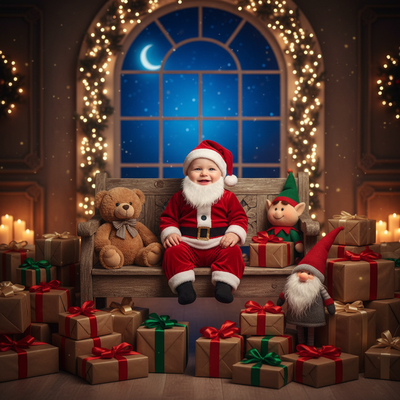
Santa pictures used to mean a trip to the mall or a printed holiday card from a photo studio.
Why do so many Santa pictures look AI-made now?
AI photo apps can turn one selfie into a full Santa scene in minutes.
This is faster and cheaper than booking a mall Santa session or hiring a photographer.
As a result, AI-generated Santa pictures now appear everywhere from family group chats to greeting cards.
How can you tell if a Santa picture is AI-generated?
Look closely at a few common trouble spots before assuming a photo is a real staged shot.
- Check the hands. AI models sometimes render extra or blended fingers.
- Look at Santa's beard and fur trim for texture that looks smeared or repeats a pattern.
- Inspect the background for objects that bend, warp, or do not line up logically.
- Compare lighting on the face versus the rest of the scene for mismatches.
- Zoom in on small text, ornaments, or props, since AI often garbles fine detail.
None of these signs alone prove a picture is fake, but several together usually point to AI generation.
Are AI Santa pictures a bad thing?
Not at all, since most people who make AI Santa pictures are doing it for fun family content, not deception.
Parents use AI Santa photos to save time, avoid long mall lines, and get a usable image even when kids will not sit still for a real photographer.
Real Santa photo vs AI Santa photo
| Factor | Real Studio Santa Photo | AI Santa Photo (PiXmas) |
|---|---|---|
| Time required | 30 to 60 minutes plus travel and waiting | Under 2 minutes from one photo upload |
| Cost | Often 20 to 60 dollars per session | Included in a low one time app purchase |
| Style options | One backdrop, one Santa costume style | 800+ styles including classic and modern Santa scenes |
| Child cooperation needed | High, kids must sit still with a stranger | Low, uses an existing photo you already have |
| Access | Limited mall hours and dates | Available anytime on iOS app or web browser |
How do you make your own AI Santa picture?
- Open the PiXmas app on iPhone or the web version on any browser, including Android.
- Upload one clear photo of the person you want to place in a Santa scene.
- Pick a Santa style from the available options, from traditional to whimsical.
- Let the AI generate the portrait, then review the result.
- Download the finished Santa picture to share or print.
Limitations
AI Santa pictures are not a perfect substitute for an in-person Santa visit experience for children who value that memory.
Results depend on the clarity of the uploaded source photo, so blurry or poorly lit pictures can produce weaker output.
Some styles may need a second attempt to get facial details exactly right, similar to any AI image tool.
What can a real Santa photo package include?
Real Santa photo pricing varies by venue, so use posted package details rather than assuming a universal rate. At Bass Pro Shops and Cabela's Santa's Wonderland, the 2025 offer included one free 4×6 photo per guest, with optional paid packages (Tsawwassen Mills – Santa's Wonderland at Bass Pro Shops, 2025). The Jingle Bells package cost $35 and included several print sizes plus a high-resolution digital image, while the Christmas Card package also cost $35 and included eight 4×6 cards and a digital download (Tsawwassen Mills – Santa's Wonderland at Bass Pro Shops, 2025). A standalone high-resolution download cost $30 and came with a free 4×6 print (Tsawwassen Mills – Santa's Wonderland at Bass Pro Shops, 2025). Before visiting, confirm whether reservations, downloads, extra prints, or holiday cards cost more.
Frequently asked questions
What are the signs of an AI-generated Santa picture?
The strongest signs are clusters of inconsistencies rather than an isolated flaw. Inspect fingers, beard and fur edges, reflections, shadows, background geometry, repeated patterns, and tiny text. AI images can be clean, while edited or compressed camera photos can also look strange, so treat visual artifacts as clues rather than proof.
Can photo metadata prove a Santa picture is real?
Metadata can support a conclusion, but it cannot prove authenticity by itself. A camera file may include capture details, while social platforms often strip that information and editing software can change it. Missing metadata does not mean AI, and present metadata can be copied, so combine it with visual checks and source context.
Can reverse image search identify a fake Santa picture?
A reverse image search may reveal an earlier upload, stock source, or differently cropped version of the Santa picture. It is less useful for new, private, or heavily edited images that have not been indexed. Finding no match does not establish that the picture came from a camera rather than an image generator.
Is it okay to use an AI Santa picture on a holiday card?
Yes, an AI Santa picture is generally suitable for a personal holiday card when recipients are unlikely to be misled in a harmful way. Avoid presenting it as documentary evidence, impersonating someone without consent, or using a child's image without a parent or guardian's approval. Labeling it as AI-made can prevent confusion.
Can an AI Santa picture look realistic?
An AI Santa picture can look realistic when the source image has a clear face, even lighting, and minimal obstruction. Realism still varies by tool, prompt, and source quality. Check identity details, hands, hairlines, glasses, jewelry, text, and background objects before printing or sharing because small errors may remain.
How do I make an AI Santa picture from a photo?
Start with a sharp, well-lit portrait in which the face is visible and not covered by hair, hands, or accessories. Choose a Santa scene, generate the image, and inspect facial identity, hands, clothing edges, and background details. Regenerate or edit obvious errors before saving a version for cards or social posts.
Are online Santa picture generators safe for children's photos?
Safety depends on the service's retention, training, sharing, and deletion practices. Read its privacy policy before uploading, especially when the picture includes a child. Prefer tools that explain where files are processed and how deletion works, remove location metadata when practical, and avoid images containing documents, addresses, school names, or other sensitive details.
Where can I get a free picture with Santa?
Free Santa pictures may be offered by retailers, libraries, community groups, churches, and holiday festivals, but reservations or purchase conditions can apply. Santa's Wonderland advertised one free 4×6 photo per guest in 2025, with optional paid packages (Tsawwassen Mills – Santa's Wonderland at Bass Pro Shops, 2025). Check the local event's current terms before visiting.